How to configure freshness checks for Nagios Core passive checks
Passive check freshness in Nagios Core catches senders that stop reporting. It fits trap handlers, remote agents, backup jobs, and distributed monitors where the absence of a new passive result is itself a monitoring problem.
Freshness checking has two layers. The main Nagios Core configuration decides whether host or service freshness is checked at all, and each passive host or service object decides whether its own result age should be tested.
When a result becomes older than its freshness_threshold, Nagios Core runs the object's check_command as an active check, even when normal active checks are disabled for that object. Set the threshold longer than the sender's normal reporting interval, and prove the behavior first on a disposable passive service before enabling notifications for a production object.
Steps to configure Nagios Core passive check freshness:
- Check the global passive service and freshness settings.
$ sudo grep -E '^(accept_passive_service_checks|check_service_freshness|service_freshness_check_interval)=' /etc/nagios4/nagios.cfg
accept_passive_service_checks=1
check_service_freshness=1
service_freshness_check_interval=60
Debian and Ubuntu package installs normally use /etc/nagios4/nagios.cfg. Source installs often use /usr/local/nagios/etc/nagios.cfg instead.
- Enable service freshness globally when the settings are disabled.
$ sudo vi /etc/nagios4/nagios.cfg
accept_passive_service_checks=1
check_service_freshness=1
service_freshness_check_interval=60
For passive host freshness, use check_host_freshness and host_freshness_check_interval in the same main configuration file.
- Open the object file that contains the passive service.
$ sudo vi /etc/nagios4/conf.d/passive-freshness.cfg
The host named in the service must already exist in the loaded object configuration. Add the host in its own object file when needed.
Related: How to add a host in Nagios Core
Related: How to add a service check in Nagios Core - Add a stale-result command and enable freshness on the passive service.
define command {
    command_name    passive-service-stale-critical
    command_line    /usr/lib/nagios/plugins/check_dummy 2 "CRITICAL - passive heartbeat is stale"
}

define service {
    use                     generic-service
    host_name               backup01.example.net
    service_description     Passive Agent Heartbeat
    active_checks_enabled   0
    passive_checks_enabled  1
    check_freshness         1
    freshness_threshold     180
    check_command           passive-service-stale-critical
}
Use a freshness_threshold that is longer than the sender's normal interval plus expected delay. A one-minute heartbeat might use 180 seconds; a nightly backup result usually needs a much larger threshold.
- Validate the Nagios Core configuration.
$ sudo nagios4 -v /etc/nagios4/nagios.cfg
Nagios Core 4.4.6
##### snipped #####
Reading configuration data...
   Read main config file okay...
   Read object config files okay...
##### snipped #####
Total Warnings: 0
Total Errors:   0

Things look okay - No serious problems were detected during the pre-flight check
Use sudo /usr/local/nagios/bin/nagios -v /usr/local/nagios/etc/nagios.cfg on source installs that follow the upstream default layout.
Related: How to validate the Nagios Core configuration - Reload Nagios Core after a clean validation.
$ sudo systemctl reload nagios4
Use the local service name when the installation uses nagios.service or a custom unit.
Related: How to manage the Nagios Core system service - Store the current Unix timestamp for a passive service result.
$ now=$(date +%s)
- Submit an OK passive result for the service.
$ printf '[%s] PROCESS_SERVICE_CHECK_RESULT;backup01.example.net;Passive Agent Heartbeat;0;OK - passive heartbeat received\n' "$now" | sudo tee /var/lib/nagios4/rw/nagios.cmd
[1782347772] PROCESS_SERVICE_CHECK_RESULT;backup01.example.net;Passive Agent Heartbeat;0;OK - passive heartbeat received
Use the sender path already used by the passive check, such as NRDP, NCPA passive checks, NSCA, or the local external command file. The direct FIFO path is suitable only for trusted local senders.
Related: How to submit a passive check result to Nagios Core - Wait longer than the service threshold plus one freshness check interval.
$ sleep 240
With freshness_threshold set to 180 and service_freshness_check_interval set to 60, the stale check should run after the result age passes the threshold and Nagios Core reaches its next freshness scan.
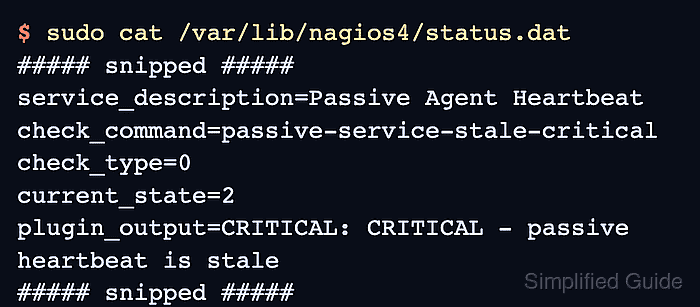
- Confirm that Nagios Core ran the stale-result command.
$ sudo cat /var/lib/nagios4/status.dat
##### snipped #####
service_description=Passive Agent Heartbeat
check_command=passive-service-stale-critical
check_type=0
current_state=2
plugin_output=CRITICAL: CRITICAL - passive heartbeat is stale
##### snipped #####
check_type 0 shows that the freshness check forced an active check command, and current_state 2 is the CRITICAL service state.