How to configure Nagios Core email notifications
Nagios Core email notifications depend on command objects that build the message and contact objects that decide who receives it. Configuring those objects directly is useful when the packaged sample commands need a real team mailbox, a different mail binary, or separate host and service alert formats.
On Ubuntu and Debian package installs, nagios.cfg reads packaged objects from /etc/nagios4/objects and local snippets from /etc/nagios4/conf.d. Keeping the email commands, contact, and contact group in a local snippet makes the change easier to validate, disable, or move to another monitoring server.
The mail command and relay must work before Nagios Core can deliver alerts. A clean pre-flight check proves the object definitions parse together, and a forced custom notification proves the running daemon selected the configured notification command for the contact.
Steps to configure Nagios Core email notification commands:
- Send a basic message with the mail command that the notification command will call.
$ printf "%b" "Nagios email notification test\n" | /usr/bin/mail -s "Nagios mail path test" ops-primary@example.net
Replace ops-primary@example.net with the mailbox or distribution list that should receive alerts. Fix local MTA, relay, DNS, or authentication problems before assigning the address to a Nagios Core contact.
- Create a local object file for the notification commands and recipient objects.
$ sudoedit /etc/nagios4/conf.d/email-notifications.cfg
- Add host and service email notification command definitions.
define command {
    command_name    notify-host-ops-email
    command_line    /usr/bin/printf "%b" "***** Nagios *****\n\nNotification Type: $NOTIFICATIONTYPE$\nHost: $HOSTNAME$\nState: $HOSTSTATE$\nAddress: $HOSTADDRESS$\nInfo: $HOSTOUTPUT$\n\nDate/Time: $LONGDATETIME$\n" | /usr/bin/mail -s "** $NOTIFICATIONTYPE$ Host Alert: $HOSTNAME$ is $HOSTSTATE$ **" $CONTACTEMAIL$
}

define command {
    command_name    notify-service-ops-email
    command_line    /usr/bin/printf "%b" "***** Nagios *****\n\nNotification Type: $NOTIFICATIONTYPE$\nService: $SERVICEDESC$\nHost: $HOSTALIAS$\nAddress: $HOSTADDRESS$\nState: $SERVICESTATE$\nInfo: $SERVICEOUTPUT$\n\nDate/Time: $LONGDATETIME$\n" | /usr/bin/mail -s "** $NOTIFICATIONTYPE$ Service Alert: $HOSTALIAS$/$SERVICEDESC$ is $SERVICESTATE$ **" $CONTACTEMAIL$
}
$CONTACTEMAIL$ expands from the contact's email field. Host and service macros are filled only when Nagios Core runs the command for the matching notification type.
Related: How to use Nagios Core macros in a commandDo not put literal semicolons in command_line. Nagios Core object files treat semicolons as comments, so the rest of the command line is ignored.
- Add the contact and contact group that will use the commands.
define contact {
    contact_name                    ops-primary
    alias                           Primary Operations Contact
    email                           ops-primary@example.net
    host_notification_period        24x7
    service_notification_period     24x7
    host_notification_options       d,u,r
    service_notification_options    w,u,c,r
    host_notification_commands      notify-host-ops-email
    service_notification_commands   notify-service-ops-email
}

define contactgroup {
    contactgroup_name       linux-admins
    alias                   Linux Administrators
    members                 ops-primary
}
The contact controls which states may notify this recipient. The host or service still needs its own notification settings, time period, and contact group assignment.
- Attach the contact group to the host or service that should send email.
define service {
    use                     generic-service
    host_name               web01.example.net
    service_description     HTTP
    check_command           check_http
    contact_groups          linux-admins
    notifications_enabled   1
    notification_period     24x7
    notification_options    w,u,c,r
}
Do not create a duplicate service with the same host_name and service_description. Edit the existing object when the service already exists.
- Validate the Nagios Core configuration.
$ sudo nagios4 -v /etc/nagios4/nagios.cfg
Nagios Core 4.4.6
##### snipped #####
Reading configuration data...
   Read main config file okay...
   Read object config files okay...
##### snipped #####
Checking objects...
	Checked 9 services.
	Checked 1 hosts.
	Checked 2 contacts.
	Checked 2 contact groups.
	Checked 182 commands.
##### snipped #####
Total Warnings: 0
Total Errors:   0

Things look okay - No serious problems were detected during the pre-flight check
Zero errors confirm that the commands, ops-primary contact, linux-admins group, and monitored service reference each other correctly.
Related: How to validate the Nagios Core configuration - Reload Nagios Core to load the validated objects.
$ sudo systemctl reload nagios4
Use sudo systemctl restart nagios4 if the installed unit does not support reload. Source installs may use a different service name or a direct SIGHUP signal.
Related: How to manage the Nagios Core system service - Submit a forced custom service notification for the monitored service.
$ printf "[%s] SEND_CUSTOM_SVC_NOTIFICATION;web01.example.net;HTTP;2;ops-primary;Nagios email notification test\n" "$(date +%s)" | sudo tee /var/lib/nagios4/rw/nagios.cmd >/dev/null
The option value 2 forces the custom notification past time-period and enablement filters for a controlled test. Use an existing host and service that reference linux-admins.
Related: How to test Nagios Core notifications - Confirm that Nagios Core recorded the notification command.
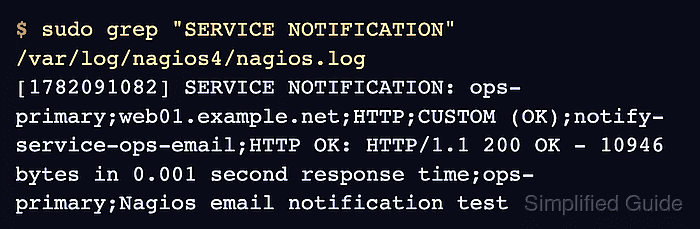
$ sudo grep "SERVICE NOTIFICATION" /var/log/nagios4/nagios.log
[1782022085] SERVICE NOTIFICATION: ops-primary;web01.example.net;HTTP;CUSTOM (OK);notify-service-ops-email;HTTP OK: HTTP/1.1 200 OK - 10946 bytes in 0.001 second response time;ops-primary;Nagios email notification test
The log entry shows the contact, service, notification type, command name, plugin output, author, and test comment. If this line appears but no email arrives, inspect the mailbox, mail queue, or relay logs.
Related: How to troubleshoot Nagios Core notifications