Nagios Core notifications should be tested after contact, notification command, time-period, or relay changes so the alert path is checked before the next incident. A forced custom notification sends one controlled message through the same contact and notification command that a host or service alert would use, without waiting for a real state change.
A service test can use web01.example.net, HTTP, and ops-primary as sample names. Substitute an existing host, service, and contact that already belongs to the target object's contact_groups setting.
The forced option on SEND_CUSTOM_SVC_NOTIFICATION bypasses schedule and enablement filters for the test message, but it still depends on the external command pipe and the configured notification command. Use a unique comment so the delivered message and the /var/log/nagios4/nagios.log entry can be matched without confusing the test with a real alert.
Steps to test Nagios Core notifications:
- Confirm that external commands are enabled and identify the command file.
$ sudo grep -E '^(check_external_commands|command_file)=' /etc/nagios4/nagios.cfg
check_external_commands=1
command_file=/var/lib/nagios4/rw/nagios.cmd
Source installs commonly use /usr/local/nagios/etc/nagios.cfg and /usr/local/nagios/var/rw/nagios.cmd instead.
Related: How to enable external commands in Nagios Core - Check that the command pipe exists and is writable through an allowed account or group.
$ sudo ls -l /var/lib/nagios4/rw/nagios.cmd
prw-rw---- 1 nagios nagios 0 Jun 22 01:25 /var/lib/nagios4/rw/nagios.cmd
The leading p marks the file as a FIFO command pipe. Use sudo for the test when the current shell user is not in the command file group.
- Confirm that external commands and notification events are logged for verification.
$ sudo grep -E '^(log_external_commands|log_notifications)=' /etc/nagios4/nagios.cfg
log_external_commands=1
log_notifications=1
If either logging option is disabled, the delivered alert can still prove the test, but /var/log/nagios4/nagios.log may not show the EXTERNAL COMMAND or SERVICE NOTIFICATION line.
- Submit a forced custom service notification.
$ printf "[%s] SEND_CUSTOM_SVC_NOTIFICATION;web01.example.net;HTTP;2;ops-primary;Nagios notification path test\n" "$(date +%s)" | sudo tee /var/lib/nagios4/rw/nagios.cmd >/dev/null
The option value 2 forces the custom notification past schedule and enablement filters. Use a service with a current check result so the message includes useful plugin output. Use SEND_CUSTOM_HOST_NOTIFICATION with a host name when testing a host notification instead.
- Confirm that Nagios Core accepted the external command.
$ sudo grep 'EXTERNAL COMMAND: SEND_CUSTOM_SVC_NOTIFICATION;web01.example.net;HTTP' /var/log/nagios4/nagios.log
[1782022629] EXTERNAL COMMAND: SEND_CUSTOM_SVC_NOTIFICATION;web01.example.net;HTTP;2;ops-primary;Nagios notification path test
No matching EXTERNAL COMMAND line usually points to the command file path, permissions, or check_external_commands setting.
Related: How to enable external commands in Nagios Core - Confirm that Nagios Core ran the service notification command.
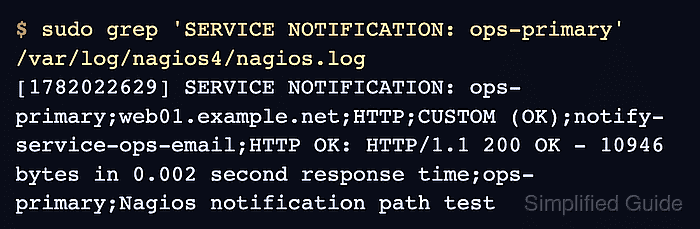
$ sudo grep 'SERVICE NOTIFICATION: ops-primary' /var/log/nagios4/nagios.log
[1782022629] SERVICE NOTIFICATION: ops-primary;web01.example.net;HTTP;CUSTOM (OK);notify-service-ops-email;HTTP OK: HTTP/1.1 200 OK - 10946 bytes in 0.002 second response time;ops-primary;Nagios notification path test
The fields show the contact, host, service, notification type, notification command, service output, author, and comment. If the external command is logged but this line is absent, check the contact assignment, notification command, and object filters.
Related: How to troubleshoot Nagios Core notifications - Check the recipient mailbox or incident channel for the CUSTOM notification.
Notification Type: CUSTOM
Service: HTTP
Host: web01.example.net
State: OK
Info: HTTP OK: HTTP/1.1 200 OK - 10946 bytes in 0.002 second response time
Comment: Nagios notification path test
The exact body depends on the configured notification command. Include $NOTIFICATIONCOMMENT$ in that command when the delivered message should carry the custom test comment.
Related: How to configure Nagios Core email notifications

Mohd Shakir Zakaria is a cloud architect with deep roots in software development and open-source advocacy. Certified in AWS, Red Hat, VMware, ITIL, and Linux, he specializes in designing and managing robust cloud and on-premises infrastructures.


