How to configure Nagios Core CGI authorization
Nagios Core CGI pages use the authenticated web username to decide which hosts, services, configuration views, and command actions a person can access. Setting those authorization lists keeps a monitoring console from treating every authenticated web user as an operator with the same visibility and command rights.
The web server must first challenge users and pass a real username to the CGI programs. On Debian and Ubuntu package installs, Apache loads the Nagios CGI snippet from its enabled configuration directory, and the CGI authorization rules live separately in the packaged Nagios configuration directory.
A common permission split gives nagiosadmin full CGI and command access while allowing cgi-viewer to view all host and service status without submitting commands. Source installs commonly use the upstream Nagios configuration directory and an htpasswd file from the quickstart instead, but the same use_authentication and authorized_for_* directives control CGI authorization.
Steps to configure Nagios Core CGI authorization:
- Identify the enabled Apache snippet for the Nagios Core CGI path.
$ readlink -f /etc/apache2/conf-enabled/nagios4-cgi.conf
/etc/apache2/conf-available/nagios4-cgi.conf
Use the matching web server configuration file on source installs or non-Apache front ends. The key requirement is that the CGI process receives an authenticated username.
- Add or reset the web user that should receive restricted CGI access.
$ sudo htdigest /etc/nagios4/htdigest.users Nagios4 cgi-viewer
Adding user cgi-viewer in realm Nagios4
New password:
Re-type new password:
Use htdigest for AuthType Digest and htpasswd for AuthType Basic. Do not recreate an existing password file unless every old web user should be removed.
Related: How to reset a Nagios Core web user password - Open the enabled Nagios Core Apache CGI snippet.
$ sudoedit /etc/apache2/conf-available/nagios4-cgi.conf
- Require authenticated users for the Nagios Core web and CGI paths.
<DirectoryMatch (/usr/share/nagios4/htdocs|/usr/lib/cgi-bin/nagios4|/etc/nagios4/stylesheets)>
    Options FollowSymLinks
    DirectoryIndex index.php index.html
    AllowOverride AuthConfig
    AuthDigestDomain "Nagios4"
    AuthDigestProvider file
    AuthUserFile "/etc/nagios4/htdigest.users"
    AuthGroupFile "/etc/group"
    AuthName "Nagios4"
    AuthType Digest
    Require valid-user
</DirectoryMatch>
Replace the package default IP access rule and move digest authentication out of the command-only cmd.cgi block when CGI authorization lists should control individual users. Leaving only Require ip or command-only authentication prevents Nagios from enforcing per-user CGI authorization consistently.
- Open the Nagios Core CGI configuration file.
$ sudoedit /etc/nagios4/cgi.cfg
- Enable CGI authentication and set the authorization lists.
use_authentication=1
authorized_for_system_information=nagiosadmin
authorized_for_configuration_information=nagiosadmin
authorized_for_system_commands=nagiosadmin
authorized_for_all_hosts=nagiosadmin,cgi-viewer
authorized_for_all_services=nagiosadmin,cgi-viewer
authorized_for_all_host_commands=nagiosadmin
authorized_for_all_service_commands=nagiosadmin
authorized_for_read_only=cgi-viewer
lock_author_names=1
Use the exact usernames supplied by the web server. authorized_for_all_hosts also grants visibility into services on those hosts, while the command-specific lists control host, service, and system command CGI access.
Do not set default_user_name to bypass web authentication. Unauthenticated visitors inherit every right granted to that default username.
- Test the Apache configuration.
$ sudo apache2ctl configtest
Syntax OK
Related: How to test Apache configuration
- Reload Apache to apply the web authentication change.
$ sudo systemctl reload apache2
CGI authorization changes in /etc/nagios4/cgi.cfg are read by the CGI programs when requested. Reload Apache after changing the web server authentication layer.
Related: How to manage the Apache web server service - Confirm anonymous requests receive an authentication challenge.
$ curl --silent --show-error --head http://monitor.example.net/nagios4/
HTTP/1.1 401 Unauthorized
WWW-Authenticate: Digest realm="Nagios4", algorithm=MD5, domain="Nagios4", qop="auth"
Content-Type: text/html; charset=iso-8859-1
A 200 OK response without credentials means the web server is still not requiring authentication for the Nagios path.
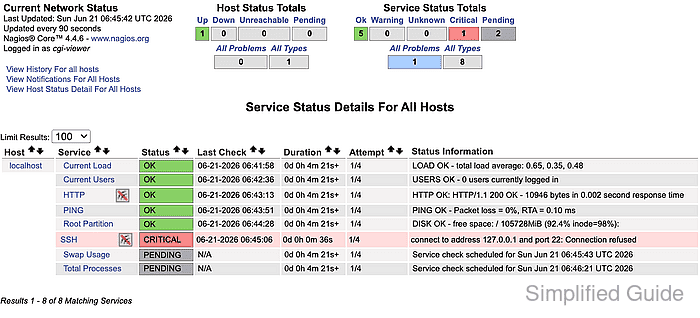
- Open the status CGI as the restricted user and confirm the page shows Logged in as cgi-viewer with host and service status visible.
http://monitor.example.net/nagios4/cgi-bin/status.cgi?host=all
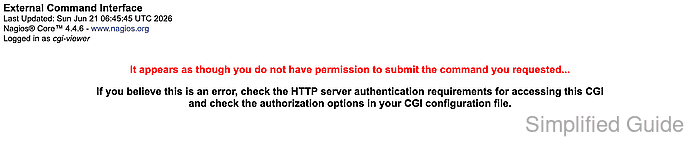
- Open a command CGI page as the restricted user and confirm command submission is blocked.
http://monitor.example.net/nagios4/cgi-bin/cmd.cgi?cmd_typ=1&host=localhost
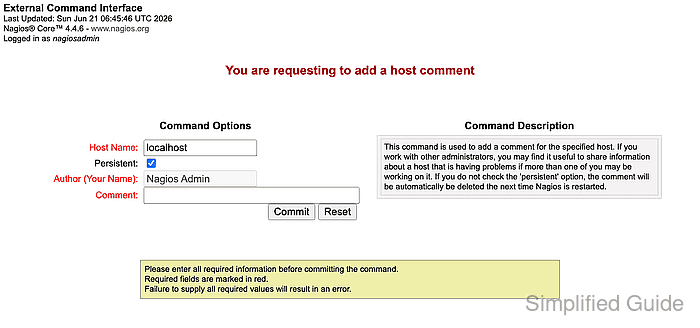
- Open the same command CGI page as nagiosadmin and confirm the command form loads.
http://monitor.example.net/nagios4/cgi-bin/cmd.cgi?cmd_typ=1&host=localhost
If the restricted user can open the command form, remove that user from the host, service, and system command authorization lists in /etc/nagios4/cgi.cfg, then retest the command CGI.