Nagios Core web access depends on several layers that can fail with similar browser symptoms. Apache must route the /nagios4/ URL, the web server may require a valid password file, the CGI configuration decides what an authenticated user can view or command, and command actions also need the external command pipe.
On Debian and Ubuntu package installs, the Apache web configuration commonly lives at /etc/nagios4/apache2.conf and the CGI settings live at /etc/nagios4/cgi.cfg. Source installs often use /usr/local/nagios/etc and the URL path /nagios/ instead, so match the commands to the active installation before changing files.
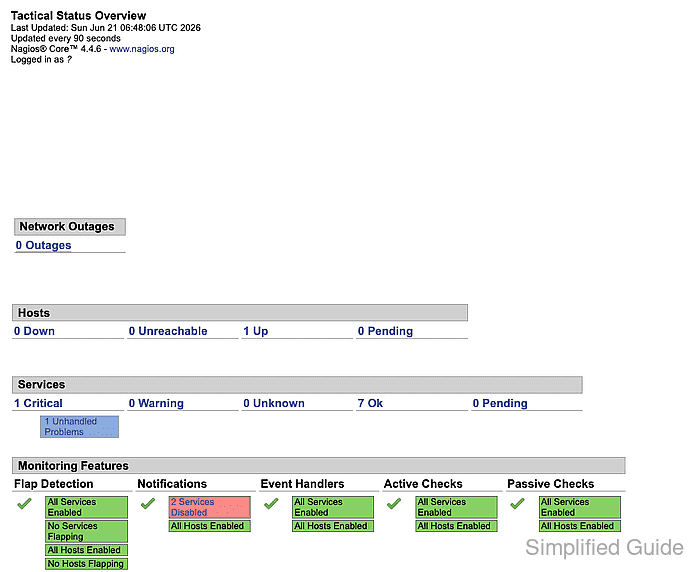
A restored interface should return the expected HTTP status, load the Tactical Status Overview or another CGI page, and allow command actions only for users that have the right CGI authorization. Keep password resets, broad authorization changes, and HTTPS hardening separate from the first access check so each fix matches the failing layer.
Steps to troubleshoot Nagios Core web interface access:
- Check the Nagios web URL from the monitoring server.
$ curl --silent --show-error --head http://monitor.example.net/nagios4/
HTTP/1.1 200 OK
Server: Apache/2.4.66 (Ubuntu)
Content-Type: text/html; charset=UTF-8
HTTP 200 or HTTP 401 means the web route exists. HTTP 404 points at a missing Apache alias or disabled Nagios web config. HTTP 403 points at an Apache Require rule, and connection failures point at Apache, firewall, DNS, or the listening address.
- Validate the Apache configuration before editing web access rules.
$ sudo apache2ctl configtest
Syntax OK
- Confirm that Apache has the Nagios aliases and access controls loaded.
$ sudo grep -E 'ScriptAlias|Alias|Require|AuthType|AuthName|AuthUserFile' /etc/nagios4/apache2.conf
ScriptAlias /cgi-bin/nagios4 /usr/lib/cgi-bin/nagios4
ScriptAlias /nagios4/cgi-bin /usr/lib/cgi-bin/nagios4
Alias /nagios4/stylesheets /etc/nagios4/stylesheets
Alias /nagios4 /usr/share/nagios4/htdocs
    Require ip ::1/128 fc00::/7 fe80::/10 10.0.0.0/8 127.0.0.0/8 169.254.0.0/16 172.16.0.0/12 192.168.0.0/16
    AuthUserFile "/etc/nagios4/htdigest.users"
    AuthName "Nagios4"
    AuthType Digest
    Require all granted
The package config may allow local and private networks to the web UI while protecting command CGI actions with Digest authentication. Replace broad access rules with authenticated access before exposing the UI beyond trusted networks.
- Enable the packaged Nagios Apache configuration when the aliases are missing.
$ sudo a2enconf nagios4-cgi
Enabling conf nagios4-cgi.
To activate the new configuration, you need to run:
  service apache2 reload
Debian and Ubuntu packages use nagios4-cgi for the Apache config name. Source installs usually place a generated Nagios config file under the web server's conf directory instead.
- Check the web authentication file when the browser repeats the login prompt.
$ sudo grep '^nagiosadmin:Nagios4:' /etc/nagios4/htdigest.users
nagiosadmin:Nagios4:6f1ed002ab5595859014ebf0951522d9
This Digest-format check should match the AuthName in the active Apache config. Do not paste real password hashes from production into tickets or shared reports. Reset the web user's password instead of guessing at the hash when the entry is missing or the password is unknown.
Related: How to reset a Nagios Core web user password - Check the CGI authentication and authorization settings when UI permissions or command links do not match the logged-in user.
$ sudo grep -E '^(use_authentication|authorized_for_all_hosts|authorized_for_all_services|authorized_for_system_commands|authorized_for_all_host_commands|authorized_for_all_service_commands)=' /etc/nagios4/cgi.cfg
use_authentication=0
authorized_for_all_hosts=nagiosadmin
authorized_for_all_services=nagiosadmin
authorized_for_system_commands=nagiosadmin
authorized_for_all_host_commands=nagiosadmin
authorized_for_all_service_commands=nagiosadmin
use_authentication=0 means the CGI programs do not enforce per-user authorization lists; the command CGI also refuses command submission when CGI authentication is disabled. Hardened systems should use use_authentication=1 and list only the users or contacts that need each CGI permission.
Related: How to configure Nagios Core CGI authorization - Confirm that web command submissions are enabled in the main Nagios configuration.
$ sudo grep -E '^(check_external_commands|command_file)=' /etc/nagios4/nagios.cfg
check_external_commands=1
command_file=/var/lib/nagios4/rw/nagios.cmd
cmd.cgi needs external commands enabled before actions such as forced checks, acknowledgements, and downtime can reach the daemon.
Related: How to enable external commands in Nagios Core - Check the external command directory and FIFO permissions when command pages fail after login.
$ sudo ls -ld /var/lib/nagios4/rw /var/lib/nagios4/rw/nagios.cmd
drwxrwsr-x 1 nagios nagios 4096 Jun 22 00:32 /var/lib/nagios4/rw
prw-rw---- 1 nagios nagios    0 Jun 22 00:32 /var/lib/nagios4/rw/nagios.cmd
The leading p on nagios.cmd means it is a FIFO created by Nagios Core. The group shown on the FIFO is the trusted command-write group; add only the web server or automation users that should be allowed to submit external commands.
Related: How to enable external commands in Nagios Core - Validate the Nagios Core configuration after correcting CGI or command settings.
$ sudo nagios4 -v /etc/nagios4/nagios.cfg
Nagios Core 4.4.6
##### snipped #####
Reading configuration data...
   Read main config file okay...
   Read object config files okay...
##### snipped #####
Total Warnings: 0
Total Errors:   0

Things look okay - No serious problems were detected during the pre-flight check
Use the binary and main config path for the local install. Source installs commonly use /usr/local/nagios/bin/nagios and /usr/local/nagios/etc/nagios.cfg.
Related: How to validate the Nagios Core configuration - Reload Apache and Nagios Core after configuration changes pass validation.
$ sudo systemctl reload apache2 nagios4
Use the service names for the local installation. Source installs or containers may use an init script, process signal, or foreground supervisor instead of systemd.
Related: How to manage the Nagios Core system service - Open the CGI page that failed and confirm that the expected Nagios view loads.
http://monitor.example.net/nagios4/cgi-bin/tac.cgi
If the same symptom returns, repeat the check at the layer named by the response: Apache route for 404, Apache access rule for 403, password file for repeated login prompts, CGI authorization for denied pages, and command pipe for failed command submissions.

Mohd Shakir Zakaria is a cloud architect with deep roots in software development and open-source advocacy. Certified in AWS, Red Hat, VMware, ITIL, and Linux, he specializes in designing and managing robust cloud and on-premises infrastructures.


