How to optimize table structures in MySQL or MariaDB
Large deletes, churn-heavy updates, and repeated bulk loads can leave a MySQL or MariaDB table with stale optimizer statistics or sparsely packed data pages. Refresh the statistics first, then rebuild only the table that still needs physical maintenance so the optimizer and storage layout are corrected without copying every busy table by habit.
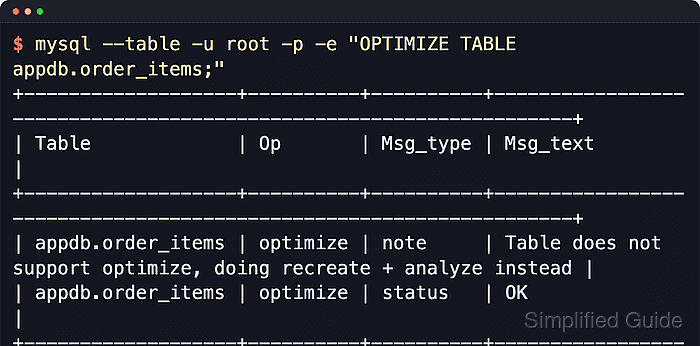
Two maintenance statements matter here. ANALYZE TABLE refreshes index distribution and other statistics the optimizer uses for join order and access-path choices. OPTIMIZE TABLE rebuilds the table or runs the storage-engine equivalent, which can reclaim unused file-per-table space and rewrite fragmented pages.
Run the rebuild during a maintenance window on large or hot InnoDB tables. Current MySQL maps OPTIMIZE TABLE to an online DDL rebuild with brief exclusive phases, while MariaDB reports the same common recreate-plus-analyze result and supports WAIT n or NOWAIT for lock waits. DATA_FREE is only a clue because InnoDB reports free bytes for the owning tablespace, so a successful rebuild can still leave a non-zero value.
Steps to optimize table structures in MySQL or MariaDB:
- Open the SQL client against the database that contains the target table.
$ mysql --host=db.example.net --port=3306 --user=dbadmin --password appdb
Enter password:
Welcome to the MySQL monitor. Commands end with ; or \g.
mysql>
On MariaDB hosts, use mariadb instead of mysql when that is the installed client name. The SQL statements below are the same unless a step explicitly calls out a MariaDB-only option.
- Confirm the active database and exact table before running maintenance.
mysql> SELECT DATABASE() AS current_database;
+------------------+
| current_database |
+------------------+
| appdb            |
+------------------+
1 ROW IN SET (0.00 sec)

mysql> SHOW FULL TABLES LIKE 'order_items';
+-------------------------------+------------+
| Tables_in_appdb (order_items) | Table_type |
+-------------------------------+------------+
| order_items                   | BASE TABLE |
+-------------------------------+------------+
1 ROW IN SET (0.00 sec)
Stop if the database or table name is not the table you intend to rebuild. Use a fully qualified name such as appdb.order_items when the current database should not matter.
- Refresh optimizer statistics before deciding whether a physical rebuild is still justified.
mysql> ANALYZE TABLE order_items;
+-------------------+---------+----------+----------+
| TABLE             | Op      | Msg_type | Msg_text |
+-------------------+---------+----------+----------+
| appdb.order_items | analyze | STATUS   | OK       |
+-------------------+---------+----------+----------+
ANALYZE TABLE can change execution plans immediately because it refreshes optimizer statistics. MySQL can take a read lock for InnoDB analysis, while MariaDB documents InnoDB analysis as allowing reads and writes.
- Inspect the table status after the statistics refresh and keep the values for comparison.
mysql> SHOW TABLE STATUS LIKE 'order_items'\G
*************************** 1. ROW ***************************
           Name: order_items
         Engine: InnoDB
          ROWS: 862
 Avg_row_length: 551
    Data_length: 475136
   Index_length: 16384
      Data_free: 7340032
 AUTO_INCREMENT: 8192
   Create_time: 2026-06-07 05:10:13
   Update_time: 2026-06-07 05:10:13
##### snipped #####
Compare Rows, Data_length, Index_length, and Data_free before and after the rebuild. Rows is approximate for InnoDB, and Data_free can describe tablespace-level free space rather than bytes one table will immediately return to the filesystem.
- Check a representative access path before rebuilding so a statistics refresh or table rewrite does not quietly push an important query onto a worse plan.
mysql> EXPLAIN SELECT * FROM order_items WHERE order_id = 42\G
*************************** 1. ROW ***************************
           id: 1
  select_type: SIMPLE
        TABLE: order_items
         TYPE: REF
possible_keys: idx_order_items_order_id
          KEY: idx_order_items_order_id
      key_len: 4
          REF: const
         ROWS: 90
        Extra: NULL
For runtime measurements instead of estimates, current MySQL uses EXPLAIN ANALYZE and current MariaDB uses ANALYZE SELECT, but plain EXPLAIN is the safest shared baseline for both servers.
- Run OPTIMIZE TABLE only when reclaiming space or rewriting sparsely filled pages is still part of the fix after the statistics refresh.
mysql> OPTIMIZE TABLE order_items;
+-------------------+----------+----------+-------------------------------------------------------------------+
| TABLE             | Op       | Msg_type | Msg_text                                                          |
+-------------------+----------+----------+-------------------------------------------------------------------+
| appdb.order_items | OPTIMIZE | note     | TABLE does NOT support OPTIMIZE, doing recreate + analyze instead |
| appdb.order_items | OPTIMIZE | STATUS   | OK                                                                |
+-------------------+----------+----------+-------------------------------------------------------------------+
OPTIMIZE TABLE needs I/O, temporary space, and metadata locks even when the storage engine uses an online rebuild. MySQL can fall back to table-copy behavior for cases such as FULLTEXT indexes. MariaDB also accepts OPTIMIZE TABLE order_items NOWAIT; when failing immediately on lock contention is preferable.
If the operation runs long enough to inspect from another connection, use SHOW FULL PROCESSLIST; or query performance_schema.processlist on MySQL.
- Re-check table status after the rebuild and compare it with the pre-rebuild snapshot.
mysql> SHOW TABLE STATUS LIKE 'order_items'\G
*************************** 1. ROW ***************************
           Name: order_items
         Engine: InnoDB
          ROWS: 862
 Avg_row_length: 551
    Data_length: 475136
   Index_length: 16384
      Data_free: 7340032
 AUTO_INCREMENT: 8192
   Create_time: 2026-06-07 05:10:13
   Update_time: 2026-06-07 05:10:13
##### snipped #####
The clearest success signal is a clean status OK result plus post-maintenance metadata that matches the expected layout on that server. A non-zero Data_free value after OPTIMIZE TABLE is not automatically a failed rebuild on InnoDB because the value may still describe the owning tablespace.
- Re-run the representative EXPLAIN when the maintained table backs a critical query.
mysql> EXPLAIN SELECT * FROM order_items WHERE order_id = 42\G
*************************** 1. ROW ***************************
           id: 1
  select_type: SIMPLE
        TABLE: order_items
         TYPE: REF
possible_keys: idx_order_items_order_id
          KEY: idx_order_items_order_id
      key_len: 4
          REF: const
         ROWS: 90
        Extra: NULL
Compare type, key, and rows with the pre-maintenance plan. Investigate before leaving the window if the plan loses the intended index or the row estimate changes enough to affect the workload.