How to fix secure-file-priv errors in MySQL or MariaDB
The secure_file_priv setting decides whether MySQL or MariaDB can read from or write to files on the database server host. When LOAD DATA INFILE or SELECT … INTO OUTFILE fails with ERROR 1290 (HY000), the server is protecting file access from paths outside its approved directory, so fixing the setting or using the approved directory restores imports and exports without removing the safety boundary.
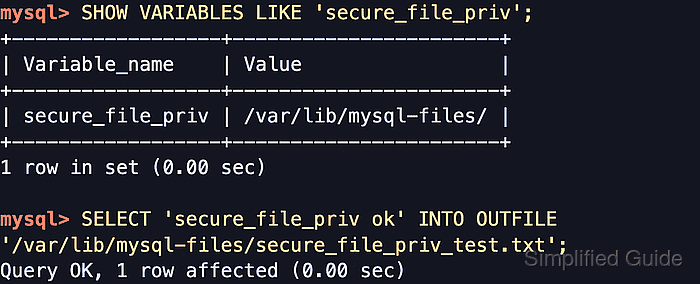
The variable is read from the --secure-file-priv server option at startup and controls server-side file operations such as LOAD DATA INFILE without LOCAL, SELECT … INTO OUTFILE, and LOAD_FILE(). A directory value restricts those operations to one path, a blank value leaves them unrestricted, and NULL disables server-side file import and export completely. LOAD DATA LOCAL INFILE is different because the client reads the file and streams it to the server.
Changing the setting requires a configuration edit plus a database service restart because the variable is read-only at runtime. Pointing it at a missing or blocked directory can keep the service from starting or still leave file access denied by AppArmor, SELinux, or service sandbox rules. MariaDB packages that use systemd can also block /home, /root, and /run/user even when secure_file_priv points there, so a dedicated service-owned path such as /var/lib/mysql-files avoids those home-directory restrictions.
Steps to fix secure-file-priv errors in MySQL or MariaDB:
- Open the mysql or mariadb client with an account that can inspect server variables and restart the database service when needed.
$ mysql -u root -p
Enter password:
Welcome to the MySQL monitor.  Commands end with ; or \g.
##### snipped #####
mysql>
- Check the live secure_file_priv value on the server that is raising the error.
mysql> SHOW VARIABLES LIKE 'secure_file_priv';
+------------------+-----------------------+
| Variable_name    | Value                 |
+------------------+-----------------------+
| secure_file_priv | /var/lib/mysql-files/ |
+------------------+-----------------------+
1 row in set (0.00 sec)
A directory value restricts server-side file access to that directory. A blank value means the server is not limiting INFILE or OUTFILE to one directory. NULL disables server-side file import and export entirely.
If the server being checked returns a blank value, this specific ERROR 1290 is usually coming from a different server, a different runtime, or a different permission problem than secure_file_priv. secure_file_priv does not affect LOAD DATA LOCAL INFILE because the client reads the file instead of the server.
- If the value already points to a usable directory, change the failing INFILE or OUTFILE path to that directory before editing any configuration.
The quickest fix is often to move or export the file under the directory returned by SHOW VARIABLES LIKE 'secure_file_priv' instead of widening the server policy.
- Exit the SQL shell before changing the server configuration.
mysql> EXIT;
Bye
- Create a dedicated directory for server-side file operations when the current setting points to the wrong location and a different restricted directory is needed.
$ sudo install -d -o mysql -g mysql -m 0750 /var/lib/mysql-files
Most MySQL and MariaDB packages run the daemon as the mysql user. Adjust the owner and group if the service on the host uses a different account.
A directory under /home, /root, or /run/user can still fail on hardened hosts even after setting secure_file_priv, especially on MariaDB packages with systemd sandboxing enabled.
- Create a dedicated server option file in a directory loaded by the database package.
$ sudoedit /etc/mysql/conf.d/secure-file-priv.cnf
Common alternatives include /etc/my.cnf, /etc/mysql/my.cnf, and on many MariaDB systems /etc/mysql/mariadb.conf.d/50-server.cnf. Keep the setting under a [mysqld] section so the server process reads it at startup.
- Set secure-file-priv to the approved directory.
[mysqld]
secure-file-priv=/var/lib/mysql-files
Use an existing directory that the database service can access. A missing or unusable path can prevent the server from starting cleanly.
Leaving the value blank removes the directory restriction, and setting it to NULL disables server-side file import and export instead of fixing the current workflow.
- Confirm the option file is visible to the server defaults reader before restarting.
$ sudo my_print_defaults mysqld
--secure-file-priv=/var/lib/mysql-files
##### snipped #####
If the line does not appear, the file is outside the loaded option chain or another option file is overriding it. Check the option-file order before restarting.
- Restart the database service so the new startup option takes effect.
$ sudo systemctl restart mysql
Common unit names are mysql, mariadb, and mysqld. Use the unit name installed on the host.
- Confirm that the service is running after the restart.
$ sudo systemctl is-active mysql
active
If the unit does not return active, inspect the service log before retrying. A bad secure_file_priv path is one of the startup failures to look for.
- Reconnect and verify that the active value matches the directory that was configured.
$ mysql -u root -p -e "SHOW VARIABLES LIKE 'secure_file_priv';"
Enter password:
+------------------+-----------------------+
| Variable_name    | Value                 |
+------------------+-----------------------+
| secure_file_priv | /var/lib/mysql-files/ |
+------------------+-----------------------+
- Write a test file inside the approved directory to confirm that the error is gone.
mysql> SELECT 'secure_file_priv ok' INTO OUTFILE '/var/lib/mysql-files/secure_file_priv_test.txt';
Query OK, 1 row affected (0.00 sec)
The target file must not already exist. The path must stay inside the current secure_file_priv directory, and the SQL account still needs the FILE privilege.
- Confirm that the server created the file in the allowed directory.
$ sudo ls -l /var/lib/mysql-files/secure_file_priv_test.txt
-rw-r----- 1 mysql mysql 20 Jun  7 04:36 /var/lib/mysql-files/secure_file_priv_test.txt
If secure_file_priv is blank or points somewhere else on the host, replace the example path with the directory returned by the server.
- Remove the test file when validation is complete.
$ sudo rm -f /var/lib/mysql-files/secure_file_priv_test.txt