CSV imports usually fail when columns shift, a header row is loaded as data, or client-side file loading is disabled on one side of the connection. LOAD DATA LOCAL INFILE turns a local CSV file into MySQL or MariaDB rows in one bulk operation while leaving the row count and warning state visible in the SQL session.
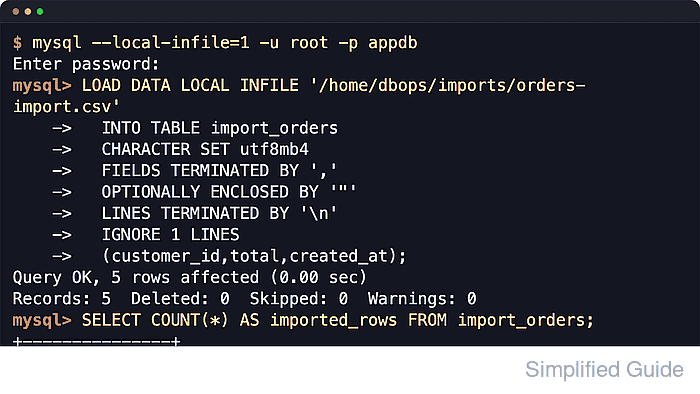
The LOCAL keyword makes the command-line client read the file from its own filesystem and stream the contents to the database server. Server-side LOAD DATA INFILE is different because the database server reads the file itself, which brings in server-side file privileges, allowed directories, and service sandbox rules.
The import works only when the CSV layout matches the destination table, including column order, header handling, quoting, character set, and newline style. The server variable local_infile must permit client-side loads, and the client must be opened with --local-infile=1. secure_file_priv does not restrict LOAD DATA LOCAL INFILE, but checking it keeps the boundary clear before switching to server-side imports.
Steps to import CSV data into MySQL or MariaDB:
- Open the mysql or mariadb client with LOCAL loading enabled.
$ mysql --local-infile=1 -u root -p
Enter password:
Welcome to the MySQL monitor.  Commands end with ; or \g.
Server version: 8.4.9 MySQL Community Server - GPL
##### snipped #####
mysql>
The mariadb client accepts the same --local-infile=1 option. The client-side option is still required even when the server allows LOCAL loads.
- Select the target database.
mysql> USE appdb;
Database changed
- Check whether the server allows LOAD DATA LOCAL INFILE.
mysql> SHOW VARIABLES LIKE 'local_infile';
+---------------+-------+
| Variable_name | Value |
+---------------+-------+
| local_infile  | OFF   |
+---------------+-------+
1 row in set (0.00 sec)
MySQL 8.4 reports OFF in the official server build. MariaDB documents ON as the server default, but managed services, packages, or site policy can still turn it off.
- Enable local_infile temporarily when the server reports OFF.
mysql> SET GLOBAL local_infile = 1;
Query OK, 0 rows affected (0.00 sec)
Changing the global value requires administrative privileges. Leave it enabled only for the import window unless the server has a deliberate policy for trusted client-side file loads.
- Confirm that local_infile is now enabled.
mysql> SHOW VARIABLES LIKE 'local_infile';
+---------------+-------+
| Variable_name | Value |
+---------------+-------+
| local_infile  | ON    |
+---------------+-------+
1 row in set (0.00 sec)
- Check secure_file_priv before choosing a server-side import path.
mysql> SHOW VARIABLES LIKE 'secure_file_priv';
+------------------+-----------------------+
| Variable_name    | Value                 |
+------------------+-----------------------+
| secure_file_priv | /var/lib/mysql-files/ |
+------------------+-----------------------+
1 row in set (0.00 sec)
secure_file_priv applies to server-side LOAD DATA INFILE without LOCAL. For LOAD DATA LOCAL INFILE, the client reads the file, so the CSV can be anywhere the client process can access it.
- Inspect the target table so the column list matches the CSV layout.
mysql> DESCRIBE import_orders;
+-------------+---------------+------+-----+---------+----------------+
| Field       | Type          | Null | Key | Default | Extra          |
+-------------+---------------+------+-----+---------+----------------+
| id          | int           | NO   | PRI | NULL    | auto_increment |
| customer_id | int           | NO   |     | NULL    |                |
| total       | decimal(10,2) | NO   |     | NULL    |                |
| created_at  | datetime      | NO   |     | NULL    |                |
+-------------+---------------+------+-----+---------+----------------+
4 rows in set (0.00 sec)
List the destination columns explicitly when the CSV omits table columns such as an AUTO_INCREMENT id.
- Import the CSV file with LOAD DATA LOCAL INFILE.
mysql> LOAD DATA LOCAL INFILE '/home/dbops/imports/orders-import.csv'
    ->   INTO TABLE import_orders
    ->   CHARACTER SET utf8mb4
    ->   FIELDS TERMINATED BY ','
    ->   OPTIONALLY ENCLOSED BY '"'
    ->   LINES TERMINATED BY '\n'
    ->   IGNORE 1 LINES
    ->   (customer_id,total,created_at);
Query OK, 3 rows affected (0.00 sec)
Records: 3  Deleted: 0  Skipped: 0  Warnings: 0
Use IGNORE 1 LINES only when the first row contains column names. Use '\r\n' for LINES TERMINATED BY when the CSV uses Windows-style line endings.
- Review import warnings before treating the load as complete.
mysql> SHOW WARNINGS;
Empty set (0.00 sec)
Warnings usually point to truncated values, invalid dates, row-shape mismatches, or character-set problems. Review them even when the affected row count looks right.
- Verify the imported row count.
mysql> SELECT COUNT(*) AS imported_rows FROM import_orders;
+---------------+
| imported_rows |
+---------------+
|             3 |
+---------------+
1 row in set (0.00 sec)
- Preview imported rows to confirm the columns landed in the expected order.
mysql> SELECT * FROM import_orders ORDER BY id;
+----+-------------+--------+---------------------+
| id | customer_id | total  | created_at          |
+----+-------------+--------+---------------------+
|  1 |         101 | 249.99 | 2026-04-09 10:00:00 |
|  2 |         102 |  89.50 | 2026-04-09 10:05:00 |
|  3 |         103 | 149.00 | 2026-04-09 10:10:00 |
+----+-------------+--------+---------------------+
3 rows in set (0.00 sec)
- Disable local_infile again when it was enabled only for this import.
mysql> SET GLOBAL local_infile = 0;
Query OK, 0 rows affected (0.00 sec)
Skip this step when the server already uses a deliberate persistent local_infile policy for trusted bulk-load workflows.
- Exit the SQL shell.
mysql> EXIT;
Bye

Mohd Shakir Zakaria is a cloud architect with deep roots in software development and open-source advocacy. Certified in AWS, Red Hat, VMware, ITIL, and Linux, he specializes in designing and managing robust cloud and on-premises infrastructures.


