How to configure MySQL or MariaDB replication
Replication setup fails quietly when the replica starts from a dump that does not match the source binary-log position. The channel can connect and still miss, repeat, or collide with changes if the seed data, coordinates, and replication account are not prepared as one handoff from source to replica.
This file-and-position method uses the source server's binary log plus a consistent logical dump. The dump captures the data the replica should already contain and writes the matching coordinates into the dump header; after import, the replica reads the source from that exact file and position.
The examples use a same-family topology and seed appdb to keep the logical dump focused. Replace that database with the full database set that must exist before replication starts, or use a physical backup path for a full-server clone where system schemas and accounts must be preserved. The source must accept TCP connections from the replica on port 3306, and every server in the topology needs a unique server_id.
Config paths and service names vary by distribution: common server config locations include /etc/mysql/mysql.conf.d/mysqld.cnf (MySQL on Debian or Ubuntu), /etc/mysql/mariadb.conf.d/50-server.cnf (MariaDB on Debian or Ubuntu), and /etc/my.cnf (RHEL, Rocky Linux, AlmaLinux, or SUSE).
Steps to configure MySQL or MariaDB replication:
- Edit the source server configuration file.
$ sudoedit /etc/mysql/conf.d/replication.cnf
- Add binary logging and a unique server ID on the source server.
[mysqld]
server_id = 1
log_bin = mysql-bin
binlog_format = ROW
MariaDB also supports log-basename if stable binlog filenames are important across host renames. Keep every server_id unique in the replication topology.
If the source only listens on 127.0.0.1 via bind-address or has skip-networking enabled, remote replicas will not be able to connect.
- Restart the source service so the replication settings take effect.
# MySQL
$ sudo systemctl restart mysql

# MariaDB
$ sudo systemctl restart mariadb
- Confirm that the source is writing a binary log and record the current file name.
# MySQL 8.4
$ mysql -u root -p -e "SHOW BINARY LOG STATUS\G"
*************************** 1. row ***************************
             File: mysql-bin.000003
         Position: 158
     Binlog_Do_DB:
 Binlog_Ignore_DB:
Executed_Gtid_Set:

# MariaDB
$ mariadb -u root -p -e "SHOW BINLOG STATUS\G"
*************************** 1. row ***************************
            File: primary-bin.000002
        Position: 1235
    Binlog_Do_DB:
Binlog_Ignore_DB:
- Create a dedicated replication account that is limited to the replica host.
# MySQL
$ mysql -u root -p -e "CREATE USER 'repl'@'192.0.2.41' IDENTIFIED BY 'REPLICATION_PASSWORD';"

# MariaDB
$ mariadb -u root -p -e "CREATE USER 'repl'@'192.0.2.41' IDENTIFIED BY 'REPLICATION_PASSWORD';"
A replica-specific IP address or DNS name is safer than '%' for the replication account.
- Grant only the replication privilege needed by the replica account.
# MySQL
$ mysql -u root -p -e "GRANT REPLICATION SLAVE ON *.* TO 'repl'@'192.0.2.41';"

# MariaDB
$ mariadb -u root -p -e "GRANT REPLICATION REPLICA ON *.* TO 'repl'@'192.0.2.41';"
- Verify the replication account grants before using them on the replica.
# MySQL
$ mysql -u root -p -e "SHOW GRANTS FOR 'repl'@'192.0.2.41';"

# MariaDB
$ mariadb -u root -p -e "SHOW GRANTS FOR 'repl'@'192.0.2.41';"
Current MariaDB accepts the REPLICATION REPLICA privilege name, but SHOW GRANTS can still display the legacy REPLICATION SLAVE wording for compatibility.
- Create a consistent dump on the source server and embed the matching replication coordinates in the dump header.
# MySQL 8.4
$ mysqldump -u root -p --databases appdb --single-transaction --routines --triggers --events --source-data=2 > /var/tmp/mysql-replication.sql

# MariaDB
$ mariadb-dump -u root -p --databases appdb --single-transaction --routines --triggers --events --master-data=2 > /var/tmp/mariadb-replication.sql
--single-transaction keeps InnoDB tables consistent without holding a write lock for the full dump. Add every existing application database that the replica must already contain before replication starts.
That option does not protect non-transactional tables such as MyISAM, and a full logical dump can include system schemas such as mysql. Use a maintenance window, explicit locking, or a physical backup workflow when a full-server clone must preserve accounts and system tables.
- Copy the dump file from the source server to the replica server.
$ scp /var/tmp/mysql-replication.sql root@192.0.2.41:/var/tmp/
$ scp /var/tmp/mariadb-replication.sql root@192.0.2.41:/var/tmp/
- Edit the replica server configuration file.
$ sudoedit /etc/mysql/conf.d/replica.cnf
- Give the replica its own server ID and relay log.
[mysqld]
server_id = 2
read_only = 1
relay_log = replica-relay-bin
Keep the replica server_id unique. On MySQL, enabling super_read_only is a useful extra guard if local writes must be blocked completely.
- Restart the replica service so the new replica settings load.
# MySQL
$ sudo systemctl restart mysql

# MariaDB
$ sudo systemctl restart mariadb
- Import the dump into the replica server before starting replication.
# MySQL
$ mysql -u root -p < /var/tmp/mysql-replication.sql

# MariaDB
$ mariadb -u root -p < /var/tmp/mariadb-replication.sql
Import into an empty or disposable dataset only. Starting replication on top of unrelated existing data can produce duplicate-key errors or silent drift.
- Extract the binlog coordinates that were written into the dump header.
# MySQL 8.4
$ grep -m1 -E "^-- CHANGE REPLICATION SOURCE TO SOURCE_LOG_FILE" /var/tmp/mysql-replication.sql
-- CHANGE REPLICATION SOURCE TO SOURCE_LOG_FILE='mysql-bin.000003', SOURCE_LOG_POS=850;

# MariaDB
$ grep -m1 -E "^-- CHANGE MASTER TO MASTER_LOG_FILE" /var/tmp/mariadb-replication.sql
-- CHANGE MASTER TO MASTER_LOG_FILE='primary-bin.000002', MASTER_LOG_POS=1235;
- Point the replica at the source server with the coordinates from the dump header.
# MySQL 8.4
$ mysql -u root -p -e "CHANGE REPLICATION SOURCE TO SOURCE_HOST='db-primary.example.net', SOURCE_PORT=3306, SOURCE_USER='repl', SOURCE_PASSWORD='REPLICATION_PASSWORD', SOURCE_LOG_FILE='mysql-bin.000003', SOURCE_LOG_POS=850, GET_SOURCE_PUBLIC_KEY=1;"

# MariaDB
$ mariadb -u root -p -e "CHANGE MASTER TO MASTER_HOST='db-primary.example.net', MASTER_PORT=3306, MASTER_USER='repl', MASTER_PASSWORD='REPLICATION_PASSWORD', MASTER_LOG_FILE='primary-bin.000002', MASTER_LOG_POS=1235;"
On current MySQL, GET_SOURCE_PUBLIC_KEY=1 is needed when the replication account uses the default caching_sha2_password plugin and the channel is not already protected with TLS or a configured server public key path.
- Start the replication threads on the replica.
# MySQL
$ mysql -u root -p -e "START REPLICA;"

# MariaDB
$ mariadb -u root -p -e "START REPLICA;"
MariaDB still accepts START SLAVE, but START REPLICA is the current compatible form.
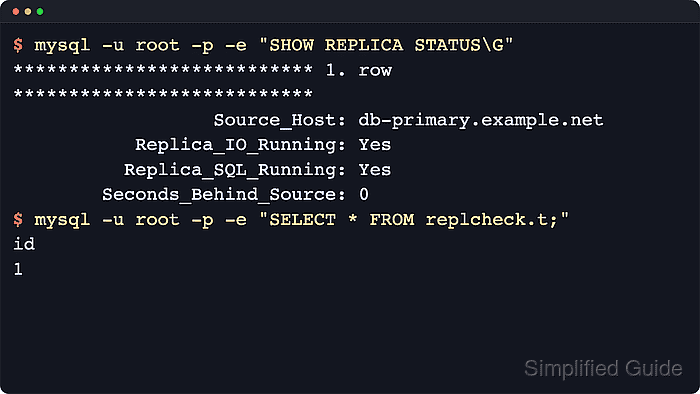
- Confirm that both replication threads are running and that lag is near zero.
# MySQL 8.4
$ mysql -u root -p -e "SHOW REPLICA STATUS\G"
*************************** 1. row ***************************
                  Source_Host: db-primary.example.net
           Replica_IO_Running: Yes
          Replica_SQL_Running: Yes
        Seconds_Behind_Source: 0

# MariaDB
$ mariadb -u root -p -e "SHOW REPLICA STATUS\G"
*************************** 1. row ***************************
                   Master_Host: db-primary.example.net
              Slave_IO_Running: Yes
             Slave_SQL_Running: Yes
         Seconds_Behind_Master: 0
Current MariaDB accepts SHOW REPLICA STATUS, but the status field names still commonly use Slave_* and Master_* labels.
- Write a small test row on the source server.
# MySQL
$ mysql -u root -p -e "CREATE DATABASE replcheck; CREATE TABLE replcheck.t (id INT PRIMARY KEY) ENGINE=InnoDB; INSERT INTO replcheck.t VALUES (1);"

# MariaDB
$ mariadb -u root -p -e "CREATE DATABASE replcheck; CREATE TABLE replcheck.t (id INT PRIMARY KEY) ENGINE=InnoDB; INSERT INTO replcheck.t VALUES (1);"
- Query the replica and confirm the same row appears there.
# MySQL
$ mysql -u root -p -e "SELECT * FROM replcheck.t;"
id
1

# MariaDB
$ mariadb -u root -p -e "SELECT * FROM replcheck.t;"
id
1
If the row does not appear, check the replica status output for authentication errors, unreachable source hostnames, blocked TCP port 3306, or a mismatch between the dump header coordinates and the values in the replication statement.