Binary logging records committed changes in a replayable event stream, which is what makes MySQL or MariaDB usable for replica catch-up, point-in-time recovery, and post-incident audit trails after a bad deploy or accidental write.
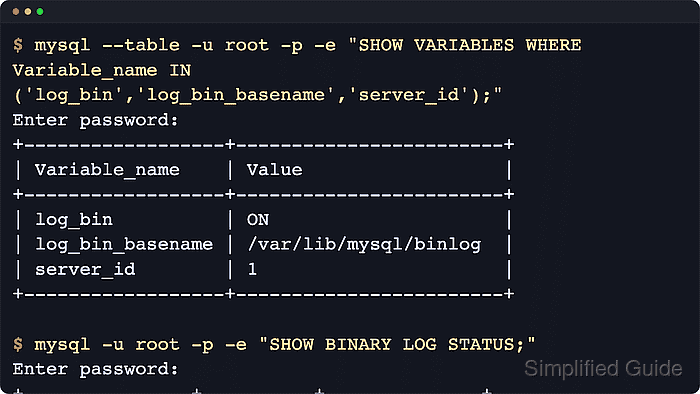
With normal file-based binary logging, each server writes binary events into numbered log files plus an index file that tracks them. Replicas read those files in order, and backup or recovery workflows use the same file and position coordinates to replay only the changes that happened after a base backup. The settings that matter most are log_bin, server_id, the binary-log basename, and the retention window that determines how long old logs remain available.
The enablement path differs by product. MySQL 8.4 LTS enables binary logging by default and already uses the ROW format, so the practical job is usually to verify that log_bin=ON and then set an explicit server_id and retention policy. MariaDB leaves log_bin=OFF until you configure log_bin or start mariadbd with --log-bin. Persistent startup changes still require a restart, and every server in the same replication topology needs a unique non-zero server_id.
Quick reference: MySQL 8.4 LTS starts with log_bin=ON, basename binlog, binlog_format=ROW, and a 30-day binlog_expire_logs_seconds default. MariaDB keeps log_bin=OFF until log_bin is configured, and binlog_format still defaults to MIXED.
Steps to enable binary logging in MySQL or MariaDB:
- Review the current product, binary-log state, file basename, server ID, and retention settings.
$ mysql --table -u root -p -e "SHOW VARIABLES WHERE Variable_name IN ('version','version_comment','log_bin','log_bin_basename','server_id','binlog_format','binlog_expire_logs_seconds','expire_logs_days');"
Enter password:
+----------------------------+------------------------------+
| Variable_name              | Value                        |
+----------------------------+------------------------------+
| binlog_expire_logs_seconds | 2592000                      |
| binlog_format              | ROW                          |
| log_bin                    | ON                           |
| log_bin_basename           | /var/lib/mysql/binlog        |
| server_id                  | 1                            |
| version                    | 8.4.9                        |
| version_comment            | MySQL Community Server - GPL |
+----------------------------+------------------------------+
On MariaDB with binary logging still disabled, expect log_bin=OFF and no useful log_bin_basename yet. MariaDB 10.6.1 and newer can also return expire_logs_days alongside binlog_expire_logs_seconds. Socket-auth installs often use
sudo mysql
or
sudo mariadb
instead of -u root -p.
- Choose a unique non-zero server_id and decide whether to keep the current binary-log basename or set an explicit one.
Every server in the same replication topology needs a distinct server_id. Even though MySQL 8.4 LTS starts with server_id=1 by default, that value is not safe to reuse across multiple servers.
If MySQL 8.4 already reports log_bin=ON and the existing log_bin_basename is already referenced by replicas or backup tooling, keep that basename instead of renaming the log files unnecessarily.
- Create or update a mysqld option-file drop-in so the setting survives restarts.
$ sudoedit /etc/mysql/conf.d/binary-logging.cnf
Common include locations are /etc/mysql/conf.d/, /etc/mysql/mysql.conf.d/, /etc/mysql/mariadb.conf.d/, and /etc/my.cnf.d/ depending on distro and package.
- Add the binary-log settings under the [mysqld] section.
[mysqld]
server_id = 101
log_bin = /var/lib/mysql/mysql-bin
binlog_expire_logs_seconds = 604800
For MySQL 8.4 LTS, log_bin and ROW logging are already the defaults. If the default MySQL basename /var/lib/mysql/binlog is acceptable, you can omit the log_bin line and let MySQL keep its built-in filename.
If you also need to force row-based logging on MariaDB or on older MySQL servers, add binlog_format = ROW below the other settings. MySQL 8.4 LTS already defaults to ROW and treats binlog_format as deprecated, so leave that line unset there unless you are standardizing older servers.
For MariaDB before 10.6.1, use expire_logs_days = 7 instead of binlog_expire_logs_seconds = 604800. On MariaDB 10.6.1 and newer, the two retention variables are aliases, so configure only one of them.
- Restart the database service or the wrapper that owns the server process.
$ sudo systemctl restart mysql
Substitute
mariadb
when the service unit is named mariadb, or restart the container or orchestration wrapper that starts mysqld or mariadbd on that host.
- Confirm the service returned cleanly before checking the log coordinates.
$ sudo systemctl is-active mysql
active
If the service does not come back, inspect the error log before retrying. A bad binary-log path or a directory that the mysql user cannot write to can prevent startup.
- Recheck the live binary-log variables after the restart.
$ mysql --table -u root -p -e "SHOW VARIABLES WHERE Variable_name IN ('log_bin','log_bin_basename','log_bin_index','server_id','binlog_format','binlog_expire_logs_seconds','expire_logs_days');"
Enter password:
+----------------------------+--------------------------------+
| Variable_name              | Value                          |
+----------------------------+--------------------------------+
| binlog_expire_logs_seconds | 604800                         |
| binlog_format              | ROW                            |
| log_bin                    | ON                             |
| log_bin_basename           | /var/lib/mysql/mysql-bin       |
| log_bin_index              | /var/lib/mysql/mysql-bin.index |
| server_id                  | 101                            |
+----------------------------+--------------------------------+
Your basename, server_id, and retention value should reflect the settings you chose. On MariaDB 10.6.1 and newer, the same query can also show expire_logs_days as the day-based alias of binlog_expire_logs_seconds.
- Display the current binary-log file and position that replication or recovery tools would use.
$ mysql -u root -p -e "SHOW BINARY LOG STATUS;"
Enter password:
+------------------+----------+--------------+------------------+-------------------+
| File             | Position | Binlog_Do_DB | Binlog_Ignore_DB | Executed_Gtid_Set |
+------------------+----------+--------------+------------------+-------------------+
| mysql-bin.000003 |      158 |              |                  |                   |
+------------------+----------+--------------+------------------+-------------------+
MySQL 8.4 uses SHOW BINARY LOG STATUS. Use
mariadb -u root -p -e "SHOW BINLOG STATUS;"
on MariaDB; older MariaDB examples often show SHOW MASTER STATUS for the same core fields.
- List the retained binary-log files to confirm the server is creating them and tracking them in the index.
$ mysql --table -u root -p -e "SHOW BINARY LOGS;"
Enter password:
+------------------+-----------+-----------+
| Log_name         | File_size | Encrypted |
+------------------+-----------+-----------+
| mysql-bin.000001 |       181 | No        |
| mysql-bin.000002 |   2997943 | No        |
| mysql-bin.000003 |       158 | No        |
+------------------+-----------+-----------+
A non-empty list confirms that binary logging is active and that the server is maintaining the index. MariaDB returns the same log names and sizes but omits the Encrypted column.
- Verify the expiration policy matches the recovery window you actually need.
$ mysql --table -u root -p -e "SHOW VARIABLES WHERE Variable_name IN ('binlog_expire_logs_seconds','expire_logs_days');"
Enter password:
+----------------------------+--------+
| Variable_name              | Value  |
+----------------------------+--------+
| binlog_expire_logs_seconds | 604800 |
+----------------------------+--------+
Retention must stay longer than your slowest replica lag and longer than the longest point-in-time recovery window you intend to support. MariaDB 10.6.1 and newer also shows expire_logs_days as an alias, while older MariaDB releases use only expire_logs_days.

Mohd Shakir Zakaria is a cloud architect with deep roots in software development and open-source advocacy. Certified in AWS, Red Hat, VMware, ITIL, and Linux, he specializes in designing and managing robust cloud and on-premises infrastructures.


