How to check database size in MySQL or MariaDB
Checking database size in MySQL or MariaDB helps catch quiet storage growth before backups, replicas, or schema changes start taking longer than expected. Per-schema totals make it easier to see which application database is expanding and whether the growth is isolated or server-wide.
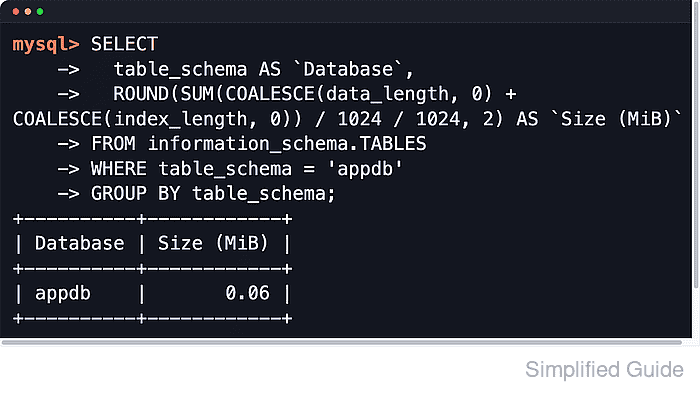
Both servers expose table metadata through INFORMATION_SCHEMA.TABLES. Summing DATA_LENGTH and INDEX_LENGTH across each TABLE_SCHEMA produces a practical database-size report based on the bytes allocated to table data and indexes, and the same metadata can be reused to break a schema down by its largest tables.
These totals are estimates, not a byte-for-byte filesystem audit. Results are limited to schemas visible to the connected account, TABLE_ROWS remains approximate for InnoDB, DATA_FREE can reflect tablespace-level free space rather than reclaimable space for one table, and MySQL can return cached INFORMATION_SCHEMA statistics for up to @@information_schema_stats_expiry seconds unless they are refreshed. Binary logs, redo or undo files, temporary files, and other server-side storage outside table data are also excluded.
Steps to check MySQL or MariaDB database size:
- Open a MySQL or MariaDB client session with an account that can inspect the target schemas.
$ mariadb --user=dbadmin --password
Enter password:
Welcome to the MariaDB monitor.  Commands end with ; or \g.
MariaDB [(none)]>
Use mysql on MySQL systems. The SQL queries are the same on both servers.
- List size by schema from INFORMATION_SCHEMA.TABLES.
MariaDB [(none)]> SELECT
    ->   table_schema AS `Database`,
    ->   ROUND(SUM(COALESCE(data_length, 0) + COALESCE(index_length, 0)) / 1024 / 1024, 2) AS `Size (MiB)`
    -> FROM information_schema.TABLES
    -> GROUP BY table_schema
    -> ORDER BY SUM(COALESCE(data_length, 0) + COALESCE(index_length, 0)) DESC;
+--------------------+------------+
| Database           | Size (MiB) |
+--------------------+------------+
| mysql              |       5.40 |
| information_schema |       0.20 |
| appdb              |       0.06 |
| sys                |       0.03 |
| reporting          |       0.02 |
| performance_schema |       0.00 |
+--------------------+------------+
These values reflect table and index space reported by the server, not every file under the data directory.
- Exclude common system schemas when reviewing application growth.
MariaDB [(none)]> SELECT -> table_schema AS `Database`, -> ROUND(SUM(COALESCE(data_length, 0) + COALESCE(index_length, 0)) / 1024 / 1024, 2) AS `Size (MiB)` -> FROM information_schema.TABLES -> WHERE table_schema NOT IN ('information_schema','mysql','performance_schema','sys') -> GROUP BY table_schema -> ORDER BY SUM(COALESCE(data_length, 0) + COALESCE(index_length, 0)) DESC; +-----------+------------+ | Database | Size (MiB) | +-----------+------------+ | appdb | 0.06 | | reporting | 0.02 | +-----------+------------+ - Show the total size for one schema.
MariaDB [(none)]> SELECT
    ->   table_schema AS `Database`,
    ->   ROUND(SUM(COALESCE(data_length, 0) + COALESCE(index_length, 0)) / 1024 / 1024, 2) AS `Size (MiB)`
    -> FROM information_schema.TABLES
    -> WHERE table_schema = 'appdb'
    -> GROUP BY table_schema;
+----------+------------+
| Database | Size (MiB) |
+----------+------------+
| appdb    |       0.06 |
+----------+------------+
Replace appdb with the schema name returned by SHOW DATABASES.
- List the largest tables inside a schema to find what is driving growth.
MariaDB [(none)]> SELECT
    ->   table_name AS `Table`,
    ->   engine AS `Engine`,
    ->   ROUND((COALESCE(data_length, 0) + COALESCE(index_length, 0)) / 1024 / 1024, 2) AS `Size (MiB)`,
    ->   table_rows AS `Rows (est.)`
    -> FROM information_schema.TABLES
    -> WHERE table_schema = 'appdb'
    -> ORDER BY (COALESCE(data_length, 0) + COALESCE(index_length, 0)) DESC
    -> LIMIT 10;
+-----------+--------+------------+-------------+
| Table     | Engine | Size (MiB) | Rows (est.) |
+-----------+--------+------------+-------------+
| orders    | InnoDB |       0.03 |           3 |
| customers | InnoDB |       0.03 |           3 |
+-----------+--------+------------+-------------+
TABLE_ROWS is often an estimate for InnoDB and should not be treated as an exact count.
- Split a schema into data, index, and free-space columns when a large table needs closer inspection.
MariaDB [(none)]> SELECT
    ->   table_name AS `Table`,
    ->   ROUND(COALESCE(data_length, 0) / 1024 / 1024, 2) AS `Data (MiB)`,
    ->   ROUND(COALESCE(index_length, 0) / 1024 / 1024, 2) AS `Index (MiB)`,
    ->   ROUND(COALESCE(data_free, 0) / 1024 / 1024, 2) AS `Free (MiB)`,
    ->   ROUND((COALESCE(data_length, 0) + COALESCE(index_length, 0)) / 1024 / 1024, 2) AS `Total (MiB)`
    -> FROM information_schema.TABLES
    -> WHERE table_schema = 'appdb'
    -> ORDER BY (COALESCE(data_length, 0) + COALESCE(index_length, 0)) DESC
    -> LIMIT 10;
+-----------+------------+-------------+------------+-------------+
| Table     | Data (MiB) | Index (MiB) | Free (MiB) | Total (MiB) |
+-----------+------------+-------------+------------+-------------+
| customers |       0.02 |        0.02 |       0.00 |        0.03 |
| orders    |       0.02 |        0.02 |       0.00 |        0.03 |
+-----------+------------+-------------+------------+-------------+
DATA_FREE can be tablespace-level free space, especially with shared InnoDB tablespaces, so it is not a guarantee that one table can reclaim that exact amount.
- Refresh table statistics when reported sizes look stale.
MariaDB [(none)]> ANALYZE TABLE appdb.orders;
+--------------+---------+----------+----------+
| Table        | Op      | Msg_type | Msg_text |
+--------------+---------+----------+----------+
| appdb.orders | analyze | status   | OK       |
+--------------+---------+----------+----------+
ANALYZE TABLE reads table metadata and can add I/O on large or busy systems.
On MySQL, run SET SESSION information_schema_stats_expiry = 0 before the size query when a one-off report must bypass cached metadata.
- Show the server data directory before comparing SQL totals to filesystem usage.
MariaDB [(none)]> SELECT @@datadir AS `Data directory`;
+-----------------+
| Data directory  |
+-----------------+
| /var/lib/mysql/ |
+-----------------+
Filesystem usage is usually higher because logs, temporary files, redo or undo data, and other server files are not included in per-schema totals.
- Exit the client session.
MariaDB [(none)]> EXIT
Bye