How to change database default character set and collation in MySQL or MariaDB
Changing the database defaults before new tables or migration-generated objects are created prevents the schema from quietly splitting into different text encodings and comparison rules. That matters when application code, ad-hoc SQL, and automation all create objects over time, because the database default is the fallback they inherit when no table-level setting is supplied.
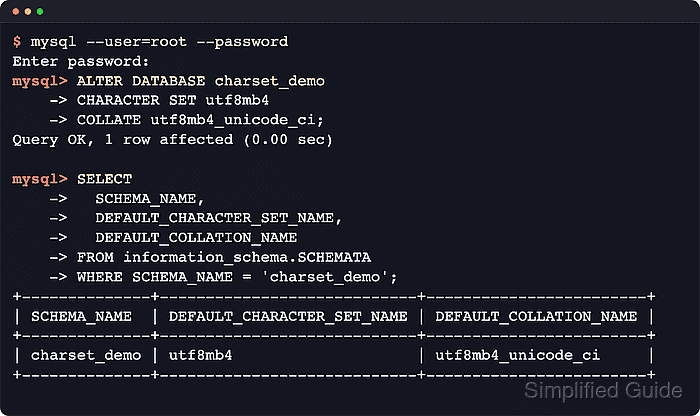
In MySQL and MariaDB, the database default sits between the server default and individual table or column settings. New tables inherit the database character set and collation unless their CREATE TABLE statement overrides them, so a single ALTER DATABASE can change what future schema objects use without rewriting existing data.
Current MySQL 8.x commonly reports utf8mb4_0900_ai_ci as the default utf8mb4 collation, while current MariaDB releases may report utf8mb4_uca1400_ai_ci. If you need one DDL path that works across both products, a shared collation such as utf8mb4_unicode_ci is safer than assuming the vendor default, and ALTER DATABASE still leaves existing tables, columns, and routines on their previous definitions until they are converted or recreated separately.
Steps to change database default character set and collation in MySQL or MariaDB:
- Connect to the MySQL or MariaDB client with an account that can alter the database.
$ mysql --user=root --password
Enter password:
mysql>
MariaDB also ships the compatible mariadb client, and many Debian or Ubuntu package installs allow sudo mysql for socket-authenticated administrative access.
- Confirm the database's current defaults before changing anything.
mysql> SHOW CREATE DATABASE charset_demo;
+--------------+------------------------------------------------------------------------------------------------------------+
| Database     | Create Database                                                                                            |
+--------------+------------------------------------------------------------------------------------------------------------+
| charset_demo | CREATE DATABASE `charset_demo` /*!40100 DEFAULT CHARACTER SET latin1 */ /*!80016 DEFAULT ENCRYPTION='N' */ |
+--------------+------------------------------------------------------------------------------------------------------------+
MariaDB commonly prints the explicit collation as well, for example COLLATE latin1_swedish_ci, while MySQL may omit it when the character set's default collation is implied.
- Check which utf8mb4 default the current server prefers before choosing a target collation.
mysql> SHOW CHARACTER SET LIKE 'utf8mb4';
+---------+---------------+-----------------------+--------+
| Charset | Description   | Default collation     | Maxlen |
+---------+---------------+-----------------------+--------+
| utf8mb4 | UTF-8 Unicode | utf8mb4_uca1400_ai_ci |      4 |
+---------+---------------+-----------------------+--------+
MySQL 8.x commonly shows utf8mb4_0900_ai_ci here, while current MariaDB releases can show utf8mb4_uca1400_ai_ci. Run SHOW COLLATION WHERE Charset='utf8mb4'; if you need the full product-specific list.
The utf8mb4_0900_ai_ci family is not portable to every MariaDB release. A shared collation such as utf8mb4_unicode_ci avoids that cross-product mismatch.
- Confirm the target collation is available on the current server.
mysql> SHOW COLLATION LIKE 'utf8mb4_unicode_ci';
+--------------------+---------+------+---------+----------+---------+
| Collation          | Charset | Id   | Default | Compiled | Sortlen |
+--------------------+---------+------+---------+----------+---------+
| utf8mb4_unicode_ci | utf8mb4 |  224 |         | Yes      |       8 |
+--------------------+---------+------+---------+----------+---------+
MySQL may include an extra Pad_attribute column in this output. A returned row is the important signal before using the collation in ALTER DATABASE.
- Change the database defaults with ALTER DATABASE.
mysql> ALTER DATABASE charset_demo
    -> CHARACTER SET utf8mb4
    -> COLLATE utf8mb4_unicode_ci;
Query OK, 1 row affected (0.00 sec)
Replace charset_demo and the collation values for the environment; an unsupported collation returns ERROR 1273 (HY000).
- Verify that the database now reports the new default character set and collation.
mysql> SELECT -> SCHEMA_NAME, -> DEFAULT_CHARACTER_SET_NAME, -> DEFAULT_COLLATION_NAME -> FROM information_schema.SCHEMATA -> WHERE SCHEMA_NAME = 'charset_demo'; +--------------+----------------------------+------------------------+ | SCHEMA_NAME | DEFAULT_CHARACTER_SET_NAME | DEFAULT_COLLATION_NAME | +--------------+----------------------------+------------------------+ | charset_demo | utf8mb4 | utf8mb4_unicode_ci | +--------------+----------------------------+------------------------+ - Compare table collations separately when the database contains tables created before and after the change.
mysql> SELECT
    ->   TABLE_NAME,
    ->   TABLE_COLLATION
    -> FROM information_schema.TABLES
    -> WHERE TABLE_SCHEMA = 'charset_demo'
    -> ORDER BY TABLE_NAME;
+--------------+--------------------+
| TABLE_NAME   | TABLE_COLLATION    |
+--------------+--------------------+
| legacy_users | latin1_swedish_ci  |
| new_users    | utf8mb4_unicode_ci |
+--------------+--------------------+
ALTER DATABASE changes defaults for future objects only. Existing tables and columns keep their current character set and collation until converted explicitly, for example: ALTER TABLE appdb.users CONVERT TO CHARACTER SET utf8mb4 COLLATE utf8mb4_unicode_ci;.
Stored routines created while the old database defaults were active can also retain those older definitions in metadata. Recreate them if their definition depends on the previous database character set or collation.