How to set a plot title in Matplotlib
Readers scan a chart's heading before they compare bars, lines, or points. Matplotlib attaches that heading to an Axes, so it stays with the plot when the figure is displayed or exported.

The object-oriented ax.set_title() method targets one plot area and returns a Text object. Its loc argument selects the left, center, or right title position, while fig.suptitle() is reserved for a heading that describes the entire figure.
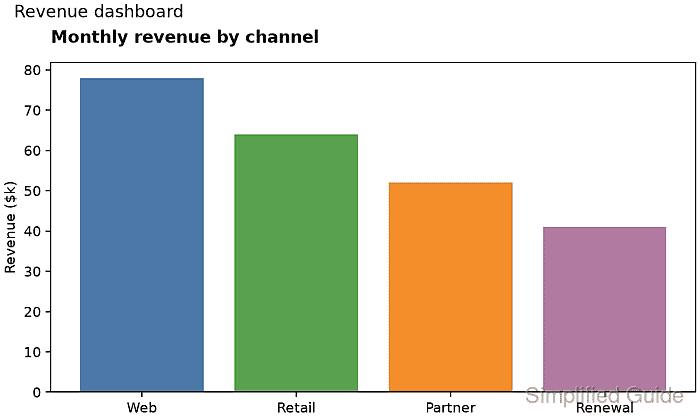
Constrained layout is enabled when the Figure is created so the title and axis label receive space before export. A saved PNG provides visible proof of the title's text, weight, and alignment without requiring an interactive plotting window.
Steps to set a Matplotlib plot title:
- Save the plotting foundation as set_plot_title.py.
- set_plot_title.py
from pathlib import Path

import matplotlib.pyplot as plt


channels = ["Web", "Retail", "Partner", "Renewal"]
revenue = [78, 64, 52, 41]

fig, ax = plt.subplots(figsize=(7, 4.2), layout="constrained")
ax.bar(channels, revenue, color=["#4C78A8", "#59A14F", "#F28E2B", "#B07AA1"])
ax.set_ylabel("Revenue ($k)")
layout=“constrained” reserves space for the Axes decorations when the figure is drawn and saved.
- Add the left-aligned Axes title immediately after the ax.set_ylabel() line.
title = ax.set_title(
    "Monthly revenue by channel",
    loc="left",
    pad=14,
    fontweight="bold",
)
loc accepts left, center, or right, and pad sets the distance above the Axes in points. The fig.suptitle() method applies one heading to an entire multi-Axes figure.
- Append the export and title-inspection block after the ax.set_title() call.
output = Path("monthly-revenue-title.png")
fig.savefig(output, dpi=160)
print(f"title: {ax.get_title(loc='left')}")
print(f"alignment: {title.get_ha()}")
print(f"saved: {output}")
print(f"bytes: {output.stat().st_size}")
plt.close(fig)
- Compare the completed set_plot_title.py with the assembled source.
- set_plot_title.py
from pathlib import Path

import matplotlib.pyplot as plt


channels = ["Web", "Retail", "Partner", "Renewal"]
revenue = [78, 64, 52, 41]

fig, ax = plt.subplots(figsize=(7, 4.2), layout="constrained")
ax.bar(channels, revenue, color=["#4C78A8", "#59A14F", "#F28E2B", "#B07AA1"])
ax.set_ylabel("Revenue ($k)")

title = ax.set_title(
    "Monthly revenue by channel",
    loc="left",
    pad=14,
    fontweight="bold",
)

output = Path("monthly-revenue-title.png")
fig.savefig(output, dpi=160)
print(f"title: {ax.get_title(loc='left')}")
print(f"alignment: {title.get_ha()}")
print(f"saved: {output}")
print(f"bytes: {output.stat().st_size}")
plt.close(fig)
- Run set_plot_title.py from the directory that should receive the image.
$ python3 set_plot_title.py
title: Monthly revenue by channel
alignment: left
saved: monthly-revenue-title.png
bytes: 28111
The byte count can vary with the Matplotlib release, fonts, backend, and DPI settings. The reported title and alignment come from the configured Axes.
- Open monthly-revenue-title.png to confirm the bold title aligns with the plot's left edge.