How to call the llama.cpp embeddings API
Embeddings turn text into numeric vectors that search, clustering, and retrieval pipelines can compare. A local llama.cpp server can produce those vectors through an OpenAI-compatible HTTP route when it is started with an embedding-capable GGUF model and a pooling mode other than none.
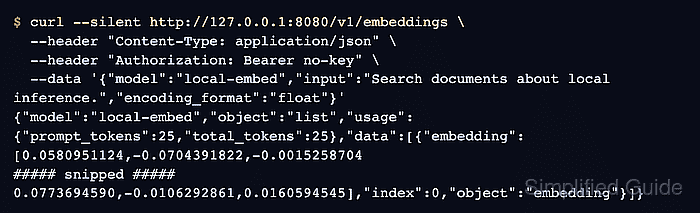
The request path is /v1/embeddings, and the JSON body carries the model alias, input text, and optional encoding_format value. Use the model ID reported by the server rather than a display name copied from a model card, because llama-server routes the request by that value.
Keep the embedding endpoint separate from chat and completion clients. A successful response contains a data array, an index for each input text, and an embedding array of floating-point numbers that downstream code can store or compare.
Steps to call the llama.cpp embeddings API:
- Start llama-server with an embedding-capable model and API alias.
$ llama-server -m ./models/embedding-model.gguf --embedding --pooling mean --alias local-embed
srv  load_model: loading model './models/embedding-model.gguf'
srv  llama_server: model loaded
srv  llama_server: listening on http://127.0.0.1:8080
Use the pooling mode recommended by the model publisher. The OpenAI-compatible embeddings route needs pooling other than none; --embedding keeps the server on the embedding use case.
Related: How to start the llama.cpp server
Related: How to load a model with the llama.cpp server router - Check server readiness.
$ curl --silent http://127.0.0.1:8080/health
{"status":"ok"}
A 503 response means the model is still loading or unavailable. Wait for ok before sending embedding requests.
Related: How to check llama.cpp server health - Confirm the model alias exposed by the OpenAI-compatible model list.
$ curl --silent http://127.0.0.1:8080/v1/models
{"object":"list","data":[{"id":"local-embed","object":"model","owned_by":"llamacpp","meta":{"n_embd":64}}]}
Use the returned id in the embeddings request. If the server was started without --alias, the model path or loaded model name may appear instead.
- Send a single text input to /v1/embeddings.
$ curl --silent http://127.0.0.1:8080/v1/embeddings \
  --header "Content-Type: application/json" \
  --header "Authorization: Bearer no-key" \
  --data '{"model":"local-embed","input":"Search documents about local inference.","encoding_format":"float"}'
{"model":"local-embed","object":"list","usage":{"prompt_tokens":25,"total_tokens":25},"data":[{"embedding":[0.0580951124,-0.0704391822,-0.0015258704
##### snipped #####
0.0773694590,-0.0106292861,0.0160594545],"index":0,"object":"embedding"}]}
llama-server does not require an authorization header unless it was started with --api-key or --api-key-file. Keep the header if an OpenAI-compatible client expects one, and replace no-key with the configured token when authentication is enabled.
- Send an input array when each source text needs its own vector.
$ curl --silent http://127.0.0.1:8080/v1/embeddings \
  --header "Content-Type: application/json" \
  --header "Authorization: Bearer no-key" \
  --data '{"model":"local-embed","input":["Search documents about local inference.","Rank passages for a local RAG query."],"encoding_format":"float"}'
{"model":"local-embed","object":"list","usage":{"prompt_tokens":53,"total_tokens":53},"data":[{"embedding":[0.0580951124,-0.0704391822
##### snipped #####
],"index":0,"object":"embedding"},{"embedding":[0.0748583749,-0.0548535287
##### snipped #####
],"index":1,"object":"embedding"}]}
The response order follows the submitted input order. Store or join vectors by index or by the caller's own document ID before inserting them into a search index or vector database.