How to run a llama.cpp benchmark
Local model performance depends on the model file, quantization, backend, batch size, thread count, and GPU offload available on the machine. llama.cpp includes llama-bench so those factors can be measured with the same inference engine used by llama-cli and llama-server.
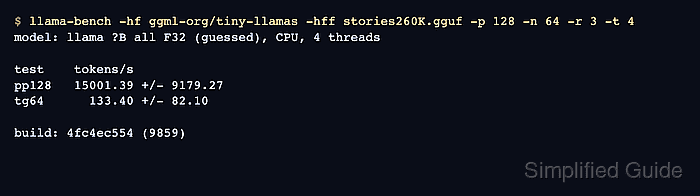
llama-bench runs prompt-processing tests, text-generation tests, or both. Prompt processing appears as names such as pp128 and measures how fast the model consumes an input prompt, while text generation appears as names such as tg64 and measures token output speed.
Use the same model, build, backend, and flags when comparing two runs. A tiny validation model proves the benchmark run, but hardware decisions should use the GGUF model and offload settings planned for the actual workload.
Steps to benchmark llama.cpp inference:
- Run a small llama-bench benchmark against a known GGUF model.
$ llama-bench -hf ggml-org/tiny-llamas -hff stories260K.gguf -p 128 -n 64 -r 3 -t 4
| model                          |       size |     params | backend    | threads |            test |                  t/s |
| ------------------------------ | ---------: | ---------: | ---------- | ------: | --------------: | -------------------: |
| llama ?B all F32 (guessed)     |   1.12 MiB |     0.29 M | CPU        |       4 |           pp128 |   15001.39 +/- 9179.27 |
| llama ?B all F32 (guessed)     |   1.12 MiB |     0.29 M | CPU        |       4 |            tg64 |       133.40 +/- 82.10 |

build: 4fc4ec554 (9859)
The -hf and -hff options load a GGUF file from Hugging Face. Use -m model.gguf when the model is already local.
- Identify the prompt-processing and text-generation rows.
pp128 is prompt processing for 128 prompt tokens. tg64 is text generation for 64 generated tokens. Higher t/s means more tokens per second only when the model, build, backend, and options match.
- Repeat the benchmark with one changed variable when comparing settings.
$ llama-bench -hf ggml-org/tiny-llamas -hff stories260K.gguf -p 128 -n 64 -r 3 -t 2,4
| model                          |       size |     params | backend    | threads |            test |                  t/s |
| ------------------------------ | ---------: | ---------: | ---------- | ------: | --------------: | -------------------: |
| llama ?B all F32 (guessed)     |   1.12 MiB |     0.29 M | CPU        |       2 |           pp128 |  26344.13 +/- 1022.38 |
| llama ?B all F32 (guessed)     |   1.12 MiB |     0.29 M | CPU        |       2 |            tg64 |    3083.56 +/- 217.01 |
| llama ?B all F32 (guessed)     |   1.12 MiB |     0.29 M | CPU        |       4 |           pp128 |  32480.11 +/- 2765.84 |
| llama ?B all F32 (guessed)     |   1.12 MiB |     0.29 M | CPU        |       4 |            tg64 |    2122.54 +/- 615.41 |

build: 4fc4ec554 (9859)
Comma-separated values ask llama-bench to run each selected value. Keep the model, prompt size, generation size, repetitions, and backend unchanged when the thread count is the only comparison.
- Save machine-readable output when results need to be archived or graphed.
$ llama-bench -hf ggml-org/tiny-llamas -hff stories260K.gguf -p 128 -n 64 -r 3 -t 4 -o csv > llama-bench.csv
Supported stdout formats include md, csv, json, jsonl, and sql. The default md table is easier to read in a terminal.
- Confirm that every tested setting has one pp128 row and one tg64 row.
Do not compare two benchmark runs if the model file, quantization, llama.cpp build, backend, prompt size, generation count, or GPU-offload setting changed unexpectedly.