How to check file and folder sizes in Linux
Unexpected growth in logs, backups, caches, or application uploads can fill a Linux mount point before the filesystem warning is obvious. Checking file and folder sizes with du shows which path is consuming space so the next action can target the right tree instead of the whole disk.
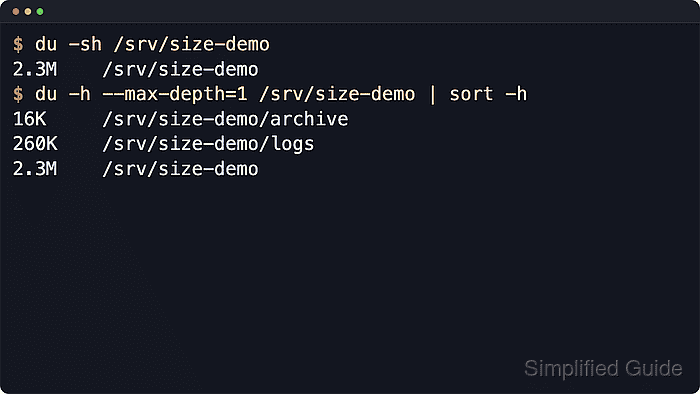
du walks the path you give it and reports allocated filesystem blocks. The -s option returns one total, --max-depth=1 limits output to immediate children, and -a includes regular files next to directories.
Allocated size can differ from apparent file length on sparse, compressed, deduplicated, or copy-on-write filesystems. GNU du is standard on most full Linux distributions and provides options such as --max-depth and --apparent-size. Protected paths may need sudo, and -x keeps a scan from crossing into another mounted filesystem.
Related: How to check disk space and usage in Linux
Related: How to free disk space on Linux
Steps to check file and folder sizes with du in Linux:
- Summarize one directory when only the total used space matters.
$ du -sh /srv/size-demo
2.3M	/srv/size-demo
-s shows one total for the path, and -h formats that total with units such as K, M, or G.
- List the target directory and its immediate child directories.
$ du -h --max-depth=1 /srv/size-demo
260K	/srv/size-demo/logs
16K	/srv/size-demo/archive
2.3M	/srv/size-demo
--max-depth=1 prints the starting path and direct child directories without expanding the full tree.
- Include files at the same depth when the large item may not be a directory.
$ du -ah --max-depth=1 /srv/size-demo
2.0M	/srv/size-demo/backup.img
260K	/srv/size-demo/logs
0	/srv/size-demo/sparse.img
4.0K	/srv/size-demo/tiny.txt
16K	/srv/size-demo/archive
2.3M	/srv/size-demo
-a adds regular files to the report instead of listing directories only.
Related: How to find the largest directories in Linux
Related: How to find the largest files in Linux - Check one specific file when the on-disk footprint matters.
$ du -h /srv/size-demo/backup.img
2.0M	/srv/size-demo/backup.img
Without -h, du prints 1024-byte block counts by default, which is easier for scripts to compare.
- Check allocated disk space for a sparse file.
$ du -h /srv/size-demo/sparse.img
0	/srv/size-demo/sparse.img
- Check apparent size when file length matters more than allocated blocks.
$ du -h --apparent-size /srv/size-demo/sparse.img
4.0G	/srv/size-demo/sparse.img
--apparent-size reports the logical file length. Sparse files can therefore look huge by apparent size while consuming little allocated space.
- Keep a system path scan on one filesystem when mount boundaries matter.
$ du -xh --max-depth=1 /var
252K	/var/log
4.0K	/var/mail
4.0K	/var/opt
4.0K	/var/local
4.0K	/var/backups
4.0K	/var/tmp
544K	/var/cache
4.0K	/var/spool
4.2M	/var/lib
5.0M	/var
-x skips directories that live on a different filesystem from the starting path.
- Add a grand total when several specific paths need one combined size.
$ du -sch /srv/size-demo/archive /srv/size-demo/logs /srv/size-demo/backup.img
16K	/srv/size-demo/archive
260K	/srv/size-demo/logs
2.0M	/srv/size-demo/backup.img
2.3M	total
-c prints a final total line after all supplied paths.