How to use an HTTPS proxy for Linux terminal applications
Some Linux terminals sit behind egress gateways where HTTPS requests must leave through an approved proxy, but proxy-aware command-line tools may still connect directly unless the shell provides a proxy setting. Exporting https_proxy in the current shell gives commands launched from that terminal one temporary route without changing global network settings.
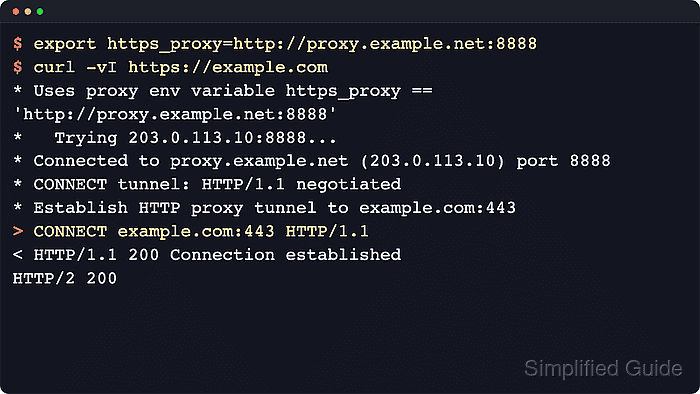
For an HTTPS destination, clients such as curl and wget read https_proxy to find the proxy endpoint. The proxy URL often still starts with http:// because the client speaks HTTP to the proxy first, asks for a CONNECT tunnel to the remote HTTPS server, and then runs TLS through that tunnel.
With a session-scoped export, the terminal can print the inherited values and prove the route with a curl tunnel check before other commands use it. Keep proxy credentials out of reusable shell history, use no_proxy only for approved direct destinations, and move the same exports to the Bash or Zsh startup guides only when future terminals should inherit the proxy automatically.
Steps to use an HTTPS proxy for Linux terminal applications:
- Choose the proxy URL for the current shell session.
Use http://proxy.example.net:8888 for a normal HTTP proxy. Use an https:// proxy URL only when the proxy listener itself expects TLS from clients.
- Export the HTTPS proxy for commands started from this shell.
$ export https_proxy="http://proxy.example.net:8888"
If proxy authentication is required, avoid placing reusable passwords in shell history, shared scripts, or startup files unless that exposure is allowed.
- Export a bypass list only for destinations that should stay direct.
$ export no_proxy="localhost,127.0.0.1,.example.internal"
Separate entries with commas. A leading dot is commonly used for domain-suffix bypasses, but exact no_proxy matching still depends on the client.
- Check the exported values before testing the route.
$ printenv https_proxy no_proxy
http://proxy.example.net:8888
localhost,127.0.0.1,.example.internal
No output means the current shell has not exported the variable.
- Verify an HTTPS request through the proxy with curl.
$ curl -q -sS -vI https://example.com
* Uses proxy env variable no_proxy == 'localhost,127.0.0.1,.example.internal'
* Uses proxy env variable https_proxy == 'http://proxy.example.net:8888'
* Establish HTTP proxy tunnel to example.com:443
> CONNECT example.com:443 HTTP/1.1
< HTTP/1.1 200 Connection established
* CONNECT tunnel established, response 200
##### snipped #####
* Established connection to proxy.example.net (198.51.100.10 port 8888)
* using HTTP/2
HTTP/2 200
content-type: text/html
server: cloudflare
##### snipped #####
Look for the https_proxy value, the CONNECT request, and the connection to the proxy host.
Related: Use proxy environment variables with cURL
Tool: Proxy Server Checker - Check another proxy-aware client when the workflow depends on more than curl.
$ wget -S --spider https://example.com/
Spider mode enabled. Check if remote file exists.
--2026-06-13 02:15:45--  https://example.com/
Resolving proxy.example.net (proxy.example.net)... 198.51.100.10
Connecting to proxy.example.net (proxy.example.net)|198.51.100.10|:8888... connected.
Proxy request sent, awaiting response...
  HTTP/1.1 200 OK
  Content-Type: text/html
  Server: cloudflare
##### snipped #####
Remote file exists and could contain further links,
but recursion is disabled -- not retrieving.
If a client still connects directly to the target host, check whether it ignores shell proxy variables, has a separate config file, or is being matched by no_proxy.
Related: Use an HTTP proxy with wget - Remove the session-scoped proxy variables when direct access should resume.
$ unset https_proxy no_proxy
Clear uppercase variants such as HTTPS_PROXY and NO_PROXY as well when an older shell or application still inherits them.
Related: How to unset an environment variable in Linux - Confirm that https_proxy is no longer exported from the current shell.
$ printenv https_proxy || echo "https_proxy is not exported"
https_proxy is not exported