How to configure user-defined variables in JMeter
Repeated constants in a JMeter test plan make samplers harder to review and harder to move between environments. A User Defined Variables config element gives a thread group an initial set of named values, so hostnames, paths, environment labels, and fixed IDs can be reused through ${name} references.
JMeter processes User Defined Variables elements when the test starts, before samplers and post-processors run. Place them near the start of the Thread Group or under the Test Plan, keep names distinct when multiple thread groups need different values, and use the values later in sampler, header, assertion, or processor fields.
Use this element for values that stay fixed for a run. Runtime data from extractors, counters, random functions, CSV rows, and post-processors belongs in the element that creates it, while run-level environment values can still be read through __P() property functions inside a UDV row.
Steps to configure JMeter user-defined variables:
- Open the .jmx test plan in the JMeter GUI.
- Select the Thread Group that should receive the fixed values.
Use the Test Plan level only when every thread group should receive the same initial values. If two thread groups need different values, use different variable names because UDV names are shared across thread groups.
- Add User Defined Variables from Add → Config Element → User Defined Variables.
- Name the element for the values it supplies.
Name: Checkout smoke variables
- Add one row for each fixed value.
Name          Value
target_host   api.example.net
api_path      /checkout
target_env    dev
JMeter processes UDV elements from top to bottom when the test starts. A variable can reference values from earlier UDV elements or the Test Plan, but not another row from the same UDV element.
- Keep per-sample functions out of UDV rows.
Functions such as __Random, __time, and counters save only their first generated value when placed in User Defined Variables. Put changing values in sampler fields, extractors, functions, CSV data, or pre/post-processors instead.
Related: How to use JMeter functions for dynamic values - Reference the variables in the sampler or config fields that should reuse them.
HTTP Request Server Name or IP: ${target_host}
Path: ${api_path}
Parameter name: env
Parameter value: ${target_env}
Use HTTP Request Defaults for shared protocol, host, port, and base path when several HTTP samplers should inherit the same target fields.
Related: How to configure HTTP Request Defaults in JMeter - Use a property function when the UDV value should be overridable at launch time.
target_host=${__P(target.host,api.example.net)}
target_env=${__P(target.env,dev)}
__P(name,default) reads a JMeter property and falls back to the default when the property was not supplied.
Related: How to override JMeter properties from the command line - Add a temporary JSR223 Sampler under the same Thread Group for the smoke test.
def host = vars.get('target_host')
def path = vars.get('api_path')
def env = vars.get('target_env')
def resolvedUrl = "https://${host}${path}?env=${env}"
def smokeOutput = "target_host=${host}\napi_path=${path}\ntarget_env=${env}\nresolved_url=${resolvedUrl}\n"

new File('udv-values.txt').text = smokeOutput

SampleResult.setSampleLabel("GET ${path}")
SampleResult.setResponseCode('200')
SampleResult.setResponseMessage('OK')
SampleResult.setDataType(org.apache.jmeter.samplers.SampleResult.TEXT)
SampleResult.setResponseData(smokeOutput, 'UTF-8')
SampleResult.setSuccessful(host == 'api.example.net' && path == '/checkout' && env == 'dev')
A Debug Sampler or application request log can replace this temporary sampler when it already shows the resolved variables clearly.
Related: How to add a Debug Sampler in JMeter - Save the validation copy of the test plan.
user-defined-variables-configure.jmx
- Run the validation plan in non-GUI mode with temporary result columns for the UDV names.
$ jmeter -n -t user-defined-variables-configure.jmx -Jsample_variables=target_host,api_path,target_env -l udv-results.jtl -j jmeter.log
Creating summariser <summary>
Created the tree successfully using user-defined-variables-configure.jmx
Starting standalone test @ 2026 Jun 30 21:58:57 GMT
Waiting for possible Shutdown/StopTestNow/HeapDump/ThreadDump message on port 4445
summary =      1 in 00:00:00 =    2.5/s Avg:   372 Min:   372 Max:   372 Err:     0 (0.00%)
Tidying up ...
... end of run
-n runs JMeter without the GUI, -t selects the saved plan, -l writes sampler results, and -j writes the run log. sample_variables adds the listed variables as extra .jtl columns for the validation run.
Related: How to run a JMeter test from the command line
Related: How to configure JMeter JTL result columns - Check the process exit status.
$ echo $?
0
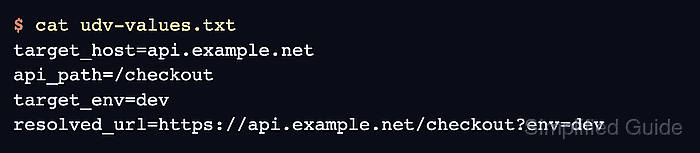
- Check the temporary smoke output for resolved values.
$ cat udv-values.txt
target_host=api.example.net
api_path=/checkout
target_env=dev
resolved_url=https://api.example.net/checkout?env=dev
- Inspect the result file for the same UDV values.
$ cat udv-results.jtl
timeStamp,elapsed,label,responseCode,responseMessage,threadName,dataType,success,failureMessage,bytes,sentBytes,grpThreads,allThreads,URL,Latency,IdleTime,Connect,"target_host","api_path","target_env"
1782856737202,372,GET /checkout,200,OK,UDV smoke users 1-1,text,true,,116,0,1,1,null,0,0,0,api.example.net,/checkout,dev
The extra columns confirm that target_host, api_path, and target_env were available to the thread when the sampler ran.
- Remove the temporary smoke sampler and validation-only result columns before the load run.
Keep the User Defined Variables element and normal sampler references. Remove the temporary JSR223 Sampler and drop sample_variables unless the production result format intentionally includes those columns.