How to extract values with a regular expression in JMeter
Dynamic web responses sometimes place request values in text that is not clean JSON, XML, or selector-friendly HTML. The JMeter Regular Expression Extractor captures a matched group after a sampler runs, so a later sampler can reuse a token, ID, header value, or short text fragment from the same virtual user flow.
The extractor is a post-processor and should sit directly under the sampler that receives the target response. Its Regular Expression field finds the text, Template chooses the capture group to store, Match No. chooses which occurrence to use, and Default Value makes a missed match visible while the plan is still small.
Use a structured extractor first when the response format supports one. A regular expression is useful for mixed text, headers, legacy markup, or a narrow string that is awkward to parse another way, but a one-user debug run should prove the captured variable before any thread count, loop count, or duration is increased.
Steps to extract values with a JMeter Regular Expression Extractor:
- Open a validation copy of the .jmx test plan in the JMeter GUI.
- Set the target Thread Group to one thread and one loop.
Number of Threads (users): 1
Loop Count: 1
- Select the sampler that receives the response containing the target value.
- Add the extractor under that sampler from Add → Post Processors → Regular Expression Extractor.
- Name the extractor for the value it captures.
Name: Extract checkout CSRF token
- Keep Apply to set to Main sample only for a normal HTTP response.
- Set Field to check to Body.
Use Response Headers for header values, Request Headers for generated request headers, or Body (unescaped) only when HTML entities must be decoded before matching. Body (unescaped) and Body as a Document add extra processing work.
- Set Name of created variable to csrf_token.
- Enter the regular expression that captures only the value needed by the later sampler.
Regular Expression: name="csrf"\s+value="([^"]+)"
The pattern needs a capture group when the template uses $1$. Do not wrap the expression in slash delimiters unless the response text literally contains those slash characters.
- Set Template to $1$.
$1$ stores the first parenthesized group. Use $0$ only when the whole match should become the variable value.
- Set Match No. to 1.
Use 0 only when a random matching occurrence is acceptable. Use a negative value only when a ForEach Controller will process all matches through numbered variables.
- Set Default Value to TOKEN_NOT_FOUND.
- Leave Use empty default value disabled while debugging.
A visible default separates a missed match from an intentionally blank optional value.
- Use the extracted variable in the later sampler that submits or reuses the value.
Name: csrf Value: ${csrf_token} - Add a temporary Debug Sampler after the extractor and enable JMeter variables.
Place the Debug Sampler before the downstream sampler when the variable should be visible before reuse.
Related: How to add a Debug Sampler in JMeter - Save the validation copy of the test plan.
regex-extractor-demo.jmx
- Run a one-user non-GUI smoke test.
$ jmeter -n -t regex-extractor-demo.jmx -l regex-extractor-results.jtl -j jmeter.log
Creating summariser <summary>
Created the tree successfully using regex-extractor-demo.jmx
Starting standalone test @ 2026 Jun 30 07:39:29 GMT
Waiting for possible Shutdown/StopTestNow/HeapDump/ThreadDump message on port 4445
summary =      3 in 00:00:01 =    3.9/s Avg:   243 Min:     1 Max:   641 Err:     0 (0.00%)
Tidying up ...
... end of run
- Check the result file for successful response, debug, and downstream samplers.
$ cat regex-extractor-results.jtl
timeStamp,elapsed,label,responseCode,responseMessage,threadName,dataType,success,failureMessage,bytes,sentBytes,grpThreads,allThreads,URL,Latency,IdleTime,Connect
1782805170433,641,GET checkout form,200,OK,Checkout correlation user 1-1,text,true,,146,0,1,1,null,0,0,0
1782805171086,1,Debug checkout variables,200,OK,Checkout correlation user 1-1,text,true,,380,0,1,1,null,0,0,0
1782805171087,87,POST checkout confirmation,200,OK,Checkout correlation user 1-1,text,true,,26,0,1,1,null,0,0,0
- Check the debug output, application log, or request capture for the captured group and reused value.
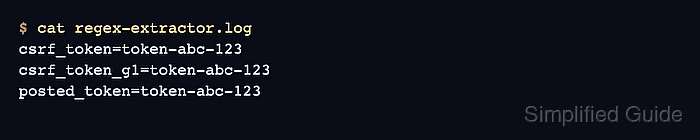
$ cat regex-extractor.log
csrf_token=token-abc-123
csrf_token_g1=token-abc-123
posted_token=token-abc-123
The created variable, first capture group, and downstream value should match. If the value is TOKEN_NOT_FOUND, inspect the response body, regular expression, template, and match number before increasing load.
- Disable or delete temporary debug elements before preparing the load run.
Keep the Regular Expression Extractor and downstream variable reference, but remove temporary Debug Sampler and View Results Tree elements after the one-user validation passes.
Related: How to disable heavy JMeter listeners before a load test