How to create a JMS test plan in JMeter
JMS tests in JMeter depend on the broker client libraries, the JNDI connection settings, and a destination name that the broker can resolve. A small queue plan that publishes one message and reads it back proves those moving parts before the same sampler path is used for a larger asynchronous workload.
JMeter provides JMS Publisher and JMS Subscriber samplers, but it does not include a JMS provider implementation jar. The broker vendor's client jars must be on the JMeter classpath before the GUI or CLI runner can create connections.
A one-thread plan with one text message, one queue, and one response assertion is enough for the first run. A successful .jtl file should contain a passed publisher row and a passed subscriber row, which means JMeter sent the message, received it from the queue, and checked the payload.
Steps to create a JMeter JMS test plan:
- Add the JMS provider client jar to JMeter before opening the plan.
Provider jar: activemq-all-5.18.6.jar
JMeter library path: $JMETER_HOME/lib/activemq-all-5.18.6.jar
Use the client jars that match the target broker. JMeter must be restarted after new jars are placed in $JMETER_HOME/lib so the sampler classpath includes them.
Related: How to check the Java runtime for JMeter - Choose the broker and destination values for the first queue smoke test.
JNDI Initial Context Factory: org.apache.activemq.jndi.ActiveMQInitialContextFactory
Provider URL: vm:(broker:(vm://localhost)?persistent=false)
Connection Factory: ConnectionFactory
Destination: dynamicQueues/orders.loadtest
Those ActiveMQ values create a disposable in-JVM broker for a local smoke run. For a shared broker, replace Provider URL with the broker endpoint, such as tcp://broker.example.net:61616, and use the destination naming pattern from that broker.
- Open the test plan in the JMeter GUI.
- Add a Thread Group for the queue smoke test.
Name: JMS smoke users
Number of Threads: 1
Ramp-up period: 1
Loop Count: 1
Action to be taken after a Sampler error: Stop Thread
Keep the first JMS run to one thread and one loop so connection, destination, and payload errors appear before load is added.
Related: How to configure a thread group in JMeter - Add a JMS Publisher sampler under the Thread Group.
Menu path: Add -> Sampler -> JMS Publisher
Name: Publish order event
- Set the publisher connection fields.
use JNDI properties file: unchecked
JNDI Initial Context Factory: org.apache.activemq.jndi.ActiveMQInitialContextFactory
Provider URL: vm:(broker:(vm://localhost)?persistent=false)
Connection Factory: ConnectionFactory
Destination: dynamicQueues/orders.loadtest
Setup: At startup
Authentication: Not required
Do not save real broker passwords directly in a .jmx file. JMeter stores sampler passwords unencrypted, so pass credentials through properties when the broker requires authentication.
Related: How to override JMeter properties from the command line - Set the publisher message fields.
Number of samples to aggregate: 1 Message source: Text area Message type: Text Message Text area: {"orderId":"SG-1001","event":"created"} Priority: 4 Use non-persistent delivery mode?: checked - Add a JMS Subscriber sampler after the publisher in the same Thread Group.
Menu path: Add -> Sampler -> JMS Subscriber
Name: Read order event
- Set the subscriber connection fields to the same queue.
use JNDI properties file: unchecked
JNDI Initial Context Factory: org.apache.activemq.jndi.ActiveMQInitialContextFactory
Provider URL: vm:(broker:(vm://localhost)?persistent=false)
Connection Factory: ConnectionFactory
Destination: dynamicQueues/orders.loadtest
Setup: At startup
Authentication: Not required
The destination must match the publisher destination exactly. For queue smoke tests, use MessageConsumer.receive() so the sampler reads only when the step runs.
- Set the subscriber receive fields.
Number of samples to aggregate: 1
Save response: checked
Timeout: 5000
Client: MessageConsumer.receive()
- Add a Response Assertion under the JMS Subscriber sampler.
Name: Assert JMS payload
Field to Test: Text Response
Pattern Matching Rules: Contains
Patterns to Test: SG-1001
The assertion turns a missing or wrong message body into a failed subscriber row instead of only proving that a message was received.
- Save the test plan.
jms-smoke.jmx
- Run the saved JMS test plan in CLI mode.
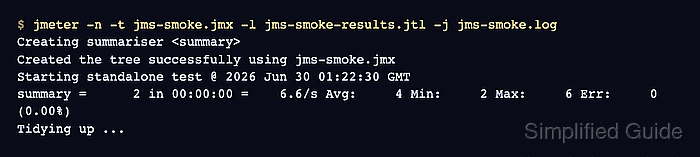
$ jmeter -n -t jms-smoke.jmx -l jms-smoke-results.jtl -j jms-smoke.log
Creating summariser <summary>
Created the tree successfully using jms-smoke.jmx
Starting standalone test @ 2026 Jun 30 01:22:30 GMT
Waiting for possible Shutdown/StopTestNow/HeapDump/ThreadDump message on port 4445
summary =      2 in 00:00:00 =    6.6/s Avg:     4 Min:     2 Max:     6 Err:     0 (0.00%)
Tidying up ...
... end of run
-n runs the saved plan without the GUI, -t selects the .jmx file, -l writes sample results, and -j writes the run log.
Related: How to run a JMeter test from the command line - Check the .jtl result file for successful publisher and subscriber rows.
$ cat jms-smoke-results.jtl
timeStamp,elapsed,label,responseCode,responseMessage,threadName,dataType,success,failureMessage,bytes,sentBytes,grpThreads,allThreads,URL,Latency,IdleTime,Connect
1782782550339,2,Publish order event,200,1 messages published,JMS smoke users 1-1,,true,,0,0,1,1,null,0,0,0
1782782550343,6,Read order event,200,1 message(s) received successfully of 1 expected,JMS smoke users 1-1,text,true,,39,0,1,1,null,0,0,0
The success column should show true for both rows. A bad provider URL, missing client jar, wrong destination name, timeout, or failed response assertion changes the affected row to false and writes details to the run log.