How to add a JDBC driver to JMeter
JMeter JDBC samplers use database vendor drivers through the Java classpath, not through the operating system package path. Adding the right driver jar lets a test plan open the same kind of database connection that the application uses, and it removes missing-driver errors before query timing or SQL logic is evaluated.
JMeter loads ordinary support jars from the lib directory under the JMeter home directory, or from paths named in user.classpath. JDBC drivers belong in that classpath layer rather than lib/ext, which is reserved for JMeter components and plugin classes.
The H2 JDBC driver works as a compact smoke-test target because it can open an in-memory database without a separate server. For a real database, use the vendor's driver jar, driver class, database URL, and credentials instead of the H2 sample values.
Steps to add a JDBC driver to JMeter:
- Confirm the database driver jar, driver class, and JDBC URL format from the database vendor.
Jar file: h2.jar
JDBC driver class: org.h2.Driver
JDBC URL: jdbc:h2:mem:jmeter_driver_check;DB_CLOSE_DELAY=-1
The driver class and URL must match the same database family. A driver jar can be present while the sampler still fails if the class name or URL prefix belongs to another vendor.
- Stop any running JMeter GUI, CLI, or server process that should use the new driver.
JMeter builds its classpath at startup, so an already-open GUI session or background server will not see a newly copied jar until it is restarted.
- Copy the driver jar into the JMeter lib directory.
$ cp h2.jar "$JMETER_HOME/lib/"
If JMETER_HOME is not set, replace it with the directory that contains JMeter's bin and lib directories, such as /opt/apache-jmeter-5.6.3. Use the actual .jar file; JMeter does not load JDBC drivers from shell CLASSPATH, and JDBC support jars do not belong in lib/ext.
- Start JMeter again from the same installation.
For a non-GUI run, the next jmeter -n command starts a fresh process. For the GUI, reopen the application before testing the JDBC element.
- Set the JDBC Connection Configuration fields for the driver.
Variable Name for created pool: sampledb
Database URL: jdbc:h2:mem:jmeter_driver_check;DB_CLOSE_DELAY=-1
JDBC Driver class: org.h2.Driver
Username: sa
Password: (blank)
Validation Query: select 1
JMeter stores JDBC usernames and passwords in the .jmx test plan. Use test credentials or a protected secret injection pattern for shared plans.
- Point the JDBC Request sampler at the same connection pool.
Variable Name of Pool declared in JDBC Connection Configuration: sampledb
Query Type: Select Statement
Query: SELECT 1 AS DRIVER_LOADED
Variable Names: driver_loaded
The pool name on the sampler must match the Variable Name for created pool in JDBC Connection Configuration.
Related: How to create a JDBC test plan in JMeter - Run a one-thread non-GUI smoke test.
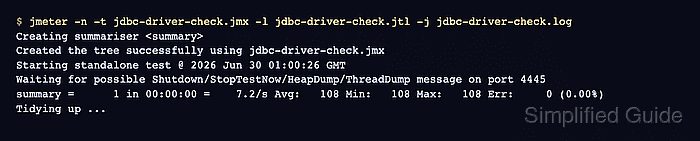
$ jmeter -n -t jdbc-driver-check.jmx -l jdbc-driver-check.jtl -j jdbc-driver-check.log
Creating summariser <summary>
Created the tree successfully using jdbc-driver-check.jmx
Starting standalone test @ 2026 Jun 30 01:00:26 GMT
Waiting for possible Shutdown/StopTestNow/HeapDump/ThreadDump message on port 4445
summary =      1 in 00:00:00 =    7.2/s Avg:   108 Min:   108 Max:   108 Err:     0 (0.00%)
Tidying up ...
... end of run
A missing driver run reports Cannot load JDBC driver class 'org.h2.Driver' or ClassNotFoundException: org.h2.Driver and records an error sample. After the jar is on the JMeter classpath, the same sampler should finish with Err: 0.
Related: How to run a JMeter test from the command line - Check the result file for a successful JDBC sampler row.
$ cat jdbc-driver-check.jtl
timeStamp,elapsed,label,responseCode,responseMessage,threadName,dataType,success,failureMessage,bytes,sentBytes,grpThreads,allThreads,URL,Latency,IdleTime,Connect
1782781227043,108,Run JDBC query,200,OK,Thread Group 1-1,text,true,,16,0,1,1,null,105,0,104
- Remove one-off smoke-test result files after the driver is proven.
$ rm jdbc-driver-check.jtl jdbc-driver-check.log