How to load JavaScript with defer
Browser scripts that initialize menus, buttons, forms, or page widgets often need the HTML to exist before they run. The defer attribute lets an external script file download while parsing continues, then runs that file after the document has been parsed and before DOMContentLoaded fires.
Deferred classic scripts keep their order in the HTML, so a dependency can appear before the file that uses it. That makes defer a good fit for application code that depends on the DOM or on another script but should not block the parser while the file is fetched.
Use defer only on external classic scripts loaded with src. Inline scripts ignore it, module scripts already defer by default, and async wins if both attributes appear on the same classic script tag.
Steps to load an external JavaScript file with defer:
- Pick an external classic script that can wait until the HTML is parsed.
Use async instead when the script is independent and can run whenever the file finishes downloading.
- Create the HTML page with the deferred script in the document head.
- index.html
<!doctype html>
<html lang="en">
  <head>
    <meta charset="utf-8">
    <title>Defer script demo</title>
    <script defer src="app.js"></script>
  </head>
  <body>
    <main>
      <h1>Defer script demo</h1>
      <p id="dom-status">Waiting for deferred script...</p>
      <p id="ready-status">Waiting for deferred script...</p>
      <p id="timing-status">Waiting for DOMContentLoaded...</p>
      <button id="target" type="button" disabled>Deferred button ready</button>
    </main>
  </body>
</html>
defer has an effect only when the script tag has a src attribute. Add multiple deferred scripts in the order they should run.
- Create the deferred script that reads the parsed DOM and records the timing.
- app.js
const target = document.querySelector("#target");
const domStatus = document.querySelector("#dom-status");
const readyStatus = document.querySelector("#ready-status");
const timingStatus = document.querySelector("#timing-status");

window.deferDemo = {
  ranBeforeDOMContentLoaded: false,
};

if (target && domStatus) {
  target.disabled = false;
  domStatus.textContent = "Deferred script found #target";
  console.log("defer script: target present");
}

if (readyStatus) {
  readyStatus.textContent = document.readyState;
  console.log(`defer script: document.readyState=${document.readyState}`);
}

window.deferDemo.ranBeforeDOMContentLoaded = true;

document.addEventListener("DOMContentLoaded", () => {
  const alreadyRan = window.deferDemo.ranBeforeDOMContentLoaded ? "yes" : "no";

  if (timingStatus) {
    timingStatus.textContent = `DOMContentLoaded saw deferred script first: ${alreadyRan}`;
  }

  console.log(`DOMContentLoaded: deferred script ran first: ${alreadyRan}`);
});
The script can query #target even though the tag is in the document head because deferred execution waits until parsing has finished.
- Serve the files through a local HTTP server.
$ python3 -m http.server 8000
Serving HTTP on :: port 8000 (http://[::]:8000/) ...
A file:// URL does not match normal browser loading, request timing, or security behavior. Use HTTP for script-loading checks.
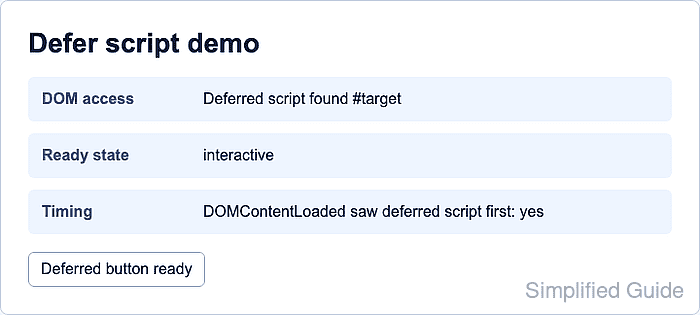
- Open the page through the local server and confirm the deferred script updated the page.
http://localhost:8000/

DOM access    Deferred script found #target
Ready state   interactive
Timing        DOMContentLoaded saw deferred script first: yes
- Check the browser console for the deferred script messages.
defer script: target present
defer script: document.readyState=interactive
DOMContentLoaded: deferred script ran first: yes
- Stop the local HTTP server after verification.
Press Ctrl+C in the terminal that is running python3 -m http.server.