How to delegate events for dynamic elements in JavaScript
Interactive lists, tables, and menus often create child controls after the first page load. Event delegation keeps one listener on a stable parent element so those later child controls can still run the same JavaScript behavior.
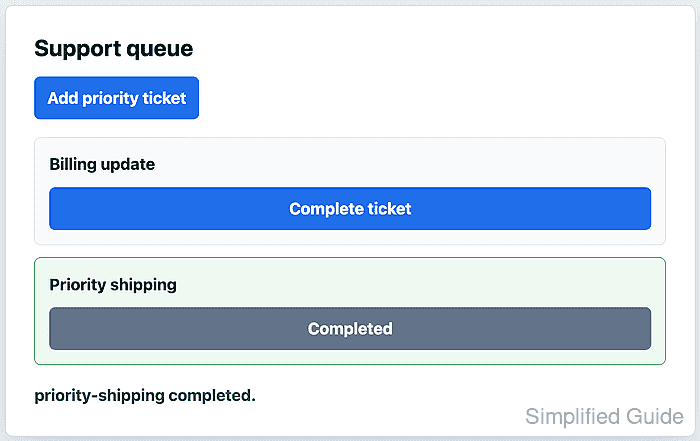
Click events bubble from the innermost clicked element toward its ancestors, so a parent listener can inspect event.target and decide whether the click came from a matching child control. Element.closest() is useful when the user clicks text or an icon inside a button, because it walks back up to the button that carries the action attribute.
The parent handler should reject clicks that do not belong to the delegated control and should keep dynamic insertion separate from action handling. That makes the listener safe for nested markup and confirms that newly inserted elements work without registering another listener for each new child.
Steps to delegate JavaScript events for dynamic elements:
- Add a stable list container, one starter item, an add button, and a status message.
- index.html
<div class="actions">
  <button id="add-ticket" type="button">Add priority ticket</button>
</div>

<ul id="ticket-list" class="ticket-list" aria-label="Support tickets">
  <li class="ticket" data-ticket-id="billing-update">
    <p class="ticket__title">Billing update</p>
    <button data-action="complete" type="button">
      <span>Complete ticket</span>
    </button>
  </li>
</ul>

<p id="ticket-status" role="status">No tickets completed yet.</p>
The id on the parent list gives the listener a stable attachment point. The data-action and data-ticket-id attributes give the handler behavior and item selectors that are separate from visual class names.
- Add the visible default and completed states.
- styles.css
.ticket-list {
  display: grid;
  gap: 0.85rem;
  padding: 0;
  list-style: none;
}

.ticket {
  display: grid;
  gap: 0.75rem;
  padding: 1rem;
  border: 1px solid #d8dee8;
  background: #f8fafc;
}

.ticket--complete {
  border-color: #16833a;
  background: #eefaf1;
}
- Select the parent list, add button, and status message in JavaScript.
- tickets.js
const ticketList = document.querySelector("#ticket-list");
const addTicketButton = document.querySelector("#add-ticket");
const status = document.querySelector("#ticket-status");

if (!ticketList || !addTicketButton || !status) {
  throw new Error("Ticket queue markup is missing.");
}
Guard the required elements before adding listeners so selector or markup drift fails at startup instead of inside a later click handler.
Related: Select DOM elements with JavaScript - Attach one click listener to the parent list.
- tickets.js
ticketList.addEventListener("click", (event) => {
  const completeButton =
    event.target instanceof Element
      ? event.target.closest("[data-action='complete']")
      : null;

  if (!completeButton || !ticketList.contains(completeButton)) {
    return;
  }

  const ticket = completeButton.closest("[data-ticket-id]");

  if (!ticket) {
    return;
  }

  ticket.classList.add("ticket--complete");
  completeButton.disabled = true;
  completeButton.textContent = "Completed";
  status.textContent = `${ticket.dataset.ticketId} completed.`;
});
event.target may be the nested span inside the button. closest() finds the button that owns the delegated action, and contains() keeps the handler scoped to the parent list.
Related: Add a JavaScript event listener - Insert the dynamic ticket from the add button.
- tickets.js
addTicketButton.addEventListener("click", () => {
  if (document.querySelector("[data-ticket-id='priority-shipping']")) {
    return;
  }

  ticketList.insertAdjacentHTML(
    "beforeend",
    `<li class="ticket" data-ticket-id="priority-shipping">
      <p class="ticket__title">Priority shipping</p>
      <button data-action="complete" type="button">
        <span>Complete ticket</span>
      </button>
    </li>`,
  );

  status.textContent = "priority-shipping added.";
});
The new button is added after the parent listener already exists. No extra listener is registered for the inserted li or its button.
- Load the stylesheet and deferred script from the page.
- index.html
<link rel="stylesheet" href="styles.css">
<script src="tickets.js" defer></script>
defer lets the browser parse the list and buttons before tickets.js runs its selectors.
Related: Load JavaScript with defer - Open the page in a browser and click Add priority ticket.
- Click Complete ticket inside the new Priority shipping item.
- Confirm that the dynamically inserted ticket handled the click.
> document.querySelector("[data-ticket-id='priority-shipping']") !== null
true
> document.querySelector("[data-ticket-id='priority-shipping']").classList.contains("ticket--complete")
true
> document.querySelector("#ticket-status").textContent
"priority-shipping completed."