How to block a port with iptables
Blocking a port with iptables is useful when a service must keep running locally but stop accepting new inbound connections. The rule has to match packets before any broader allow rule reaches ACCEPT, otherwise a valid DROP rule can sit in the chain without changing traffic.
The default filter table sends packets addressed to the host through the INPUT chain. A TCP port block matches -p tcp with --dport and jumps to DROP, which ends traversal silently. Use REJECT only when clients should receive an immediate error instead of waiting for a timeout.
Runtime iptables changes disappear unless the host restores them at boot. Check the active backend, test the blocked port from a separate client, repeat the equivalent rule with ip6tables when the service accepts IPv6, and use counters before saving the ruleset permanently.
Related: Block an IP address with iptables
Related: Set a default iptables chain policy
Tool: iptables Rule Generator
Steps to block an inbound port with iptables:
- Print the active iptables backend.
$ iptables --version
iptables v1.8.11 (nf_tables)
(nf_tables) means the command uses the nftables compatibility backend. (legacy) means it uses the older xtables backend.
- List the current INPUT chain before inserting the block rule.
$ sudo iptables --list INPUT --line-numbers --numeric --verbose
Chain INPUT (policy ACCEPT 0 packets, 0 bytes)
num   pkts bytes target     prot opt in     out     source               destination
Use FORWARD instead of INPUT when the host routes traffic to another system. Related: How to list iptables rules with counters
- Insert the TCP port block at the top of the INPUT chain.
$ sudo iptables -I INPUT 1 -p tcp --dport 8080 -j DROP
Replace 8080 with the service port to block. Use the matching management or console access path before changing firewall rules on a remote host.
For UDP, use -p udp with the same --dport value and verify with the service client or counters because UDP has no TCP connection handshake.
- Check that the exact block rule exists.
$ sudo iptables -C INPUT -p tcp --dport 8080 -j DROP
No output means the exact rule is present. A nonzero exit means the current chain does not contain that rule specification.
- Confirm the block rule appears before broader allow rules.
$ sudo iptables -S INPUT
-P INPUT ACCEPT
-A INPUT -p tcp -m tcp --dport 8080 -j DROP
iptables may display the implicit TCP match as -m tcp after the rule is inserted.
- Test the blocked port from a separate client or monitoring host.
$ nc -vz -w 2 server.example.com 8080
nc: connect to server.example.com port 8080 (tcp) timed out: Operation now in progress
A silent timeout is expected with DROP. Use REJECT with --reject-with tcp-reset only when TCP clients should receive an immediate reset.
- Test a port that should remain reachable.
$ nc -vz -w 2 server.example.com 8081
Connection to server.example.com 8081 port [tcp/tproxy] succeeded!
If the unaffected test also fails, review the chain, rule order, target port, service health, and any upstream firewall before saving the change.
- List the INPUT counters after the blocked connection attempt.
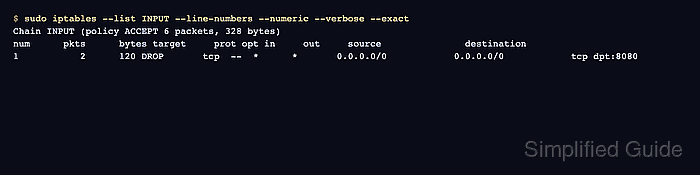
$ sudo iptables --list INPUT --line-numbers --numeric --verbose --exact
Chain INPUT (policy ACCEPT 6 packets, 328 bytes)
num      pkts      bytes target     prot opt in     out     source               destination
1           2      120 DROP       tcp  --  *      *       0.0.0.0/0            0.0.0.0/0            tcp dpt:8080
The pkts and bytes counters on the DROP rule increase when packets hit the blocked port.
- Keep the rollback command ready until the block is confirmed.
$ sudo iptables -D INPUT -p tcp --dport 8080 -j DROP
Deleting by exact match is safer than deleting by line number after other rules have been inserted or removed. Related: How to delete an iptables rule
- Save the tested ruleset when the block should survive reboot.
$ sudo netfilter-persistent save
run-parts: executing /usr/share/netfilter-persistent/plugins.d/15-ip4tables save
run-parts: executing /usr/share/netfilter-persistent/plugins.d/25-ip6tables save
Debian and Ubuntu use netfilter-persistent when iptables-persistent is installed. Use the firewall manager that owns policy on the host. Related: How to save iptables rules permanently