How to allow a port with iptables
Opening a service port with direct iptables rules is only safe when the new ACCEPT rule sits on the path that receives the packets and comes before anything that would drop them. A rule appended below a blocking rule can look correct in a saved ruleset while clients still time out.
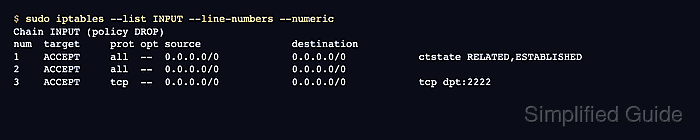
The filter table's INPUT chain handles packets addressed to services on the local host. The example allows a TCP service on port 2222 by inserting a rule after existing loopback and established-connection rules, then proving the change with a connection from another host and the rule's packet counter.
IPv6 traffic needs an equivalent rule through ip6tables when the host accepts IPv6. UDP services need a udp match instead of tcp, plus verification with the application's own client or logs, because a basic UDP port probe does not prove that a service accepted a request.
Steps to allow a port with iptables:
- Confirm that the service is listening on the port before changing firewall rules.
$ ss --listening --tcp --numeric sport = :2222
State  Recv-Q Send-Q Local Address:Port Peer Address:Port
LISTEN 0      1            0.0.0.0:2222      0.0.0.0:*
A firewall allow rule cannot make a closed socket answer. Fix the service bind address or listener before opening the port.
- List the current INPUT chain with line numbers and counters.
$ sudo iptables --list INPUT --line-numbers --numeric --verbose
Chain INPUT (policy DROP 0 packets, 0 bytes)
num   pkts bytes target     prot opt in     out     source               destination
1        0     0 ACCEPT     all  --  *      *       0.0.0.0/0            0.0.0.0/0            ctstate RELATED,ESTABLISHED
2        0     0 ACCEPT     all  --  lo     *       0.0.0.0/0            0.0.0.0/0
The example chain already drops unmatched inbound packets through its policy. If the chain has an explicit DROP or REJECT rule, insert the allow rule before that rule's line number.
- Check whether the exact TCP allow rule already exists.
$ sudo iptables --check INPUT --protocol tcp --match tcp --destination-port 2222 --jump ACCEPT
iptables: Bad rule (does a matching rule exist in that chain?).
No output with exit status 0 means the rule already exists. The error above means the rule still needs to be inserted.
- Insert the TCP allow rule at the selected line number.
$ sudo iptables --insert INPUT 3 --protocol tcp --match tcp --destination-port 2222 --jump ACCEPT
Replace 2222 with the real service port. Limit the rule with --source, --in-interface, or a more specific chain when the service should not be reachable from every network path.
For a UDP service, use udp for both protocol fields and the UDP port number, such as --protocol udp --match udp --destination-port 1194. Do not add both TCP and UDP rules unless the application actually uses both protocols.
- Confirm that the allow rule appears before a broad blocking rule or before the end of a default-deny chain.
$ sudo iptables --list INPUT --line-numbers --numeric
Chain INPUT (policy DROP)
num  target     prot opt source               destination
1    ACCEPT     all  --  0.0.0.0/0            0.0.0.0/0            ctstate RELATED,ESTABLISHED
2    ACCEPT     all  --  0.0.0.0/0            0.0.0.0/0
3    ACCEPT     tcp  --  0.0.0.0/0            0.0.0.0/0            tcp dpt:2222
- Test the port from another host on the expected network path.
$ nc -vz -w 2 server.example.net 2222
Connection to server.example.net 2222 port [tcp/*] succeeded!
A local loopback test proves only that the service is listening. A separate client proves the packet crossed the inbound interface and rule chain that should accept the service.
- Check exact counters after the connection test.
$ sudo iptables --list INPUT --line-numbers --numeric --verbose --exact
Chain INPUT (policy DROP 0 packets, 0 bytes)
num      pkts      bytes target     prot opt in     out     source               destination
1           3      144 ACCEPT     all  --  *      *       0.0.0.0/0            0.0.0.0/0            ctstate RELATED,ESTABLISHED
2           0        0 ACCEPT     all  --  lo     *       0.0.0.0/0            0.0.0.0/0
3           1       60 ACCEPT     tcp  --  *      *       0.0.0.0/0            0.0.0.0/0            tcp dpt:2222
The packet counter on the service-port rule should increase after the remote client connects.
- Save the runtime rule only after the remote connection and counter check pass.
$ sudo netfilter-persistent save
run-parts: executing /usr/share/netfilter-persistent/plugins.d/15-ip4tables save
run-parts: executing /usr/share/netfilter-persistent/plugins.d/25-ip6tables save
Do not save a rule that fails the remote test or appears below a blocking rule. Delete or reposition the runtime rule first, then test again.