How to configure MinIO object storage for InfluxDB 3 Core
Configuring MinIO object storage lets InfluxDB 3 Core persist its catalog, write-ahead log, and data files through an S3-compatible API instead of a local filesystem path. It fits lab, edge, and staging deployments where the database should exercise object-storage behavior before a production S3 provider is selected.
Core connects to MinIO through the S3 storage mode on influxdb3 serve. The node ID becomes the object-key prefix, the bucket stores Core's database state, and the MinIO user credentials map to the AWS-style access key and secret key that the S3 client expects.
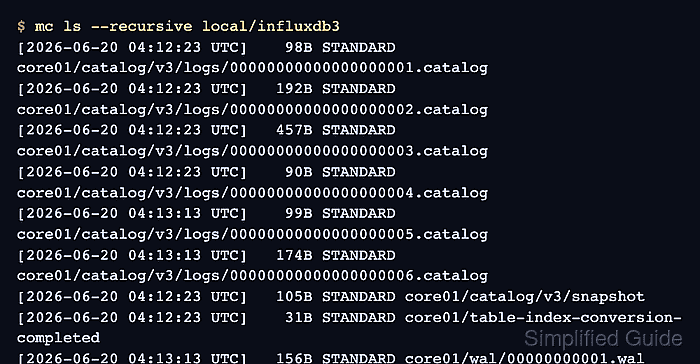
A dedicated MinIO user keeps database access separate from root administration. A write/query smoke test confirms InfluxDB can use the configured object store, and a final mc ls check shows the catalog and WAL objects created under the configured bucket.
Steps to configure MinIO object storage for InfluxDB 3 Core:
- Add a MinIO alias for the administrative account.
$ mc alias set local http://minio.example.net:9000 MINIO_ROOT_USER MINIO_ROOT_PASSWORD
Added `local` successfully.
Use root or administrator credentials only for bucket, user, and policy setup. InfluxDB 3 Core should run with a dedicated user after the policy is attached.
- Create the bucket that InfluxDB 3 Core will use.
$ mc mb --ignore-existing local/influxdb3
Bucket created successfully `local/influxdb3`.
Keep one bucket or prefix boundary per Core deployment so object listings, backups, and restore tests are not mixed with unrelated workloads.
- Create a bucket policy file for the InfluxDB service user.
- influxdb3-policy.json
{
  "Version": "2012-10-17",
  "Statement": [
    {
      "Action": [
        "s3:GetBucketLocation",
        "s3:ListBucket"
      ],
      "Effect": "Allow",
      "Resource": ["arn:aws:s3:::influxdb3"]
    },
    {
      "Action": [
        "s3:PutObject",
        "s3:GetObject",
        "s3:DeleteObject"
      ],
      "Effect": "Allow",
      "Resource": ["arn:aws:s3:::influxdb3/*"]
    }
  ]
}
The object permissions allow Core to write, read, and remove the files it manages inside the bucket.
- Create the MinIO user that InfluxDB will use.
$ mc admin user add local influxdb3 STRONG_MINIO_PASSWORD
Added user `influxdb3` successfully.
Use a generated secret and store it in the same secret-management surface that supplies the InfluxDB service environment.
- Create the MinIO policy from the JSON file.
$ mc admin policy create local influxdb3-rw ./influxdb3-policy.json
Created policy `influxdb3-rw` successfully.
- Attach the policy to the InfluxDB user.
$ mc admin policy attach local influxdb3-rw --user influxdb3
Attached Policies: [influxdb3-rw]
To User: influxdb3
- Start InfluxDB 3 Core with the MinIO endpoint.
$ influxdb3 serve \
  --node-id core01 \
  --object-store s3 \
  --bucket influxdb3 \
  --aws-endpoint http://minio.example.net:9000 \
  --aws-access-key-id influxdb3 \
  --aws-secret-access-key STRONG_MINIO_PASSWORD \
  --aws-allow-http
InfluxDB 3 Core server started
##### snipped #####
Use --aws-allow-http only for a trusted non-TLS MinIO endpoint. Omit it when the endpoint uses HTTPS with a certificate that Core trusts.
For the packaged systemd service, put the equivalent keys in /etc/influxdb3/influxdb3-core.conf and restart the influxdb3-core unit.
Related: How to configure InfluxDB 3 Core for systemd
Related: How to manage the InfluxDB 3 Core service with systemctl - Set the InfluxDB admin token in a second terminal.
$ export INFLUXDB3_AUTH_TOKEN='AUTH_TOKEN'
Replace AUTH_TOKEN with an admin token or another token that can create the test database and write data. Keep raw tokens out of shared transcripts, screenshots, issue comments, and committed scripts.
- Create a disposable database for the object-storage smoke test.
$ influxdb3 create database --token "$INFLUXDB3_AUTH_TOKEN" factory_metrics
Database "factory_metrics" created successfully
- Write one point to the database.
$ influxdb3 write --token "$INFLUXDB3_AUTH_TOKEN" --database factory_metrics 'temperature,site=plant-1 value=22.4'
722ms: 1 request (1.38 requests/sec), 1 lines (1 lines/s), 35B (48B/s)
- Query the point from InfluxDB.
$ influxdb3 query --token "$INFLUXDB3_AUTH_TOKEN" --database factory_metrics 'SELECT site, value FROM temperature'
+---------+-------+
| site    | value |
+---------+-------+
| plant-1 | 22.4  |
+---------+-------+
- List the MinIO objects created by the Core node.
$ mc ls --recursive local/influxdb3
[2026-06-20 04:12:23 UTC]    98B STANDARD core01/catalog/v3/logs/00000000000000000001.catalog
[2026-06-20 04:12:23 UTC]   192B STANDARD core01/catalog/v3/logs/00000000000000000002.catalog
[2026-06-20 04:12:23 UTC]   457B STANDARD core01/catalog/v3/logs/00000000000000000003.catalog
[2026-06-20 04:12:23 UTC]    90B STANDARD core01/catalog/v3/logs/00000000000000000004.catalog
[2026-06-20 04:13:13 UTC]    99B STANDARD core01/catalog/v3/logs/00000000000000000005.catalog
[2026-06-20 04:13:13 UTC]   174B STANDARD core01/catalog/v3/logs/00000000000000000006.catalog
[2026-06-20 04:12:23 UTC]   105B STANDARD core01/catalog/v3/snapshot
[2026-06-20 04:12:23 UTC]    31B STANDARD core01/table-index-conversion-completed
[2026-06-20 04:13:13 UTC]   156B STANDARD core01/wal/00000000001.wal
The core01 prefix should match --node-id. Catalog and WAL objects after the write confirm Core is using the MinIO bucket instead of local file storage.