Managing InfluxDB 3 Core with systemctl controls when the packaged database starts, stops, restarts, and starts at boot. It is the service layer to use after package installation, TOML configuration changes, host maintenance, or a failed startup.
The DEB and RPM packages install the influxdb3-core unit for systemd hosts. The unit is enabled during package installation but remains stopped so the TOML configuration can be reviewed before the first start.
The packaged unit has no reload action, so service changes that affect /etc/influxdb3/influxdb3-core.conf, environment overrides, storage paths, or processing-engine paths require a restart. A quick service check should combine systemctl state with a local HTTP request because an active unit can still take a few seconds to bind port 8181.
Steps to manage the InfluxDB 3 Core service with systemctl:
- Open a terminal with sudo privileges.
- List the installed InfluxDB service unit files.
$ systemctl list-unit-files --type=service 'influxdb*'
UNIT FILE              STATE   PRESET
influxdb3-core.service enabled enabled

1 unit files listed.
The current InfluxDB 3 Core package uses influxdb3-core.service. Older InfluxDB packages can expose different units, so use the unit that matches the installed server.
- Check whether the packaged service starts during boot.
$ systemctl is-enabled influxdb3-core
enabled
- Start the InfluxDB 3 Core service.
$ sudo systemctl start influxdb3-core
The package enables the unit during installation but does not start it until an operator reviews configuration and starts the service.
- Confirm that systemd reports the service as active.
$ systemctl is-active influxdb3-core
active
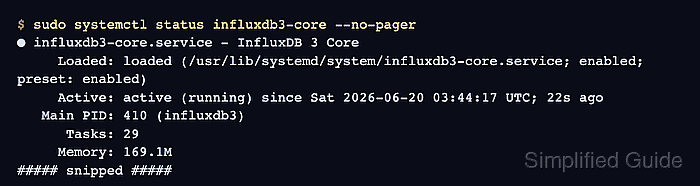
- Inspect the full service status after startup.
$ sudo systemctl status influxdb3-core --no-pager ● influxdb3-core.service - InfluxDB 3 Core Loaded: loaded (/usr/lib/systemd/system/influxdb3-core.service; enabled; preset: enabled) Active: active (running) since Sat 2026-06-20 03:44:17 UTC; 22s ago Main PID: 410 (influxdb3) Tasks: 29 Memory: 169.1M CPU: 2.745s CGroup: /system.slice/influxdb3-core.service └─410 /usr/bin/influxdb3 serve ##### snipped ##### - Check that the local HTTP listener answers.
$ curl --silent --include --request GET http://127.0.0.1:8181/health
HTTP/1.1 401 Unauthorized
content-length: 46
date: Sat, 20 Jun 2026 03:44:39 GMT

{"error": "the request was not authenticated"}
A 401 Unauthorized response from InfluxDB means the HTTP service answered the health endpoint but no token was supplied. Use a token-bearing health check when the host already has an admin or monitoring token.
Related: How to check InfluxDB server health
Related: How to create an InfluxDB 3 Core admin token - Restart InfluxDB 3 Core after TOML or environment changes.
$ sudo systemctl restart influxdb3-core
A restart interrupts writes and queries during process shutdown and startup. Schedule it during a maintenance window when clients cannot safely retry.
- Confirm that the service returned to active after the restart.
$ systemctl is-active influxdb3-core
active
The packaged unit does not reload configuration in place. Restart after changes to /etc/influxdb3/influxdb3-core.conf or service environment overrides.
Related: How to configure InfluxDB 3 Core for systemd - Review recent service logs when startup fails.
$ sudo journalctl --unit=influxdb3-core --no-pager
Jun 20 03:44:17 server systemd[1]: Started influxdb3-core.service - InfluxDB 3 Core.
Jun 20 03:44:17 server influxdb3[410]: InfluxDB 3 Core server starting node_id=primary-node version=3.10.0
Jun 20 03:44:19 server influxdb3[410]: startup time: 2328ms address=0.0.0.0:8181
Jun 20 03:44:39 server influxdb3[410]: cannot authenticate token path="/health"
Look for TOML parsing, storage permission, object-store, or token/authentication errors before retrying the service action.
- Stop InfluxDB 3 Core only when maintenance requires the database offline.
$ sudo systemctl stop influxdb3-core
Stopping the service makes writes, queries, and local API checks fail until it is started again.
- Confirm that the stopped service is inactive.
$ systemctl is-active influxdb3-core
inactive
inactive is expected after a deliberate stop, and systemctl returns a nonzero exit status for that state.
- Disable the service from boot and stop it immediately when the host should keep InfluxDB offline after reboot.
$ sudo systemctl disable --now influxdb3-core
Removed '/etc/systemd/system/multi-user.target.wants/influxdb3-core.service'.
Use this only for a planned outage or decommissioning window. It stops the current service and removes boot-time startup.
- Enable the service at boot and start it immediately.
$ sudo systemctl enable --now influxdb3-core
Created symlink '/etc/systemd/system/multi-user.target.wants/influxdb3-core.service' -> '/usr/lib/systemd/system/influxdb3-core.service'.
- Confirm the final boot startup state.
$ systemctl is-enabled influxdb3-core
enabled
- Confirm the final runtime state.
$ systemctl is-active influxdb3-core
active

Mohd Shakir Zakaria is a cloud architect with deep roots in software development and open-source advocacy. Certified in AWS, Red Hat, VMware, ITIL, and Linux, he specializes in designing and managing robust cloud and on-premises infrastructures.


