How to install ImageMagick PHP module on Ubuntu
Installing the Imagick extension lets PHP scripts call ImageMagick directly for image creation, resizing, conversion, and metadata-aware processing. On Ubuntu, the supported package-manager path is php-imagick, which installs the extension and the matching ImageMagick library packages from the enabled APT repositories.
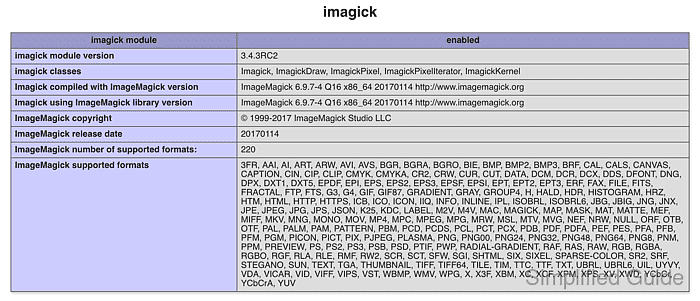
Current Ubuntu packages enable Imagick through the packaged PHP configuration tree after installation. The unversioned php-imagick package follows the distro-default PHP branch, so current Ubuntu 26.04 LTS installs it for PHP 8.5 while older releases use their packaged branch.
A completed install should make php --ri imagick report the module as enabled and a small Imagick script should be able to create an image object. Web-facing Apache module or PHP-FPM workers may need a reload before new requests see the extension, and upload-processing code should still validate image MIME types before passing user files into Imagick.
Related: Show loaded PHP extensions
Related: Install PHP on Ubuntu or Debian
Related: Manage the PHP-FPM service
Steps to install ImageMagick PHP module on Ubuntu:
- Open a terminal with sudo privileges.
- Refresh the APT package index.
$ sudo apt-get update
- Install the PHP command-line runtime and Imagick extension package.
$ sudo apt-get install --yes php-cli php-imagick
Reading package lists... Done
Building dependency tree... Done
Reading state information... Done
The following NEW packages will be installed:
  imagemagick-7-common libmagickcore-7.q16-10 libmagickwand-7.q16-10
  php-cli php-imagick php8.5-cli php8.5-imagick
##### snipped #####
Setting up php-imagick (3.8.0-3ubuntu1) ...
Install the matching web-facing runtime separately when the host serves browser requests, such as php-fpm for PHP-FPM or an Apache PHP module package when that is the site's architecture.
- Confirm that the current PHP CLI runtime loads Imagick.
$ php --ri imagick

imagick

imagick module => enabled
imagick module version => 3.8.0
Imagick using ImageMagick library version => ImageMagick 7.1.2-18 Q16 aarch64 23822 https://imagemagick.org
ImageMagick number of supported formats:  => 263
Exact PHP, Imagick, ImageMagick, CPU architecture, and supported-format values vary by Ubuntu release and enabled repositories. Related: Show loaded PHP extensions
- Run a small Imagick smoke test from the same PHP runtime.
$ php -r '$image = new Imagick(); $image->newImage(80, 40, "white"); $image->setImageFormat("png"); printf("%s %dx%d\n", $image->getImageFormat(), $image->getImageWidth(), $image->getImageHeight());'
PNG 80x40
The output proves the extension can instantiate Imagick and create a simple PNG image in memory.
- Check the active PHP configuration tree when the shell and web application disagree.
$ php --ini
Configuration File (php.ini) Path: "/etc/php/8.5/cli"
Loaded Configuration File:         "/etc/php/8.5/cli/php.ini"
Scan for additional .ini files in: "/etc/php/8.5/cli/conf.d"
Additional .ini files parsed:      /etc/php/8.5/cli/conf.d/10-pdo.ini,
##### snipped #####
/etc/php/8.5/cli/conf.d/20-imagick.ini,
##### snipped #####
The CLI tree can differ from the PHP-FPM or Apache module tree. Compare the runtime that serves the site before enabling, disabling, or reinstalling extensions.
- Reload PHP-FPM if the site serves PHP through PHP-FPM.
$ sudo systemctl reload php8.5-fpm
Replace php8.5-fpm with the unit that serves the site. Reload Apache instead when PHP runs through an Apache module, for example sudo systemctl reload apache2. Related: Manage the PHP-FPM service