How to run the Hyperledger Fabric test network
Running the Hyperledger Fabric test network starts the sample peers and orderer that ship with fabric-samples. Developers use it to confirm the local binaries, Docker images, channel scripts, and sample chaincode before writing application code or testing a chaincode package.
The sample network is a Docker Compose lab with two peer organizations, one ordering organization, and a default channel named mychannel. It is meant for learning and local development, not as a production topology or a production certificate model.
Start from an installed fabric-samples workspace with Docker access and no other Fabric sample network using the fixed sample container names. A complete run leaves the peer and orderer containers running, the basic chaincode committed on mychannel, and a query returning one of the sample ledger assets.
Steps to run the Hyperledger Fabric test network:
- Change to the Fabric test network directory.
$ cd fabric-samples/test-network
Run network.sh from this directory. The script expects the sample compose files, organization material, and helper scripts relative to its own path.
- Remove containers and artifacts from an earlier sample run.
$ ./network.sh down
Stopping network
Removing network fabric_test
Removing volume net_orderer.example.com
Removing volume net_peer0.org1.example.com
Removing volume net_peer0.org2.example.com
This removes generated sample-network crypto material, ledgers, chaincode containers, and Docker volumes created by the test network. Keep any lab evidence or modified sample files before resetting.
Related: How to reset the Hyperledger Fabric test network - Start the test network and create the default channel.
$ ./network.sh up createChannel
Using docker and docker-compose
Creating network "fabric_test" with the default driver
Creating volume "net_orderer.example.com" with default driver
Creating volume "net_peer0.org1.example.com" with default driver
Creating volume "net_peer0.org2.example.com" with default driver
Creating channel 'mychannel'.
Channel 'mychannel' joined
The combined mode starts the orderer and two peers, creates mychannel, and joins the sample peers to that channel.
- Confirm the Fabric containers are running.
$ docker ps --filter label=service=hyperledger-fabric
CONTAINER ID   IMAGE                               COMMAND             STATUS         PORTS                                            NAMES
9d9df89a6b9f   hyperledger/fabric-peer:latest      "peer node start"   Up 2 minutes   0.0.0.0:7051->7051/tcp                           peer0.org1.example.com
5d2b6c0b601a   hyperledger/fabric-peer:latest      "peer node start"   Up 2 minutes   7051/tcp, 0.0.0.0:9051->9051/tcp                 peer0.org2.example.com
3f35b0913e4a   hyperledger/fabric-orderer:latest   "orderer"           Up 2 minutes   0.0.0.0:7050->7050/tcp, 0.0.0.0:7053->7053/tcp   orderer.example.com
- Deploy the Go asset-transfer chaincode to the channel.
$ ./network.sh deployCC -ccn basic -ccp ../asset-transfer-basic/chaincode-go -ccl go
deploying chaincode on channel 'mychannel'
executing with the following
- CHANNEL_NAME: mychannel
- CC_NAME: basic
- CC_SRC_PATH: ../asset-transfer-basic/chaincode-go
- CC_SRC_LANGUAGE: go
##### snipped #####
Chaincode definition committed on channel 'mychannel'
The script installs the sample chaincode on both peers, approves the same lifecycle definition for Org1MSP and Org2MSP, and commits it to mychannel.
Related: How to deploy Hyperledger Fabric chaincode - Add the Fabric binaries and sample configuration directory to the current shell.
$ export PATH="$PWD/../bin:$PATH"
$ export FABRIC_CFG_PATH="$PWD/../config"
- Set the Org1 peer CLI environment.
$ export CORE_PEER_TLS_ENABLED=true
$ export CORE_PEER_LOCALMSPID=Org1MSP
$ export CORE_PEER_MSPCONFIGPATH="$PWD/organizations/peerOrganizations/org1.example.com/users/Admin@org1.example.com/msp"
$ export CORE_PEER_TLS_ROOTCERT_FILE="$PWD/organizations/peerOrganizations/org1.example.com/peers/peer0.org1.example.com/tls/ca.crt"
$ export CORE_PEER_ADDRESS=localhost:7051
$ export ORDERER_CA="$PWD/organizations/ordererOrganizations/example.com/orderers/orderer.example.com/msp/tlscacerts/tlsca.example.com-cert.pem"
$ export ORG1_TLS_ROOTCERT="$PWD/organizations/peerOrganizations/org1.example.com/peers/peer0.org1.example.com/tls/ca.crt"
$ export ORG2_TLS_ROOTCERT="$PWD/organizations/peerOrganizations/org2.example.com/peers/peer0.org2.example.com/tls/ca.crt"
The peer CLI uses these values to sign as the Org1 admin and to trust the sample TLS certificates generated under organizations.
- List the channels joined by the Org1 peer.
$ peer channel list
INFO [channelCmd] InitCmdFactory -> Endorser and orderer connections initialized
Channels peers has joined:
mychannel
- Initialize the sample ledger through the committed chaincode.
$ peer chaincode invoke \
  -o localhost:7050 \
  --ordererTLSHostnameOverride orderer.example.com \
  --tls \
  --cafile "$ORDERER_CA" \
  -C mychannel \
  -n basic \
  --peerAddresses localhost:7051 \
  --tlsRootCertFiles "$ORG1_TLS_ROOTCERT" \
  --peerAddresses localhost:9051 \
  --tlsRootCertFiles "$ORG2_TLS_ROOTCERT" \
  -c '{"function":"InitLedger","Args":[]}'
2026-06-21 12:04:18.931 UTC [chaincodeCmd] chaincodeInvokeOrQuery -> INFO 001 Chaincode invoke successful. result: status:200
The invoke targets both peers because the default chaincode endorsement policy requires endorsements from Org1 and Org2.
Related: How to invoke Hyperledger Fabric chaincode - Query one sample asset from the ledger.
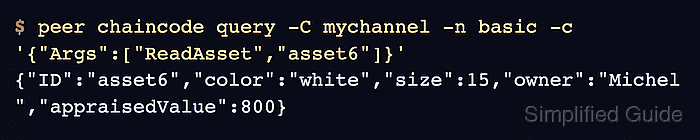
$ peer chaincode query -C mychannel -n basic -c '{"Args":["ReadAsset","asset6"]}'
{"ID":"asset6","color":"white","size":15,"owner":"Michel","appraisedValue":800}
The asset response confirms that the channel, committed chaincode, peer CLI identity, and world state are usable.
Related: How to query Hyperledger Fabric chaincode