Installing Hyperledger Fabric on macOS prepares a local fabric-samples workspace with Fabric command-line binaries, default configuration files, and Docker images for the sample network. The setup gives developers and platform operators a workstation baseline before running Fabric tutorials, testing chaincode, or inspecting Fabric commands locally.
The official install-fabric.sh script clones fabric-samples into the directory where it runs, downloads platform-specific binaries into fabric-samples/bin, places default configuration files under fabric-samples/config, and pulls the Fabric container images through Docker Desktop. The script selects the matching darwin-arm64 or darwin-amd64 binary package from the Mac architecture.
Docker Desktop must be installed, open, and connected to its engine before the image pull step. Keep the Fabric workspace in a project directory you plan to reuse, and run the test network as a separate follow-on check after the install commands show the binaries and images are present.
Steps to install Hyperledger Fabric on macOS:
- Open Terminal.
- Install Homebrew if brew is not already available.
$ /bin/bash -c "$(curl -fsSL https://raw.githubusercontent.com/Homebrew/install/HEAD/install.sh)"
Homebrew installs or prompts for the Xcode Command Line Tools when they are missing.
- Confirm Homebrew is available.
$ brew --version
Homebrew 6.0.2
- Install the Fabric prerequisite tools.
$ brew install git curl jq
Git clones fabric-samples, curl downloads the installer and binary archives, and jq is used by Fabric sample-network scripts.
- Install Docker Desktop with Homebrew Cask.
$ brew install --cask --appdir="/Applications" docker
- Open Docker Desktop.
$ open /Applications/Docker.app
Finish the first-run prompts and wait until Docker Desktop shows that the engine is running.
- Confirm the Docker engine is reachable.
$ docker --version
Docker version 29.5.3, build d1c06ef6b4
- Confirm the Docker Compose plugin is available.
$ docker compose version
Docker Compose version v5.1.4
- Create a Fabric workspace.
$ mkdir -p "$HOME/fabric"
- Enter the Fabric workspace.
$ cd "$HOME/fabric"
- Download the official Fabric installer script.
$ curl -fsSLO https://raw.githubusercontent.com/hyperledger/fabric/main/scripts/install-fabric.sh
- Make the installer executable.
$ chmod +x install-fabric.sh
- Review the installer options and version defaults.
$ ./install-fabric.sh -h
Usage: ./install-fabric.sh [-f|--fabric-version <arg>] [-c|--ca-version <arg>] <comp-1> [<comp-2>] ... [<comp-n>] ...
        <comp> Component to install, one or more of  docker | binary | samples | podman  First letter of component also accepted; If none specified docker | binary | samples is assumed
        -f, --fabric-version: FabricVersion (default: '2.5.16')
        -c, --ca-version: Fabric CA Version (default: '1.5.17')
The script help from the downloaded copy is the version source for that install run. Pin versions with --fabric-version and --ca-version only when matching a specific Fabric lab or release line.
- Install the samples, Fabric binaries, and Docker images.
$ ./install-fabric.sh docker binary samples

Clone hyperledger/fabric-samples repo

===> Cloning hyperledger/fabric-samples repo
##### snipped #####

Pull Hyperledger Fabric binaries

===> Downloading version 2.5.16 platform specific fabric binaries
==> Done.
===> Downloading version 1.5.17 platform specific fabric-ca-client binary
==> Done.

Pull Hyperledger Fabric docker images

FABRIC_IMAGES: peer orderer ccenv baseos
===> Pulling fabric Images
##### snipped #####
===> Pulling fabric ca Image
##### snipped #####
===> List out hyperledger images
The Docker image pull can take several minutes. If Docker reports a credential-helper or engine error, keep Docker Desktop open, confirm docker --version works, and rerun the same installer command.
- Enter the samples directory created by the installer.
$ cd fabric-samples
- Add the Fabric binaries and configuration directory to the current terminal session.
$ export PATH="$PWD/bin:$PATH"
$ export FABRIC_CFG_PATH="$PWD/config"
This changes only the current terminal session. Add equivalent exports to a shell profile only when you want Fabric commands available in every new terminal.
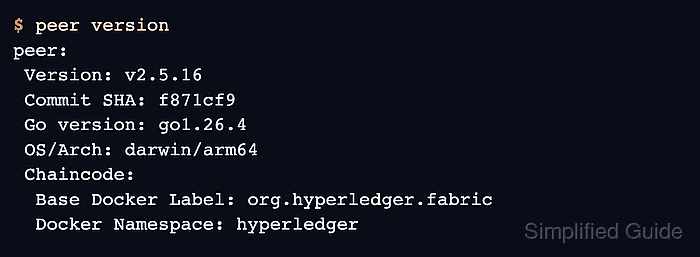
- Verify the Fabric peer binary.
$ peer version
peer:
 Version: v2.5.16
 Commit SHA: f871cf9
 Go version: go1.26.4
 OS/Arch: darwin/arm64
 Chaincode:
  Base Docker Label: org.hyperledger.fabric
  Docker Namespace: hyperledger
OS/Arch shows darwin/amd64 on Intel Macs.
- Verify the Fabric CA client binary.
$ fabric-ca-client version
fabric-ca-client:
 Version: v1.5.17
 Go version: go1.25.7
 OS/Arch: darwin/arm64
- Confirm the Fabric Docker images are tagged locally.
$ docker image ls --filter reference='hyperledger/fabric-*:2.5.16' --filter reference='hyperledger/fabric-ca:1.5.17'
IMAGE                               ID             DISK USAGE   CONTENT SIZE   EXTRA
hyperledger/fabric-baseos:2.5.16    109b4a15b282        245MB         80.2MB
hyperledger/fabric-ca:1.5.17        453a0a727e82        358MB          116MB
hyperledger/fabric-ccenv:2.5.16     807493f095f6        972MB          248MB
hyperledger/fabric-orderer:2.5.16   1d918fc7e1e0        167MB         46.8MB
hyperledger/fabric-peer:2.5.16      58979b65744b        215MB           62MB
After these checks pass, use fabric-samples/test-network/network.sh from the same workspace to start a local sample network.
Related: Run the Hyperledger Fabric test network

Mohd Shakir Zakaria is a cloud architect with deep roots in software development and open-source advocacy. Certified in AWS, Red Hat, VMware, ITIL, and Linux, he specializes in designing and managing robust cloud and on-premises infrastructures.


