How to deploy Hyperledger Fabric chaincode
Deploying Hyperledger Fabric chaincode makes a smart contract available on a channel after the channel organizations have agreed to the same lifecycle definition. Operators use this path when a peer has the chaincode package installed, but the channel cannot invoke the contract until the definition is approved and committed.
The Fabric lifecycle separates local peer installation from channel approval. Each organization that must endorse transactions installs the package on its own peers, approves the same chaincode name, version, sequence, and package ID for its MSP, and then one admin commits the agreed definition to the channel.
A lab deployment can use the fabric-samples test network, the JavaScript asset-transfer-basic chaincode, and the default mychannel channel. Replace the channel name, MSP IDs, peer addresses, certificate paths, and package label when deploying a different contract or production network.
Steps to deploy Hyperledger Fabric chaincode with the Fabric lifecycle:
- Change to the Fabric test network directory.
$ cd fabric-samples/test-network
The sample network should already be running with a joined channel before the lifecycle commands run. For the default samples, ./network.sh up createChannel creates mychannel with Org1MSP and Org2MSP.
- Set the chaincode lifecycle values.
$ export CHANNEL_NAME=mychannel
$ export CC_NAME=basic
$ export CC_VERSION=1.0
$ export CC_SEQUENCE=1
$ export CC_LABEL=basic_1.0
Increase CC_SEQUENCE when upgrading an existing chaincode definition. Keep the same values for every organization that approves the definition.
- Add the Fabric binaries and sample config directory to the current shell.
$ export PATH="$PWD/../bin:$PATH"
$ export FABRIC_CFG_PATH="$PWD/../config"
- Install the JavaScript chaincode dependencies.
$ npm --prefix ../asset-transfer-basic/chaincode-javascript install
added 360 packages, and audited 361 packages in 6s
##### snipped #####
Use the matching dependency command for the chaincode language being packaged. The Fabric sample JavaScript contract expects its dependencies under asset-transfer-basic/chaincode-javascript before packaging.
- Package the chaincode.
$ peer lifecycle chaincode package basic.tar.gz \
  --path ../asset-transfer-basic/chaincode-javascript/ \
  --lang node \
  --label "$CC_LABEL"
The package command writes basic.tar.gz in the current directory. The label becomes part of the package ID returned after installation.
- Set the Org1 admin environment.
$ export CORE_PEER_TLS_ENABLED=true
$ export CORE_PEER_LOCALMSPID=Org1MSP
$ export CORE_PEER_MSPCONFIGPATH="$PWD/organizations/peerOrganizations/org1.example.com/users/Admin@org1.example.com/msp"
$ export CORE_PEER_TLS_ROOTCERT_FILE="$PWD/organizations/peerOrganizations/org1.example.com/peers/peer0.org1.example.com/tls/ca.crt"
$ export CORE_PEER_ADDRESS=localhost:7051
$ export ORDERER_CA="$PWD/organizations/ordererOrganizations/example.com/orderers/orderer.example.com/msp/tlscacerts/tlsca.example.com-cert.pem"
$ export ORG1_TLS_ROOTCERT="$PWD/organizations/peerOrganizations/org1.example.com/peers/peer0.org1.example.com/tls/ca.crt"
$ export ORG2_TLS_ROOTCERT="$PWD/organizations/peerOrganizations/org2.example.com/peers/peer0.org2.example.com/tls/ca.crt"
The active CORE_PEER_MSPCONFIGPATH must point to an admin MSP for the organization approving or installing the package.
- Install the chaincode package on the Org1 peer.
$ peer lifecycle chaincode install basic.tar.gz
2026-06-21 05:45:21.104 UTC [chaincodeCmd] install -> INFO 001 Installed remotely: response:<status:200 payload:"\nJbasic_1.0:8f65c6a2d4b1d8e6a4f9c1e0a77b5ed22a9569e8a1a4cf2d5bf2d1a29128a928\022\tbasic_1.0" >
2026-06-21 05:45:21.104 UTC [chaincodeCmd] install -> INFO 002 Chaincode code package identifier: basic_1.0:8f65c6a2d4b1d8e6a4f9c1e0a77b5ed22a9569e8a1a4cf2d5bf2d1a29128a928
- Query the installed package ID from the Org1 peer.
$ peer lifecycle chaincode queryinstalled
Installed chaincodes on peer:
Package ID: basic_1.0:8f65c6a2d4b1d8e6a4f9c1e0a77b5ed22a9569e8a1a4cf2d5bf2d1a29128a928, Label: basic_1.0
- Save the package ID returned by the peer.
$ export CC_PACKAGE_ID=basic_1.0:8f65c6a2d4b1d8e6a4f9c1e0a77b5ed22a9569e8a1a4cf2d5bf2d1a29128a928
Do not copy a package ID from another environment. The hash changes when the chaincode package content changes.
- Set the Org2 admin environment.
$ export CORE_PEER_LOCALMSPID=Org2MSP
$ export CORE_PEER_MSPCONFIGPATH="$PWD/organizations/peerOrganizations/org2.example.com/users/Admin@org2.example.com/msp"
$ export CORE_PEER_TLS_ROOTCERT_FILE="$ORG2_TLS_ROOTCERT"
$ export CORE_PEER_ADDRESS=localhost:9051
- Install the same chaincode package on the Org2 peer.
$ peer lifecycle chaincode install basic.tar.gz
2026-06-21 05:46:03.331 UTC [chaincodeCmd] install -> INFO 001 Installed remotely: response:<status:200 payload:"\nJbasic_1.0:8f65c6a2d4b1d8e6a4f9c1e0a77b5ed22a9569e8a1a4cf2d5bf2d1a29128a928\022\tbasic_1.0" >
2026-06-21 05:46:03.331 UTC [chaincodeCmd] install -> INFO 002 Chaincode code package identifier: basic_1.0:8f65c6a2d4b1d8e6a4f9c1e0a77b5ed22a9569e8a1a4cf2d5bf2d1a29128a928
Install the package on every peer that will endorse transactions for the chaincode. Peers that only commit blocks do not need the package.
- Approve the chaincode definition for Org2.
$ peer lifecycle chaincode approveformyorg \
  -o localhost:7050 \
  --ordererTLSHostnameOverride orderer.example.com \
  --channelID "$CHANNEL_NAME" \
  --name "$CC_NAME" \
  --version "$CC_VERSION" \
  --package-id "$CC_PACKAGE_ID" \
  --sequence "$CC_SEQUENCE" \
  --tls \
  --cafile "$ORDERER_CA"
2026-06-21 05:46:45.640 UTC [chaincodeCmd] ClientWait -> INFO 001 txid [4a7350d6f6a3d1880d507bd8a9df6d39a28e9e8df1f71064a4c53b8719d90027] committed with status (VALID) at localhost:9051
- Set the Org1 admin environment again.
$ export CORE_PEER_LOCALMSPID=Org1MSP
$ export CORE_PEER_MSPCONFIGPATH="$PWD/organizations/peerOrganizations/org1.example.com/users/Admin@org1.example.com/msp"
$ export CORE_PEER_TLS_ROOTCERT_FILE="$ORG1_TLS_ROOTCERT"
$ export CORE_PEER_ADDRESS=localhost:7051
- Approve the chaincode definition for Org1.
$ peer lifecycle chaincode approveformyorg \
  -o localhost:7050 \
  --ordererTLSHostnameOverride orderer.example.com \
  --channelID "$CHANNEL_NAME" \
  --name "$CC_NAME" \
  --version "$CC_VERSION" \
  --package-id "$CC_PACKAGE_ID" \
  --sequence "$CC_SEQUENCE" \
  --tls \
  --cafile "$ORDERER_CA"
2026-06-21 05:47:08.215 UTC [chaincodeCmd] ClientWait -> INFO 001 txid [a8e5db49105640355d58fb5442aa6e3af3247ab27f9dbd1f0ac31f48049f3e3f] committed with status (VALID) at localhost:7051
- Check whether the channel organizations are ready to commit the definition.
$ peer lifecycle chaincode checkcommitreadiness \
  --channelID "$CHANNEL_NAME" \
  --name "$CC_NAME" \
  --version "$CC_VERSION" \
  --sequence "$CC_SEQUENCE" \
  --tls \
  --cafile "$ORDERER_CA" \
  --output json
{
        "approvals": {
                "Org1MSP": true,
                "Org2MSP": true
        }
}
A false approval means at least one organization approved a different lifecycle definition or has not approved it yet. Fix the mismatch before committing.
- Commit the chaincode definition to the channel.
$ peer lifecycle chaincode commit \
  -o localhost:7050 \
  --ordererTLSHostnameOverride orderer.example.com \
  --channelID "$CHANNEL_NAME" \
  --name "$CC_NAME" \
  --version "$CC_VERSION" \
  --sequence "$CC_SEQUENCE" \
  --tls \
  --cafile "$ORDERER_CA" \
  --peerAddresses localhost:7051 \
  --tlsRootCertFiles "$ORG1_TLS_ROOTCERT" \
  --peerAddresses localhost:9051 \
  --tlsRootCertFiles "$ORG2_TLS_ROOTCERT"
2026-06-21 05:47:32.592 UTC [chaincodeCmd] ClientWait -> INFO 001 txid [5d214f15c7d1fc0aa32d383c9acebd3d0ad538c6bfbf207333dc07661209ef7a] committed with status (VALID) at localhost:7051
2026-06-21 05:47:32.593 UTC [chaincodeCmd] ClientWait -> INFO 002 txid [5d214f15c7d1fc0aa32d383c9acebd3d0ad538c6bfbf207333dc07661209ef7a] committed with status (VALID) at localhost:9051
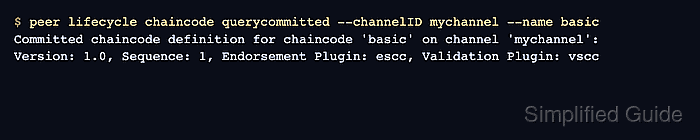
- Query the committed chaincode definition.
$ peer lifecycle chaincode querycommitted --channelID "$CHANNEL_NAME" --name "$CC_NAME"
Committed chaincode definition for chaincode 'basic' on channel 'mychannel':
Version: 1.0, Sequence: 1, Endorsement Plugin: escc, Validation Plugin: vscc
- Initialize the sample ledger through the committed chaincode.
$ peer chaincode invoke \
  -o localhost:7050 \
  --ordererTLSHostnameOverride orderer.example.com \
  --tls \
  --cafile "$ORDERER_CA" \
  -C "$CHANNEL_NAME" \
  -n "$CC_NAME" \
  --peerAddresses localhost:7051 \
  --tlsRootCertFiles "$ORG1_TLS_ROOTCERT" \
  --peerAddresses localhost:9051 \
  --tlsRootCertFiles "$ORG2_TLS_ROOTCERT" \
  -c '{"function":"InitLedger","Args":[]}'
2026-06-21 05:48:19.706 UTC [chaincodeCmd] chaincodeInvokeOrQuery -> INFO 001 Chaincode invoke successful. result: status:200
The asset-transfer sample does not require the lifecycle --init-required flag. The invoke is a normal transaction that proves the committed definition can start the chaincode container and write ledger state.
Related: How to invoke Hyperledger Fabric chaincode - Query the sample assets from the ledger.
$ peer chaincode query -C "$CHANNEL_NAME" -n "$CC_NAME" -c '{"Args":["GetAllAssets"]}'
[{"Key":"asset1","Record":{"ID":"asset1","color":"blue","size":5,"owner":"Tomoko","appraisedValue":300}},
{"Key":"asset2","Record":{"ID":"asset2","color":"red","size":5,"owner":"Brad","appraisedValue":400}},
##### snipped #####
{"Key":"asset6","Record":{"ID":"asset6","color":"white","size":15,"owner":"Michel","appraisedValue":800}}]
The query confirms that the committed chaincode can read the world state after the initialization transaction.
Related: How to query Hyperledger Fabric chaincode