How to configure a BFT ordering service in Hyperledger Fabric
A Hyperledger Fabric BFT ordering service uses SmartBFT consensus to order channel transactions when the ordering set must tolerate Byzantine behavior. Configuring it requires both channel-level BFT metadata and local orderer cluster settings so every consenter can identify the other orderers by enrollment identity and TLS material.
SmartBFT is available only on Fabric v3-capable channels. The channel profile needs V3_0 enabled, OrdererType set to BFT, a SmartBFT tuning section, and a ConsenterMapping entry for each ordering node that participates in the channel.
Start with orderer MSP folders, enrollment certificates, TLS certificates, admin endpoints, and routable hostnames already prepared. configtxgen can prove that the channel genesis block encodes the BFT configuration before orderer administrators join the channel through the channel participation API.
Steps to configure a Hyperledger Fabric BFT ordering service:
- Confirm the Fabric configuration tools are v3.x.
$ configtxgen --version
configtxgen:
 Version: v3.1.5
##### snipped #####
SmartBFT requires Fabric v3.0 channel capability. Upgrade every peer and orderer that participates in the channel before enabling V3_0.
- Enable the V3_0 channel capability in configtx.yaml.
Capabilities:
  Channel: &ChannelCapabilities
    V3_0: true
Do not enable V3_0 on a mixed-version channel. Older Fabric binaries must stop processing a channel whose enabled capabilities they do not support.
- Add every BFT orderer endpoint to the orderer organization definition.
Organizations:
  - &OrdererOrg
    Name: OrdererOrg
    ID: OrdererMSP
    MSPDir: ../organizations/ordererOrganizations/example.com/msp
    OrdererEndpoints:
      - orderer.example.com:7050
      - orderer2.example.com:7052
      - orderer3.example.com:7056
      - orderer4.example.com:7058
Keep the endpoint list aligned with the BFT consenter mapping. In Fabric v3 BFT profiles, peers and clients discover orderers through organization endpoints instead of a legacy global Orderer.Addresses list.
- Set the channel profile to use the BFT orderer type and SmartBFT options.
Profiles:
  ChannelUsingBFT:
    <<: *ChannelDefaults
    Orderer:
      <<: *OrdererDefaults
      Organizations:
        - *OrdererOrg
      Capabilities: *OrdererCapabilities
      OrdererType: BFT
      SmartBFT:
        RequestBatchMaxCount: 100
        RequestBatchMaxInterval: 50ms
        RequestForwardTimeout: 2s
        RequestComplainTimeout: 20s
        RequestAutoRemoveTimeout: 3m0s
        ViewChangeResendInterval: 5s
        ViewChangeTimeout: 20s
        LeaderHeartbeatTimeout: 1m0s
        CollectTimeout: 1s
        RequestBatchMaxBytes: 10485760
        IncomingMessageBufferSize: 200
        RequestPoolSize: 100000
        LeaderHeartbeatCount: 10
RequestPoolSize is not a dynamic BFT setting. Changing it later requires restarting the affected orderer nodes.
- Add one ConsenterMapping entry for each BFT orderer in the same profile.
      ConsenterMapping:
        - ID: 1
          Host: orderer.example.com
          Port: 7050
          MSPID: OrdererMSP
          Identity: ../organizations/ordererOrganizations/example.com/orderers/orderer.example.com/msp/signcerts/orderer.example.com-cert.pem
          ClientTLSCert: ../organizations/ordererOrganizations/example.com/orderers/orderer.example.com/tls/server.crt
          ServerTLSCert: ../organizations/ordererOrganizations/example.com/orderers/orderer.example.com/tls/server.crt
        - ID: 2
          Host: orderer2.example.com
          Port: 7052
          MSPID: OrdererMSP
          Identity: ../organizations/ordererOrganizations/example.com/orderers/orderer2.example.com/msp/signcerts/orderer2.example.com-cert.pem
          ClientTLSCert: ../organizations/ordererOrganizations/example.com/orderers/orderer2.example.com/tls/server.crt
          ServerTLSCert: ../organizations/ordererOrganizations/example.com/orderers/orderer2.example.com/tls/server.crt
        - ID: 3
          Host: orderer3.example.com
          Port: 7056
          MSPID: OrdererMSP
          Identity: ../organizations/ordererOrganizations/example.com/orderers/orderer3.example.com/msp/signcerts/orderer3.example.com-cert.pem
          ClientTLSCert: ../organizations/ordererOrganizations/example.com/orderers/orderer3.example.com/tls/server.crt
          ServerTLSCert: ../organizations/ordererOrganizations/example.com/orderers/orderer3.example.com/tls/server.crt
        - ID: 4
          Host: orderer4.example.com
          Port: 7058
          MSPID: OrdererMSP
          Identity: ../organizations/ordererOrganizations/example.com/orderers/orderer4.example.com/msp/signcerts/orderer4.example.com-cert.pem
          ClientTLSCert: ../organizations/ordererOrganizations/example.com/orderers/orderer4.example.com/tls/server.crt
          ServerTLSCert: ../organizations/ordererOrganizations/example.com/orderers/orderer4.example.com/tls/server.crt
Identity points to the orderer's enrollment certificate in PEM format, not to the whole MSP directory. BFT clusters need at least 3F+1 consenters to tolerate F Byzantine failures, so four orderers tolerate one faulty orderer.
- Set the local orderer configuration for each node.
General:
  ListenAddress: 0.0.0.0
  ListenPort: 7050
  LocalMSPID: OrdererMSP
  LocalMSPDir: /var/hyperledger/orderer/msp
  TLS:
    Enabled: true
    PrivateKey: /var/hyperledger/orderer/tls/server.key
    Certificate: /var/hyperledger/orderer/tls/server.crt
    RootCAs:
      - /var/hyperledger/orderer/tls/ca.crt
  Cluster:
    ClientCertificate: /var/hyperledger/orderer/tls/server.crt
    ClientPrivateKey: /var/hyperledger/orderer/tls/server.key
    RootCAs:
      - /var/hyperledger/orderer/tls/ca.crt

Admin:
  ListenAddress: 0.0.0.0:7053
  TLS:
    Enabled: true
    Certificate: /var/hyperledger/orderer/tls/server.crt
    PrivateKey: /var/hyperledger/orderer/tls/server.key
    ClientAuthRequired: true
    ClientRootCAs:
      - /var/hyperledger/orderer/tls/ca.crt

ChannelParticipation:
  Enabled: true

Consensus:
  WALDir: /var/hyperledger/production/orderer/smartbft/wal
If the cluster traffic uses a separate listener, set General.Cluster.ListenPort, ListenAddress, ServerCertificate, and ServerPrivateKey together. Leave them unset when the cluster should share the orderer's main listener.
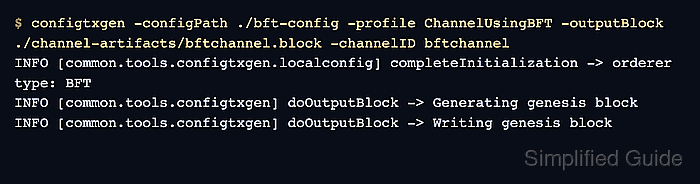
- Generate the BFT channel genesis block.
$ configtxgen -configPath ./bft-config -profile ChannelUsingBFT -outputBlock ./channel-artifacts/bftchannel.block -channelID bftchannel
INFO [common.tools.configtxgen.localconfig] completeInitialization -> orderer type: BFT
INFO [common.tools.configtxgen] doOutputBlock -> Generating genesis block
INFO [common.tools.configtxgen] doOutputBlock -> Writing genesis block
The -configPath directory must contain the configtx.yaml file with the ChannelUsingBFT profile and every certificate path referenced by ConsenterMapping.
- Inspect the generated block for the BFT consensus type, SmartBFT metadata, consenter mapping, and channel capability.
$ configtxgen -inspectBlock ./channel-artifacts/bftchannel.block
{
  "channel_group": {
    "groups": {
      "Orderer": {
        "values": {
          "ConsensusType": {
            "value": {
              "type": "BFT",
              "metadata": {
                "request_batch_max_count": "100",
                "request_pool_size": "100000",
                "leader_heartbeat_timeout": "1m0s"
              }
            }
          },
          "Orderers": {
            "value": {
              "consenter_mapping": [
                {"id": 1, "host": "orderer.example.com", "port": 7050, "msp_id": "OrdererMSP"},
                {"id": 2, "host": "orderer2.example.com", "port": 7052, "msp_id": "OrdererMSP"},
                {"id": 3, "host": "orderer3.example.com", "port": 7056, "msp_id": "OrdererMSP"},
                {"id": 4, "host": "orderer4.example.com", "port": 7058, "msp_id": "OrdererMSP"}
              ]
            }
          }
        }
      }
    },
    "values": {
      "Capabilities": {
        "value": {
          "capabilities": {
            "V3_0": {}
          }
        }
      }
    }
  }
}
##### snipped #####
The full inspection output also includes MSP and certificate bytes. Review the structure, not the generated base64 certificate payloads.
- Start all BFT orderers with their local configuration.
$ orderer
Containerized deployments normally set the same orderer.yaml keys with ORDERER_ environment variables. Keep each orderer's listener port, admin port, mounted MSP, and mounted TLS material matched to its ConsenterMapping entry.
- Join each running orderer to the BFT channel through its admin endpoint.
$ osnadmin channel join \
  -o orderer.example.com:7053 \
  --ca-file "$ORDERER_ADMIN_CA" \
  --client-cert "$ORDERER_ADMIN_CLIENT_CERT" \
  --client-key "$ORDERER_ADMIN_CLIENT_KEY" \
  --channelID bftchannel \
  --config-block ./channel-artifacts/bftchannel.block
Status: 201
{
  "name": "bftchannel",
  "url": "/participation/v1/channels/bftchannel",
  "consensusRelation": "consenter",
  "status": "active",
  "height": 1
}
Run the join command once per orderer admin endpoint, changing -o and the admin TLS files for that orderer.
- Check the joined channel state on an orderer.
$ osnadmin channel list \
  -o orderer.example.com:7053 \
  --ca-file "$ORDERER_ADMIN_CA" \
  --client-cert "$ORDERER_ADMIN_CLIENT_CERT" \
  --client-key "$ORDERER_ADMIN_CLIENT_KEY" \
  --channelID bftchannel
Status: 200
{
  "name": "bftchannel",
  "url": "/participation/v1/channels/bftchannel",
  "consensusRelation": "consenter",
  "status": "active",
  "height": 3
}
consenter and active confirm that the orderer joined as a voting BFT consenter for the channel.
- Invoke an existing smoke-test chaincode through a BFT orderer endpoint after peers and chaincode are ready.
$ peer chaincode invoke \
  -o orderer.example.com:7050 \
  --ordererTLSHostnameOverride orderer.example.com \
  --tls --cafile "$ORDERER_TLS_CA" \
  -C bftchannel -n basic \
  --peerAddresses peer0.org1.example.com:7051 --tlsRootCertFiles "$ORG1_PEER_TLS_CA" \
  --peerAddresses peer0.org2.example.com:9051 --tlsRootCertFiles "$ORG2_PEER_TLS_CA" \
  -c '{"function":"CreateAsset","Args":["asset-bft","blue","5","ops-team","100"]}'
INFO [chaincodeCmd] chaincodeInvokeOrQuery -> Chaincode invoke successful. result: status:200
A successful transaction through one of the mapped BFT orderer endpoints proves the channel can order client traffic after the configuration is joined.