How to set retriever top_k in Haystack
Retriever limits decide how many matching Haystack documents leave a search component for ranking, prompting, or generation. Setting top_k keeps a query from sending too much context downstream while still leaving enough room for relevant matches.
Most Haystack retrievers accept top_k when the retriever is created and again when its run() method is called. The constructor value becomes the default for every query, while a run-time value overrides that default for one retrieval call.
Inside a Pipeline, pass the override under the retriever component name in the Pipeline.run() input dictionary. The component key must match the name added with add_component(), and the top_k value travels beside the query input for that component.
Steps to set Haystack retriever top_k:
- Choose the default and per-query limits for the retriever.
Use a smaller default when downstream prompts or rankers should see fewer documents. Use a larger value when recall matters more than context size, ranking time, or generator cost.
- Set the default result limit in the retriever constructor.
retriever = InMemoryBM25Retriever(
    document_store=document_store,
    top_k=1,
)
The fixture uses InMemoryBM25Retriever because it runs without model downloads or API keys. The same top_k pattern applies to in-memory embedding retrieval after document and query embeddings are available.
- Override the result limit for one direct retriever call.
result = retriever.run(
    query="FAQ documents",
    top_k=3,
)
A run-time top_k value changes that retrieval call only. It does not replace the constructor default stored on the retriever.
- Pass top_k through Pipeline.run() when the retriever is inside a pipeline.
pipeline = Pipeline()
pipeline.add_component("retriever", retriever)
pipeline_result = pipeline.run(
    {"retriever": {"query": "FAQ documents", "top_k": 2}}
)
The outer key is the component name, not the retriever class name. In this snippet, the pipeline added the component as retriever.
Related: How to run a pipeline in Haystack
- Create retriever_top_k_demo.py with a small fixture that compares the default limit and two overrides.
- retriever_top_k_demo.py
from haystack import Document, Pipeline
from haystack.components.retrievers.in_memory import InMemoryBM25Retriever
from haystack.document_stores.in_memory import InMemoryDocumentStore


document_store = InMemoryDocumentStore()
document_store.write_documents(
    [
        Document(
            content="Retriever tuning limits how many FAQ documents reach the generator.",
            meta={"title": "retriever tuning"},
        ),
        Document(
            content="FAQ documents explain password reset and account recovery.",
            meta={"title": "account recovery"},
        ),
        Document(
            content="Support agents review FAQ documents before escalating tickets.",
            meta={"title": "support escalation"},
        ),
        Document(
            content="Billing records are exported from the invoice dashboard.",
            meta={"title": "billing export"},
        ),
    ]
)

retriever = InMemoryBM25Retriever(document_store=document_store, top_k=1)


def titles(result):
    return [document.meta["title"] for document in result["documents"]]


def show(label, result, noun="documents"):
    count = len(result["documents"])
    print(f"{label}: {count} {noun} -> {titles(result)}")


default_result = retriever.run(query="FAQ documents")
override_result = retriever.run(query="FAQ documents", top_k=3)

pipeline = Pipeline()
pipeline.add_component("retriever", retriever)
pipeline_result = pipeline.run(
    {"retriever": {"query": "FAQ documents", "top_k": 2}}
)

show("default top_k=1", default_result, "document")
show("run top_k=3", override_result)
show("pipeline top_k=2", pipeline_result["retriever"])
Run the script in the Python environment where haystack-ai is installed.
Related: How to install Haystack with pip - Run the top_k comparison script.
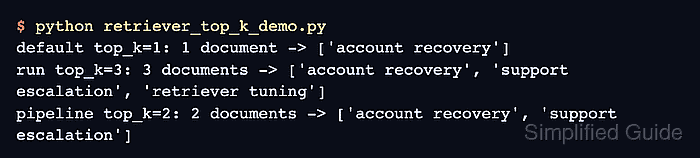
$ python retriever_top_k_demo.py
default top_k=1: 1 document -> ['account recovery']
run top_k=3: 3 documents -> ['account recovery', 'support escalation', 'retriever tuning']
pipeline top_k=2: 2 documents -> ['account recovery', 'support escalation']
- Confirm each line returns the requested document count.
The default constructor value returns one document, the direct run() override returns three documents, and the Pipeline.run() override returns two documents from the same document store.
- Remove the smoke-test file if it was only used to verify the pattern.
$ rm retriever_top_k_demo.py