How to build a RAG chatbot with Haystack and Ollama
Local RAG chatbots need two things to work together: a retriever that finds relevant private text and a local chat model that answers from that context. Haystack supplies the pipeline wiring, and Ollama supplies the chat model without sending the prompt to a hosted model provider.
This build uses an InMemoryDocumentStore, InMemoryBM25Retriever, ChatPromptBuilder, and OllamaChatGenerator. BM25 keyword retrieval keeps the first local prototype small because it does not require a separate embedding model, while still proving the document-to-prompt-to-answer path.
Start with an Ollama chat model that already appears in ollama list and a Python environment for the Haystack application. The smoke test writes three support FAQ snippets, asks one billing question, verifies the retrieved document, and checks that the answer comes back through Ollama.
Steps to build a Haystack RAG chatbot with Ollama:
- Check that Ollama has a local chat model available.
$ ollama list
NAME           ID              SIZE     MODIFIED
gpt-oss:20b    17052f91a42e    13 GB    6 months ago
Use a model name from your own ollama list output. If no model is listed, pull one with ollama pull before running the Haystack pipeline.
- Install the Haystack Ollama integration in the project environment.
$ python3 -m pip install --upgrade ollama-haystack
Collecting ollama-haystack
  Downloading ollama_haystack-6.7.0-py3-none-any.whl.metadata
##### snipped #####
Successfully installed ollama-0.6.2 ollama-haystack-6.7.0
ollama-haystack installs the Haystack Ollama components and the Python Ollama client. Install it in the same virtual environment that runs the application.
Related: How to install Haystack with pip - Set the model name for the chatbot run.
$ export OLLAMA_MODEL=gpt-oss:20b
Replace gpt-oss:20b with the model name from your machine. Set OLLAMA_URL only when Haystack reaches Ollama at a non-default URL, such as from a container or another host.
- Create the RAG chatbot script.
- rag_chatbot_ollama.py
import os

from haystack import Document, Pipeline
from haystack.components.builders import ChatPromptBuilder
from haystack.components.retrievers.in_memory import InMemoryBM25Retriever
from haystack.dataclasses import ChatMessage
from haystack.document_stores.in_memory import InMemoryDocumentStore
from haystack_integrations.components.generators.ollama import OllamaChatGenerator


model = os.environ.get("OLLAMA_MODEL", "gpt-oss:20b")
url = os.environ.get("OLLAMA_URL", "http://localhost:11434")
question = "Which support team handles invoice corrections?"

document_store = InMemoryDocumentStore()
documents = [
    Document(
        content=(
            "Billing support handles invoice corrections and payment receipt questions."
        ),
        meta={"source": "billing-faq"},
    ),
    Document(
        content="Platform support handles login, password, and access token issues.",
        meta={"source": "access-faq"},
    ),
    Document(
        content="Shipping support handles delivery address changes before dispatch.",
        meta={"source": "shipping-faq"},
    ),
]
written = document_store.write_documents(documents)

retriever = InMemoryBM25Retriever(document_store=document_store, top_k=2)
retrieved = retriever.run(query=question)["documents"]

jinja_open = "{" + "{"
jinja_close = "}" + "}"

template = [
    ChatMessage.from_system(
        "Answer only from the supplied support FAQ context. "
        "If the answer is not in the context, say you do not know."
    ),
    ChatMessage.from_user(
        "Support FAQ context:\n"
        "{% for document in documents %}"
        "- " + jinja_open + " document.content " + jinja_close + "\n"
        "{% endfor %}\n"
        "Question: " + jinja_open + " question " + jinja_close + "\n"
        "Answer in one short sentence."
    ),
]

pipe = Pipeline()
pipe.add_component("retriever", retriever)
pipe.add_component(
    "prompt_builder",
    ChatPromptBuilder(template=template, required_variables=["documents", "question"]),
)
pipe.add_component(
    "llm",
    OllamaChatGenerator(
        model=model,
        url=url,
        generation_kwargs={"temperature": 0, "num_predict": 64},
        timeout=300,
        keep_alive="2m",
        think=False,
    ),
)
pipe.connect("retriever.documents", "prompt_builder.documents")
pipe.connect("prompt_builder.prompt", "llm.messages")

result = pipe.run(
    {
        "retriever": {"query": question},
        "prompt_builder": {"question": question},
    }
)
reply = result["llm"]["replies"][0].text.strip()

print(f"documents written: {written}")
print(f"model: {model}")
print(f"question: {question}")
print(f"top document source: {retrieved[0].meta['source']}")
print(f"top document: {retrieved[0].content}")
print(f"answer: {reply}")
ChatPromptBuilder renders a list of ChatMessage objects. The pipeline sends those rendered messages to OllamaChatGenerator through the llm.messages input.
- Run the chatbot script and verify the retrieved context.
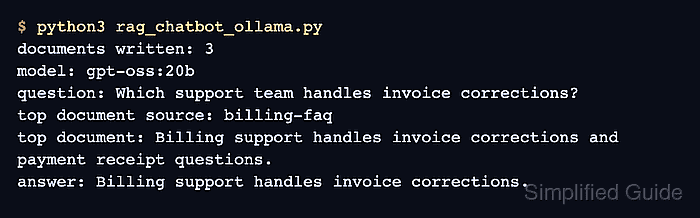
$ python3 rag_chatbot_ollama.py
documents written: 3
model: gpt-oss:20b
question: Which support team handles invoice corrections?
top document source: billing-faq
top document: Billing support handles invoice corrections and payment receipt questions.
answer: Billing support handles invoice corrections.
top document source: billing-faq proves the retriever selected the FAQ entry that contains the answer, and the final answer line proves the prompt reached Ollama and returned through the Haystack pipeline.
- Remove the temporary chatbot script after copying the pattern into the application.
$ rm rag_chatbot_ollama.py