How to enable logging tracer output in Haystack
Tracing in Haystack records pipeline and component activity while a pipeline run is being debugged. The built-in LoggingTracer sends those trace records through Python logging, which gives a local script visibility into component names, payload shapes, and pipeline output without a separate tracing backend.
Python code enables LoggingTracer with tracing.enable_tracing(). Content tracing is a separate switch because inputs and outputs can contain prompts, documents, API responses, user text, or other sensitive payloads.
A logger scoped to haystack.tracing.logging_tracer keeps the console focused on trace records instead of unrelated framework debug lines. A small custom component makes the logged component span, content tags, and final pipeline output easy to recognize before the same setup is added to a larger pipeline.
Steps to enable Haystack logging tracer output:
- Create haystack_logging_tracer_demo.py with the Haystack imports and a logger limited to LoggingTracer debug records.
- haystack_logging_tracer_demo.py
import logging

from haystack import Pipeline, component, tracing
from haystack.tracing.logging_tracer import LoggingTracer


logging.basicConfig(
    format="%(levelname)s:%(name)s:%(message)s",
    level=logging.WARNING,
)
logging.getLogger("haystack.tracing.logging_tracer").setLevel(logging.DEBUG)
The LoggingTracer class is built into haystack-ai and does not need an additional tracing package.
Related: How to install Haystack with pip - Enable Haystack tracing below the logger setup with a LoggingTracer instance.
tracing.tracer.is_content_tracing_enabled = True
tracing.enable_tracing(LoggingTracer(tags_color_strings={}))
Content tracing writes component payloads to logs, including any prompts, documents, chat messages, API responses, or credentials passed through a pipeline. Only payloads that are safe to store belong in content tracing.
- Append the DebugEcho component below the tracing configuration.
@component
class DebugEcho:
    @component.output_types(reply=str)
    def run(self, text: str):
        return {"reply": text.upper()}
- Append the pipeline construction and execution below the component class.
pipeline = Pipeline()
pipeline.add_component("debug_echo", DebugEcho())

result = pipeline.run({"debug_echo": {"text": "trace me"}})

print(f"reply={result['debug_echo']['reply']}")
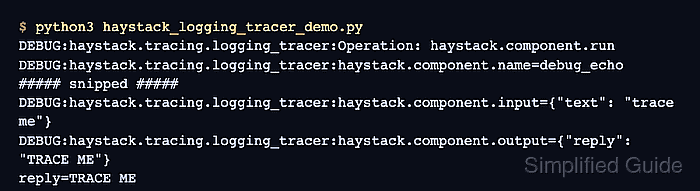
- Run the completed demo to verify the component trace content and final pipeline result.
$ python3 haystack_logging_tracer_demo.py
reply=TRACE ME
DEBUG:haystack.tracing.logging_tracer:Operation: haystack.component.run
DEBUG:haystack.tracing.logging_tracer:haystack.component.name=debug_echo
DEBUG:haystack.tracing.logging_tracer:haystack.component.type=DebugEcho
DEBUG:haystack.tracing.logging_tracer:haystack.component.fully_qualified_type=__main__.DebugEcho
DEBUG:haystack.tracing.logging_tracer:haystack.component.input_types={"text": "str"}
DEBUG:haystack.tracing.logging_tracer:haystack.component.input_spec={"text": {"type": "str", "senders": []}}
DEBUG:haystack.tracing.logging_tracer:haystack.component.output_spec={"reply": {"type": "str", "receivers": []}}
DEBUG:haystack.tracing.logging_tracer:haystack.component.input={"text": "trace me"}
DEBUG:haystack.tracing.logging_tracer:haystack.component.visits=1
DEBUG:haystack.tracing.logging_tracer:haystack.component.output={"reply": "TRACE ME"}
DEBUG:haystack.tracing.logging_tracer:Operation: haystack.pipeline.run
DEBUG:haystack.tracing.logging_tracer:haystack.pipeline.input_data={"debug_echo": {"text": "trace me"}}
DEBUG:haystack.tracing.logging_tracer:haystack.pipeline.output_data={"debug_echo": {"reply": "TRACE ME"}}
DEBUG:haystack.tracing.logging_tracer:haystack.pipeline.metadata={}
DEBUG:haystack.tracing.logging_tracer:haystack.pipeline.max_runs_per_component=100
Python logging writes to stderr while print() writes to stdout, so terminals and runners can show the final reply=TRACE ME line before or after the pipeline-level tracer lines.