How to configure HTTP load balancing with HAProxy
An HAProxy HTTP load balancer gives clients one listener address while two or more application servers handle the requests behind it. Without a clear frontend-to-backend mapping, a configuration can parse successfully but still send traffic to the wrong pool, keep a failed target eligible, or leave no simple proof that requests reached more than one server.
HTTP load balancing uses an HAProxy frontend to accept client connections and a backend to name the server pool. In HTTP mode, HAProxy can parse request metadata before choosing a backend, while the balance directive controls how eligible servers are selected. roundrobin is the direct starting point for a stateless web pool because HAProxy cycles through available server lines in order.
HAProxy should already be installed, the service should load /etc/haproxy/haproxy.cfg, and the two HTTP backend services should be reachable from the HAProxy host. The example uses plain HTTP on port 80, leaves TLS termination and hostname or path routing to separate guides, validates the full configuration before reload, and verifies request distribution with repeated frontend requests.
Steps to configure HTTP load balancing with HAProxy:
- Confirm that each backend web server responds from the HAProxy host.
$ curl -sS http://10.0.10.11:8080/
app1
$ curl -sS http://10.0.10.12:8080/
app2
Use the same backend address, port, scheme, and readiness path that HAProxy will use. A server that answers from a laptop may still be unreachable from the load balancer network path.
- Open the HAProxy configuration file.
$ sudoedit /etc/haproxy/haproxy.cfg
Debian and Ubuntu packages commonly load /etc/haproxy/haproxy.cfg through the haproxy service. Preserve existing package global settings such as user, group, logging, and runtime socket lines unless the deployment already manages them elsewhere.
- Add or update the HTTP defaults, frontend, and backend pool.
- /etc/haproxy/haproxy.cfg
defaults
    log global
    mode http
    option httplog
    timeout connect 5s
    timeout client 30s
    timeout server 30s

frontend fe_http
    bind :80
    default_backend be_apps

backend be_apps
    mode http
    balance roundrobin
    server app1 10.0.10.11:8080 check
    server app2 10.0.10.12:8080 check
Line What it controls mode http Enables HTTP processing for the listener and pool instead of opaque TCP forwarding. bind :80 Listens for client HTTP connections on port 80. Use a specific address such as 192.0.2.10:80 when only one interface should accept traffic. default_backend be_apps Sends unmatched requests from the frontend to the named backend pool. balance roundrobin Selects each eligible server in turn, which is suitable for a stateless basic web pool. server app1 10.0.10.11:8080 check Adds a backend target and enables a basic active check for that server line. Do not remove the timeout lines. HAProxy requires explicit timeouts for normal proxy operation, and current packages warn or fail when required timeouts are missing.
If another service already listens on port 80, change the HAProxy bind address or stop the conflicting service before reload.
- Validate the complete HAProxy file before touching the running service.
$ sudo haproxy -c -V -f /etc/haproxy/haproxy.cfg
Configuration file is valid
-c checks the configuration and exits without starting a proxy process. -V prints the success message; automation should still use the command exit status.
- Reload HAProxy after the configuration check passes.
$ sudo systemctl reload haproxy
A failed validation blocks the reload. Fix the reported file and line, then run the same haproxy -c -V -f command again before applying the change.
Related: How to reload HAProxy gracefully
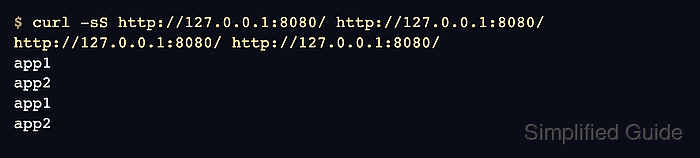
- Request the frontend several times and confirm responses come from both backend servers.
$ curl -sS http://www.example.com/ http://www.example.com/ http://www.example.com/ http://www.example.com/
app1
app2
app1
app2
Use the real public hostname or a test hostname that reaches the HAProxy listener. The response body must identify the backend, or another visible signal such as a response header must show which server handled each request.
If only one backend appears, recheck direct backend curls, the server addresses, active check results in the stats page or runtime socket, and any application session affinity before changing balance roundrobin.
Related: How to enable the HAProxy stats page
Related: How to enable the HAProxy runtime socket