How to sync the Gentoo repository
Gentoo package decisions depend on the local ebuild repository, so an old repository tree can hide updates, miss news items, or produce dependency plans that no longer match the current package set. Sync the repository before package installs, world updates, profile changes, and other Portage maintenance that should use current ebuild metadata.
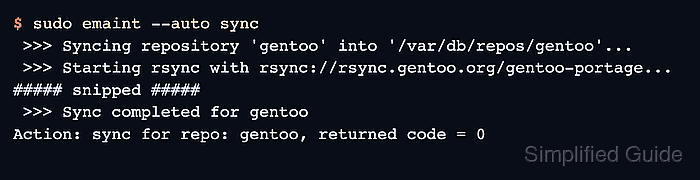
Portage reads repository definitions from /etc/portage/repos.conf and stores the main gentoo repository under /var/db/repos/gentoo on current installations. The emaint sync module is the current sync interface; emerge –sync remains a compatibility command that uses the same sync machinery.
Use emaint –auto sync for normal maintenance because it updates repositories whose auto-sync setting is enabled. Use a targeted --repo sync only when one configured repository needs a refresh, and avoid editing files inside rsync-managed repository directories because the next sync can replace local changes.
Related: How to read Gentoo news items
Related: How to update a Gentoo world set
Related: How to install a package on Gentoo with emerge
Steps to sync the Gentoo repository:
- Inspect the active repository configuration.
$ portageq repos_config /
[DEFAULT]
auto-sync = yes
main-repo = gentoo
##### snipped #####

[gentoo]
auto-sync = yes
location = /var/db/repos/gentoo
sync-type = rsync
sync-uri = rsync://rsync.gentoo.org/gentoo-portage
##### snipped #####
The auto-sync value controls whether emaint --auto sync includes a repository. The location path is where Portage reads the local ebuild tree.
- Sync repositories enabled for automatic sync.
$ sudo emaint --auto sync
>>> Syncing repository 'gentoo' into '/var/db/repos/gentoo'...
>>> Starting rsync with rsync://rsync.gentoo.org/gentoo-portage...
##### snipped #####
>>> Sync completed for gentoo
Action: sync for repo: gentoo, returned code = 0
Use sudo emaint --repo gentoo sync instead when only the main gentoo repository should be refreshed. Keep emerge –sync for older notes or scripts that still call it.
- Read any news items that appeared with the synced repository.
$ sudo eselect news count
0
If the count is greater than 0, read the items before a world update or major package change. Related: How to read Gentoo news items
- Confirm that Portage can read packages from the refreshed repository.
$ emerge --search sys-apps/portage
[ Results for search key : sys-apps/portage ]
[ Applications found : 1 ]

*  sys-apps/portage
      Latest version available: 3.0.79
      Latest version installed: 3.0.79
      Homepage: https://wiki.gentoo.org/wiki/Project:Portage
      Description: Portage is the package management and distribution system for Gentoo
The available-version line proves that the local ebuild repository and package metadata are readable after the sync. Installed-version output depends on the system's current Portage package.