How to use the Logstash mutate filter
Using the Logstash mutate filter normalizes event fields before outputs send them onward. It is useful when upstream senders deliver the same values with inconsistent casing, extra whitespace, temporary field names, or numeric values still encoded as strings.
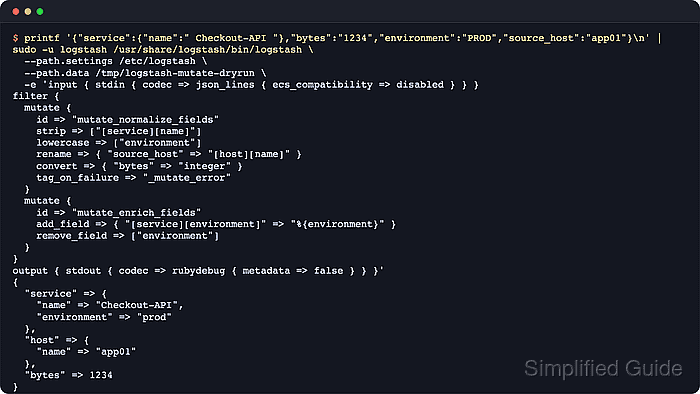
Mutations run inside the pipeline filter stage, after inputs create event fields and before outputs index or forward the event. Nested destinations use field-reference syntax such as [service][name], and dependent operations should be split into separate mutate blocks because the plugin applies mutation types in its own documented order.
Package-based Logstash installs normally run the service as the logstash user. Validation should run as that account with a writable --path.data directory, and a dry-run pipeline should show the transformed event before the filter is copied into the service-managed pipeline.
Steps to use the Logstash mutate filter:
- Open a temporary dry-run pipeline file.
$ sudoedit /tmp/logstash-mutate-dryrun.conf
- Add a dry-run pipeline that emits one JSON event and prints the transformed event.
input {
  generator {
    lines => [ '{"service":{"name":" Checkout-API "},"bytes":"1234","environment":"PROD","source_host":"app01"}' ]
    count => 1
    codec => json {
      ecs_compatibility => disabled
    }
  }
}

filter {
  mutate {
    id => "mutate_normalize_fields"
    strip => ["[service][name]"]
    lowercase => ["environment"]
    rename => { "source_host" => "[host][name]" }
    convert => { "bytes" => "integer" }
    tag_on_failure => "_mutate_error"
  }

  mutate {
    id => "mutate_promote_environment"
    add_field => { "[service][environment]" => "%{environment}" }
    remove_field => ["environment"]
  }
}

output {
  stdout {
    codec => rubydebug {
      metadata => false
    }
  }
}
The second mutate block reads the lowercased environment value from the first block. Keeping dependent changes in separate blocks matches the plugin processing order.
Paste the JSON line into the validator before changing field names or quotes.
Tool: JSON Validator - Test the dry-run pipeline syntax.
$ sudo -u logstash /usr/share/logstash/bin/logstash \
  --path.settings /etc/logstash \
  --path.data /tmp/logstash-mutate-dryrun \
  -f /tmp/logstash-mutate-dryrun.conf \
  --config.test_and_exit
Using bundled JDK: /usr/share/logstash/jdk
Configuration OK
[2026-06-18T20:27:07,685][INFO ][logstash.runner          ] Using config.test_and_exit mode. Config Validation Result: OK. Exiting Logstash
The --path.data directory must be writable by the logstash user. Current Logstash releases block superuser runs unless allow_superuser is enabled.
- Run the dry-run pipeline and confirm the mutated fields.
$ sudo -u logstash /usr/share/logstash/bin/logstash \
  --path.settings /etc/logstash \
  --path.data /tmp/logstash-mutate-dryrun \
  -f /tmp/logstash-mutate-dryrun.conf \
  --log.level error
{
       "service" => {
               "name" => "Checkout-API",
        "environment" => "prod"
    },
         "bytes" => 1234,
          "host" => {
        "name" => "app01"
    },
##### snipped #####
}
The output shows strip removed whitespace, lowercase changed PROD to prod, rename moved source_host to [host][name], and convert changed bytes from a string to an integer.
- Open the target service-managed pipeline file.
$ sudoedit /etc/logstash/conf.d/60-mutate.conf
Choose a filename that sorts after input definitions and before output-only fragments when the pipeline is split across multiple files.
Related: How to configure Logstash pipelines
- Add the mutate blocks before the output section.
filter {
  if [source_host] and [environment] {
    mutate {
      id => "mutate_normalize_fields"
      strip => ["[service][name]"]
      lowercase => ["environment"]
      rename => { "source_host" => "[host][name]" }
      convert => { "bytes" => "integer" }
      tag_on_failure => "_mutate_error"
    }

    mutate {
      id => "mutate_promote_environment"
      add_field => { "[service][environment]" => "%{environment}" }
      remove_field => ["environment"]
    }
  }
}
Adjust the condition and field names to match the event shape handled by the pipeline. The condition keeps the transform from running on unrelated events that do not carry the expected source fields.
- Test the full Logstash configuration.
$ sudo -u logstash /usr/share/logstash/bin/logstash \
  --path.settings /etc/logstash \
  --path.data /tmp/logstash-configtest \
  --config.test_and_exit
Using bundled JDK: /usr/share/logstash/jdk
Configuration OK
[2026-06-18T20:27:07,685][INFO ][logstash.runner          ] Using config.test_and_exit mode. Config Validation Result: OK. Exiting Logstash
- Restart the Logstash service to load the updated pipeline.
$ sudo systemctl restart logstash
Restarting Logstash briefly stops active pipelines while inputs reopen, filters recompile, and outputs reconnect.
- Send a fresh event through the input that reaches the mutated pipeline.
{"service":{"name":" Checkout-API "},"bytes":"1234","environment":"PROD","source_host":"app01"}Use the real input for the pipeline, such as a file, Beats input, Kafka topic, or HTTP input. The event only needs to include fields that match the mutate block.
- Check the pipeline API for both named mutate filters.
$ curl --silent --show-error "http://localhost:9600/_node/stats/pipelines/main?pretty=true&filter_path=pipelines.main.plugins.filters.id,pipelines.main.plugins.filters.name,pipelines.main.plugins.filters.events"
{
  "pipelines" : {
    "main" : {
      "plugins" : {
        "filters" : [ {
          "id" : "mutate_normalize_fields",
          "name" : "mutate",
          "events" : {
            "in" : 1,
            "out" : 1
          }
        }, {
          "id" : "mutate_promote_environment",
          "name" : "mutate",
          "events" : {
            "in" : 1,
            "out" : 1
          }
        } ]
      }
    }
  }
}
Replace main in the URL when the pipeline uses another pipeline.id. The monitoring API may also require TLS or authentication when logstash.yml exposes it beyond localhost.
- Fetch a recent destination document and confirm the normalized fields.
$ curl --silent --show-error --get "http://elasticsearch.example.net:9200/app-mutate-*/_search" \
  --data-urlencode "size=1" \
  --data-urlencode "sort=@timestamp:desc" \
  --data-urlencode "filter_path=hits.hits._source.service,hits.hits._source.host,hits.hits._source.bytes" \
  --data-urlencode "pretty"
{
  "hits" : {
    "hits" : [ {
      "_source" : {
        "service" : {
          "name" : "Checkout-API",
          "environment" : "prod"
        },
        "host" : {
          "name" : "app01"
        },
        "bytes" : 1234
      }
    } ]
  }
}
If the destination index still stores bytes as a string, an existing Elasticsearch mapping may already define that field as text or keyword. Send the corrected events to a new index or reindex older documents after updating the mapping.
- Search the destination index for mutate failure tags after the rollout.
$ curl --silent --show-error --get "http://elasticsearch.example.net:9200/app-mutate-*/_search" \
  --data-urlencode "q=tags:_mutate_error" \
  --data-urlencode "size=0" \
  --data-urlencode "filter_path=hits.total" \
  --data-urlencode "pretty"
{
  "hits" : {
    "total" : {
      "value" : 0,
      "relation" : "eq"
    }
  }
}
A non-zero count means one of the mutate operations failed and the remaining operations in that mutate block stopped for those events.
- Remove the temporary dry-run pipeline file.
$ sudo rm /tmp/logstash-mutate-dryrun.conf