The dissect filter in Logstash splits fixed-format log lines into named fields without running a regular expression. It fits events whose delimiters and field order stay the same, such as an application log that always starts with a timestamp, level, service name, status code, duration, and message text.
A dissect mapping combines literal delimiters with placeholders such as {field}. Nested placeholders like {[service][name]} write directly into structured fields, empty placeholders such as {} skip unwanted segments, and append placeholders such as {+ts} combine repeated segments into one field.
Keep dissect inside a condition that matches only the source format it expects. Missing delimiters or unexpected optional sections add the default _dissectfailure tag unless tag_on_failure is changed, and convert_datatype can turn selected captures into int or float values after the mapping runs.
Related: How to parse logs with grok in Logstash
Related: How to use the Logstash date filter
Steps to use the Logstash dissect filter:
- Dry-run the mapping against one representative log line.
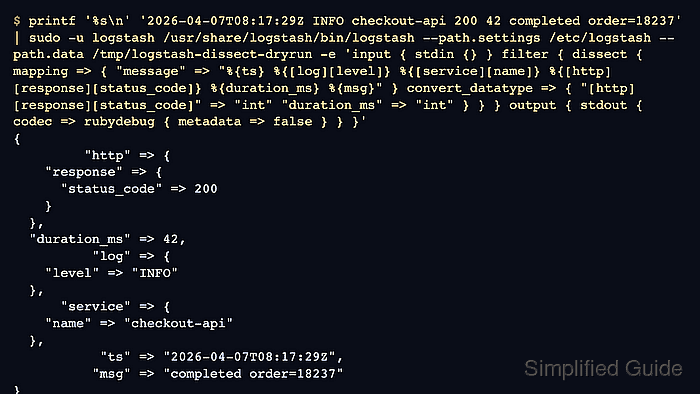
$ printf '%s\n' '2026-04-07T08:17:29Z INFO checkout-api 200 42 completed order=18237' | sudo -u logstash /usr/share/logstash/bin/logstash \
  --path.settings /etc/logstash \
  --path.data /tmp/logstash-dissect-dryrun \
  -e 'input { stdin {} }
filter {
  dissect {
    id => "dissect_app_log"
    mapping => {
      "message" => "%{ts} %{[log][level]} %{[service][name]} %{[http][response][status_code]} %{duration_ms} %{msg}"
    }
    convert_datatype => {
      "[http][response][status_code]" => "int"
      "duration_ms" => "int"
    }
    tag_on_failure => ["_dissectfailure"]
  }
}
output { stdout { codec => rubydebug { metadata => false } } }'
{
         "http" => {
    "response" => {
      "status_code" => 200
    }
  },
  "duration_ms" => 42,
          "log" => {
    "level" => "INFO"
  },
      "service" => {
    "name" => "checkout-api"
  },
           "ts" => "2026-04-07T08:17:29Z",
          "msg" => "completed order=18237"
}
The dry run keeps the live service pipeline untouched. Replace the sample line and mapping with a real line from the target source before saving the filter.
- Add the dissect pipeline fragment under /etc/logstash/conf.d/50-dissect.conf.
input {
  file {
    path => "/var/lib/logstash/examples/dissect.log"
    start_position => "beginning"
    sincedb_path => "/var/lib/logstash/sincedb-dissect"
    tags => ["dissect_demo"]
  }
}

filter {
  if "dissect_demo" in [tags] {
    dissect {
      id => "dissect_app_log"
      mapping => {
        "message" => "%{ts} %{[log][level]} %{[service][name]} %{[http][response][status_code]} %{duration_ms} %{msg}"
      }
      convert_datatype => {
        "[http][response][status_code]" => "int"
        "duration_ms" => "int"
      }
      tag_on_failure => ["_dissectfailure"]
    }
  }
}

output {
  if "dissect_demo" in [tags] {
    elasticsearch {
      hosts => ["http://elasticsearch.example.net:9200"]
      index => "app-dissect-%{+YYYY.MM.dd}"
    }
  }
}
The input and output blocks show a complete package-style pipeline. In an existing pipeline, copy only the dissect block into the matching filter branch.
Related: How to configure a Logstash file input
Related: How to configure Logstash output to Elasticsearch - Test the updated pipeline configuration with the packaged settings directory.
$ sudo -u logstash /usr/share/logstash/bin/logstash --path.settings /etc/logstash --path.data /tmp/logstash-configtest --config.test_and_exit
Using bundled JDK: /usr/share/logstash/jdk
Configuration OK
The temporary --path.data directory keeps the syntax test away from the live service data directory. Current Logstash package installs should run this check as the logstash service account unless allow_superuser has been changed deliberately.
Related: How to test a Logstash pipeline configuration - Restart logstash.service to load the updated filter.
$ sudo systemctl restart logstash.service
Restarting Logstash briefly pauses active ingestion while pipelines stop, compile, and reconnect.
- Confirm the dissect plugin is receiving events in the monitoring API.
$ curl --silent --show-error "http://localhost:9600/_node/stats/pipelines/main?pretty=true&filter_path=pipelines.main.plugins.filters.id,pipelines.main.plugins.filters.name,pipelines.main.plugins.filters.events"
{
  "pipelines" : {
    "main" : {
      "plugins" : {
        "filters" : [ {
          "id" : "dissect_app_log",
          "name" : "dissect",
          "events" : {
            "in" : 12844,
            "out" : 12844
          }
        } ]
      }
    }
  }
}
Replace main when the filter runs in another pipeline ID. If the API is secured or moved from localhost:9600, use the host, port, TLS, and authentication settings from /etc/logstash/logstash.yml.
Related: How to check Logstash pipeline metrics - Fetch a recent indexed event and confirm the parsed fields exist.
$ curl --silent --get "http://elasticsearch.example.net:9200/app-dissect-*/_search" \
  --data-urlencode "size=1" \
  --data-urlencode "filter_path=hits.hits._index,hits.hits._source.ts,hits.hits._source.log,hits.hits._source.service,hits.hits._source.http,hits.hits._source.duration_ms,hits.hits._source.msg" \
  --data-urlencode "pretty"
{
  "hits" : {
    "hits" : [ {
      "_index" : "app-dissect-2026.04.07",
      "_source" : {
        "ts" : "2026-04-07T08:17:29Z",
        "log" : {
          "level" : "INFO"
        },
        "service" : {
          "name" : "checkout-api"
        },
        "http" : {
          "response" : {
            "status_code" : 200
          }
        },
        "duration_ms" : 42,
        "msg" : "completed order=18237"
      }
    } ]
  }
}
The parsed ts field remains a string here. Use the date filter when that source timestamp should replace @timestamp.
- Search for dissect failure tags after the rollout.
$ curl --silent --get "http://elasticsearch.example.net:9200/app-dissect-*/_search" \
  --data-urlencode "q=tags:_dissectfailure" \
  --data-urlencode "size=0" \
  --data-urlencode "filter_path=hits.total" \
  --data-urlencode "pretty"
{
  "hits" : {
    "total" : {
      "value" : 0,
      "relation" : "eq"
    }
  }
}
A non-zero count usually means the delimiter pattern no longer matches every incoming line. Split variable formats with conditionals or use grok when the source has optional sections.

Mohd Shakir Zakaria is a cloud architect with deep roots in software development and open-source advocacy. Certified in AWS, Red Hat, VMware, ITIL, and Linux, he specializes in designing and managing robust cloud and on-premises infrastructures.


