How to reprocess events from a Logstash dead letter queue
Reprocessing a Logstash dead letter queue reads failed events back through a separate recovery pipeline after the reason for the failure is understood. It is most useful when mapping conflicts, bad field types, or conditional errors sent otherwise valid events to disk instead of the intended output.
The recovery pipeline reads the top-level DLQ directory with the dead_letter_queue input plugin and selects the source queue with pipeline_id. Previewing with commit_offsets disabled keeps the reader position unchanged while the failure metadata and event fields are inspected.
Committed replay should use a separate path.data directory, a dedicated sincedb_path file, and a correction that matches the recorded failure reason. Events emitted by the DLQ input are not submitted to the DLQ again if the recovery pipeline fails, so send a small sample to stdout before routing the batch back to Elasticsearch or another production output.
Steps to reprocess Logstash dead letter queue events:
- Check the current dead letter queue state for the source pipeline.
$ curl --silent --show-error 'http://localhost:9600/_node/stats/pipelines/main?pretty&filter_path=pipelines.main.dead_letter_queue'
{
  "pipelines" : {
    "main" : {
      "dead_letter_queue" : {
        "queue_size_in_bytes" : 18432,
        "storage_policy" : "drop_newer",
        "dropped_events" : 0,
        "last_error" : "no errors"
      }
    }
  }
}
Replace main with the pipeline ID that wrote the failed events. On package installs that do not set path.dead_letter_queue, the top-level DLQ directory is usually /var/lib/logstash/dead_letter_queue and the source queue is under a child directory named after the pipeline ID.
Related: How to enable the Logstash dead letter queue
Related: How to check Logstash pipeline metrics - Create a separate recovery configuration directory and writable data directory.
$ sudo install -d -o logstash -g logstash -m 0750 /etc/logstash/reprocess.d /var/lib/logstash/dlq-reprocess
The recovery run uses its own --path.data value so its plugin state, locks, and temporary files do not collide with the running logstash.service data directory.
- Create a preview pipeline that reads the DLQ without committing offsets.
input {
  dead_letter_queue {
    path => "/var/lib/logstash/dead_letter_queue"
    pipeline_id => "main"
    commit_offsets => false
    sincedb_path => "/var/lib/logstash/dlq-reprocess/preview.sincedb"
  }
}

output {
  stdout {
    codec => rubydebug {
      metadata => true
    }
  }
}
commit_offsets ⇒ false lets the same DLQ entries be previewed again while the correction is being designed. Keep path pointed at the top-level DLQ directory, not at /var/lib/logstash/dead_letter_queue/main.
- Run the preview pipeline in the foreground and read the DLQ metadata.
$ sudo -u logstash /usr/share/logstash/bin/logstash --path.settings /etc/logstash --path.data /var/lib/logstash/dlq-reprocess/preview -f /etc/logstash/reprocess.d/dlq-preview.conf
Using bundled JDK: /usr/share/logstash/jdk
##### snipped #####
{
    "@metadata" => {
        "dead_letter_queue" => {
                 "reason" => "condition evaluation error, (TypeError) no implicit conversion of nil into Integer",
            "plugin_type" => "if-statement",
              "plugin_id" => "if-statement"
        }
    },
       "message" => "checkout failed",
       "service" => "checkout",
        "status" => "500"
}
Stop the foreground preview with Ctrl-C after the needed samples appear. The reason field should drive the correction, such as converting a string field to an integer, removing an invalid mapping field, or fixing a conditional branch before replay.
- Create the committed reprocess pipeline with the event correction.
input {
  dead_letter_queue {
    path => "/var/lib/logstash/dead_letter_queue"
    pipeline_id => "main"
    commit_offsets => true
    clean_consumed => true
    sincedb_path => "/var/lib/logstash/dlq-reprocess/reprocess.sincedb"
  }
}

filter {
  mutate {
    convert => { "[status]" => "integer" }
    add_field => { "reprocess_result" => "dlq_replayed" }
  }
}

output {
  stdout {
    codec => rubydebug {
      metadata => true
    }
  }
}
Replace the sample mutate block with the fix that matches the previewed DLQ reason. Keep stdout for the first committed sample; after the corrected event is safe, swap in the intended output such as elasticsearch.
Related: How to configure Logstash output to Elasticsearchclean_consumed deletes fully consumed DLQ segments only when offsets are committed, so use it only after the recovery output is ready for a committed replay.
- Test the reprocess pipeline configuration before reading committed events.
$ sudo -u logstash /usr/share/logstash/bin/logstash --path.settings /etc/logstash --path.data /tmp/logstash-dlq-configtest --config.test_and_exit -f /etc/logstash/reprocess.d/dlq-reprocess.conf
Using bundled JDK: /usr/share/logstash/jdk
##### snipped #####
Configuration OK
[INFO ][logstash.runner          ] Using config.test_and_exit mode. Config Validation Result: OK. Exiting Logstash
The temporary --path.data directory keeps the syntax test away from both the running service and the committed reprocess state directory.
Related: How to test a Logstash pipeline configuration - Run the committed reprocess pipeline and confirm that the corrected event reaches the output.
$ sudo -u logstash /usr/share/logstash/bin/logstash --path.settings /etc/logstash --path.data /var/lib/logstash/dlq-reprocess/run -f /etc/logstash/reprocess.d/dlq-reprocess.conf
Using bundled JDK: /usr/share/logstash/jdk
##### snipped #####
{
             "message" => "checkout failed",
             "service" => "checkout",
              "status" => 500,
    "reprocess_result" => "dlq_replayed"
}
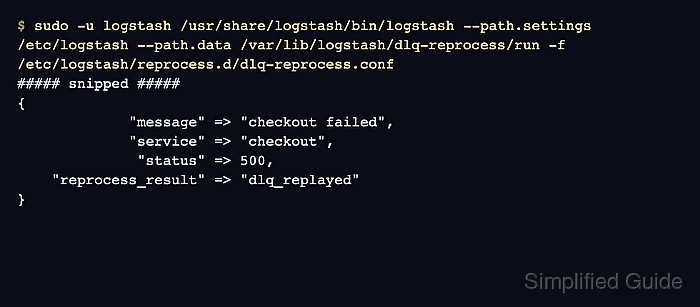
The sample output shows the failed string status replayed as an integer with a recovery marker. When the pipeline uses an elasticsearch output instead of stdout, verify the destination index with a read-capable credential before stopping the recovery run.
- Recheck the source pipeline DLQ size after the recovery run catches up.
$ curl --silent --show-error 'http://localhost:9600/_node/stats/pipelines/main?pretty&filter_path=pipelines.main.dead_letter_queue.queue_size_in_bytes'
{
  "pipelines" : {
    "main" : {
      "dead_letter_queue" : {
        "queue_size_in_bytes" : 0
      }
    }
  }
}
A source pipeline that is still receiving new failures can keep the queue non-empty. If the same segment files remain after the recovery has caught up, confirm that commit_offsets and clean_consumed are both enabled and that the recovery pipeline is reading the correct pipeline_id.
- Remove the preview configuration and temporary validation data after the recovery result is accepted.
$ sudo rm --recursive --force /etc/logstash/reprocess.d/dlq-preview.conf /var/lib/logstash/dlq-reprocess/preview /tmp/logstash-dlq-configtest
Keep /etc/logstash/reprocess.d/dlq-reprocess.conf and /var/lib/logstash/dlq-reprocess/reprocess.sincedb until the batch is confirmed, because they record how the committed replay was performed.