Enabling the Logstash dead letter queue writes eligible failed events to disk instead of dropping them immediately. It is useful when Elasticsearch rejects documents, mapping conflicts appear, or conditional logic fails and the bad events need inspection after the pipeline keeps running.
The dead letter queue is not a universal retry buffer. Elastic supports DLQ writes for individual Elasticsearch output failures with HTTP-style status 400 or 404 and for events that fail during conditional evaluation; connection failures and whole-request output failures follow the output plugin's retry behavior instead.
On Debian and RPM package installs, /etc/logstash/logstash.yml controls the feature and path.data normally resolves to /var/lib/logstash. DLQ settings are process settings, so a package-based service needs a syntax test and restart before the node API reports dead_letter_queue_enabled and the active queue policy.
Steps to enable the Logstash dead letter queue:
- Open the packaged Logstash settings file.
$ sudoedit /etc/logstash/logstash.yml
- Enable the dead letter queue and set the queue limit.
dead_letter_queue.enable: true
dead_letter_queue.max_bytes: 1024mb
#dead_letter_queue.storage_policy: drop_newer
#dead_letter_queue.retain.age: 7d
#path.dead_letter_queue: /var/lib/logstash/dead_letter_queue
Each pipeline gets its own child directory under the top-level DLQ path. With the packaged path.data default, the main pipeline uses /var/lib/logstash/dead_letter_queue/main unless path.dead_letter_queue points somewhere else.
Elastic requires DLQ files on a local filesystem. Do not place path.dead_letter_queue on NFS or share the same DLQ path between two Logstash instances.
- Test the packaged configuration with the service settings directory.
$ sudo -u logstash /usr/share/logstash/bin/logstash --path.settings /etc/logstash --path.data /tmp/logstash-configtest --config.test_and_exit
Using bundled JDK: /usr/share/logstash/jdk
Sending Logstash logs to /var/log/logstash which is now configured via log4j2.properties
##### snipped #####
Configuration OK
[2026-06-18T20:49:14,114][INFO ][logstash.runner          ] Using config.test_and_exit mode. Config Validation Result: OK. Exiting Logstash
The temporary --path.data directory must be writable by the logstash user and keeps the validation away from the live service data directory. Current Logstash defaults allow_superuser to false, so package-based tests should run as the logstash service account.
Related: How to test a Logstash pipeline configuration - Restart the Logstash service.
$ sudo systemctl restart logstash.service
Restarting Logstash pauses every active pipeline while inputs reopen, filters recompile, and outputs reconnect. Changes in /etc/logstash/logstash.yml are not applied by automatic pipeline reload.
Related: How to manage the Logstash service with systemctl in Linux
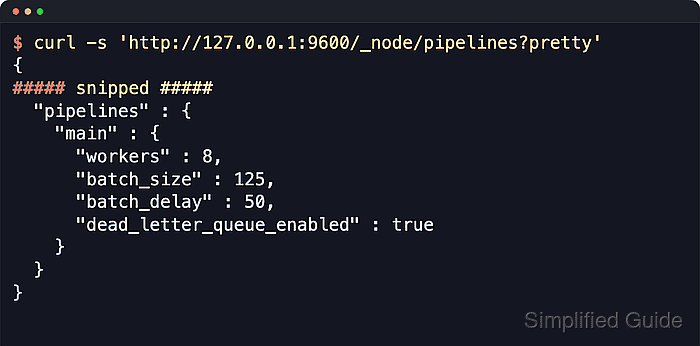
Related: How to enable Logstash pipeline reloads - Query the pipeline settings API and confirm that the target pipeline reports the DLQ as enabled.
$ curl -s 'http://localhost:9600/_node/pipelines?pretty'
{
##### snipped #####
  "pipelines" : {
    "main" : {
      "workers" : 10,
      "batch_size" : 125,
      "batch_delay" : 50,
      "dead_letter_queue_enabled" : true,
      "dead_letter_queue_path" : "/var/lib/logstash/dead_letter_queue/main"
    }
  }
}
Replace main when /etc/logstash/pipelines.yml uses a different pipeline.id. Packaged installs normally expose the node API on localhost within the 9600-9700 port range unless api.http.host or api.http.port changes that listener.
Related: How to check Logstash pipeline metrics - Check the runtime DLQ policy and size limit for the same pipeline.
$ curl -s 'http://localhost:9600/_node/stats/pipelines/main?pretty'
{
##### snipped #####
  "dead_letter_queue" : {
    "storage_policy" : "drop_newer",
    "max_queue_size_in_bytes" : 1073741824,
    "queue_size_in_bytes" : 1,
    "last_error" : "no errors",
    "dropped_events" : 0,
    "expired_events" : 0
  }
##### snipped #####
}
The dead_letter_queue object proves the runtime policy after the restart. A growing dropped_events value or a last_error value other than no errors means the queue is no longer accepting every eligible failed event.
- Remove the temporary validation data directory.
$ sudo rm --recursive --force /tmp/logstash-configtest

Mohd Shakir Zakaria is a cloud architect with deep roots in software development and open-source advocacy. Certified in AWS, Red Hat, VMware, ITIL, and Linux, he specializes in designing and managing robust cloud and on-premises infrastructures.


