How to run a rolling upgrade for Elasticsearch
A rolling upgrade moves a self-managed Elasticsearch cluster to a newer supported release one node at a time while the cluster keeps serving search and indexing traffic. It is the normal production path for package-based patch, minor, and supported major upgrades when replica placement and master-eligible capacity can tolerate each node restart.
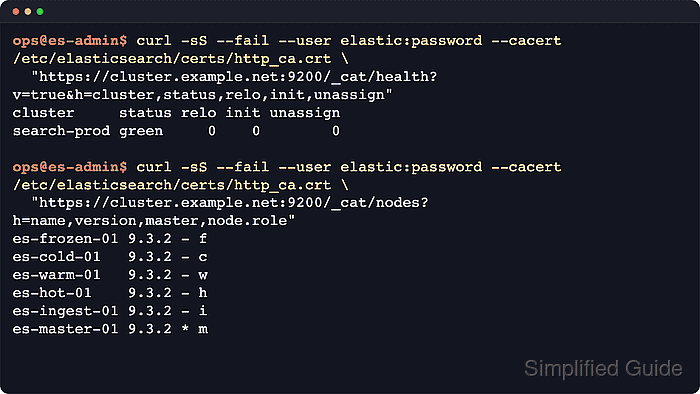
During the upgrade window, mixed Elasticsearch versions are temporary and should not remain after maintenance. Upgrade data nodes first in tier order, continue with non-data and non-master nodes such as ML, ingest, transform, remote-cluster, or coordinating nodes, and leave master-eligible plus voting-only nodes until the end.
A supported upgrade path, a recent snapshot, and clean preparation matter more than speed. For most upgrades from 8.x to 9.x, prepare on the latest 8.19 patch release, resolve Upgrade Assistant blockers, keep HTTPS authentication and certificate trust consistent for API calls, and reinstall every non-bundled plugin before starting each upgraded node.
Steps to run a rolling upgrade for Elasticsearch:
- Record the current node versions and roles before the first restart.
$ curl --silent --show-error --fail --user elastic \
  "https://cluster.example.net:9200/_cat/nodes?v=true&h=name,ip,version,master,node.role"
name         ip           version master node.role
es-frozen-01 192.0.2.31   8.19.7  -      f
es-cold-01   192.0.2.21   8.19.7  -      c
es-warm-01   192.0.2.22   8.19.7  -      w
es-hot-01    192.0.2.11   8.19.7  -      h
es-ingest-01 192.0.2.41   8.19.7  -      i
es-master-01 192.0.2.51   8.19.7  *      m
Upgrade data nodes in tier order: data_frozen, data_cold, data_warm, data_hot, then other data nodes such as data_content. Continue with dedicated ML, ingest, transform, remote-cluster-client, and coordinating nodes, and upgrade master-eligible plus voting-only nodes last.
- Verify the cluster is green before taking any node out of service.
$ curl --silent --show-error --fail --user elastic \
  "https://cluster.example.net:9200/_cluster/health?wait_for_status=green&wait_for_no_relocating_shards=true&wait_for_no_initializing_shards=true&pretty"
{
  "cluster_name" : "search-prod",
  "status" : "green",
  "timed_out" : false,
  "number_of_nodes" : 6,
  "number_of_data_nodes" : 4,
  "active_primary_shards" : 184,
  "active_shards" : 368,
  "relocating_shards" : 0,
  "initializing_shards" : 0,
  "unassigned_shards" : 0,
  "number_of_pending_tasks" : 0,
  "active_shards_percent_as_number" : 100.0
}
Use the same HTTPS endpoint, credential, and CA trust for each API call. Add --cacert /etc/elasticsearch/certs/http_ca.crt when the certificate is signed by a private CA.
Related: How to monitor Elasticsearch cluster health - Confirm the snapshot that would be used if the upgrade must be abandoned.
$ curl --silent --show-error --fail --user elastic \
  "https://cluster.example.net:9200/_cat/snapshots/prod_repo?v=true&s=end_epoch:desc&h=id,status,end_epoch,duration,indices,successful_shards,failed_shards"
id                     status  end_epoch  duration indices successful_shards failed_shards
upgrade-2026.06.18-01 SUCCESS 1781769908 28s          184               368             0
After any node has joined on the new version, rollback means restoring from a supported snapshot rather than downgrading that node in place.
- Enable ML upgrade mode if the cluster runs active machine learning jobs or datafeeds.
$ curl --silent --show-error --fail --user elastic \
  --request POST "https://cluster.example.net:9200/_ml/set_upgrade_mode?enabled=true"
{
  "acknowledged" : true
}
Omit ML upgrade mode when the cluster does not use ML. Upgrade mode temporarily prevents new jobs from opening and avoids manually closing every job and datafeed.
- Disable replica allocation before stopping the next data node.
$ curl --silent --show-error --fail --user elastic \
  --request PUT "https://cluster.example.net:9200/_cluster/settings?pretty" \
  --header "Content-Type: application/json" \
  --data '{
  "persistent": {
    "cluster.routing.allocation.enable": "primaries"
  }
}'
{
  "acknowledged" : true,
  "persistent" : {
    "cluster" : {
      "routing" : {
        "allocation" : {
          "enable" : "primaries"
        }
      }
    }
  },
  "transient" : { }
}
Do this only when the selected node currently holds data. Dedicated ingest, coordinating, ML, transform, remote-cluster-client, and master-only nodes do not need replica allocation disabled first.
Related: How to control shard allocation in Elasticsearch - Flush the cluster after pausing non-essential indexing.
$ curl --silent --show-error --fail --user elastic \
  --request POST "https://cluster.example.net:9200/_flush?pretty"
{
  "_shards" : {
    "total" : 368,
    "successful" : 368,
    "failed" : 0
  }
}
The flush is optional, but recovery is faster when recent writes have already been committed to disk.
- Stop the Elasticsearch service on the selected node.
$ sudo systemctl stop elasticsearch.service
- Refresh package metadata on the stopped node.
$ sudo apt-get update
Hit:1 https://artifacts.elastic.co/packages/9.x/apt stable InRelease
Reading package lists... Done
On Debian and Ubuntu nodes, apt-get upgrades packages from the configured Elastic repository. Use the equivalent RPM transaction on RPM-based nodes.
Related: How to install Elasticsearch on Ubuntu or Debian - Upgrade the stopped node to the target Elasticsearch package version.
$ sudo apt-get install --only-upgrade elasticsearch
Reading package lists... Done
Building dependency tree... Done
Reading state information... Done
The following packages will be upgraded:
  elasticsearch
1 upgraded, 0 newly installed, 0 to remove and 0 not upgraded.
##### snipped #####
Setting up elasticsearch (9.4.2) ...
Review package prompts before accepting file replacements. Losing /etc/elasticsearch/elasticsearch.yml, JVM overrides, logging settings, or keystore-adjacent files can keep the node from rejoining.
- Review configuration overrides before starting the upgraded node.
Leave cluster.initial_master_nodes unset because the node is joining an existing cluster. Keep discovery.seed_hosts or discovery.seed_providers configured, and move custom JVM or logging overrides into the target version's supported override files.
- List installed Elasticsearch plugins on the stopped node.
$ sudo /usr/share/elasticsearch/bin/elasticsearch-plugin list
analysis-icu
Skip plugin removal and installation when this command returns no plugins.
- Remove each extra plugin that must be reinstalled for the new node version.
$ sudo /usr/share/elasticsearch/bin/elasticsearch-plugin remove analysis-icu
-> Removing analysis-icu...
-> Removed analysis-icu
- Install the plugin that matches the upgraded Elasticsearch version.
$ sudo /usr/share/elasticsearch/bin/elasticsearch-plugin install --batch analysis-icu
-> Installing analysis-icu
-> Installed analysis-icu
Repeat the remove and install steps for every listed plugin. Most plugins are version-specific and must be reinstalled whenever the node version changes.
- Start the upgraded node.
$ sudo systemctl start elasticsearch.service
- Confirm the upgraded node rejoined the cluster with the target version.
$ curl --silent --show-error --fail --user elastic \
  "https://cluster.example.net:9200/_cat/nodes?v=true&h=name,version,master,node.role"
name         version master node.role
es-frozen-01 9.4.2   -      f
es-cold-01   8.19.7  -      c
es-warm-01   8.19.7  -      w
es-hot-01    8.19.7  -      h
es-ingest-01 8.19.7  -      i
es-master-01 8.19.7  *      m
Do not add cluster.initial_master_nodes for a rolling upgrade restart. The upgraded node is rejoining an existing cluster, not bootstrapping a new cluster.
- Re-enable shard allocation after the upgraded data node is back in the cluster.
$ curl --silent --show-error --fail --user elastic \
  --request PUT "https://cluster.example.net:9200/_cluster/settings?pretty" \
  --header "Content-Type: application/json" \
  --data '{
  "persistent": {
    "cluster.routing.allocation.enable": null
  }
}'
{
  "acknowledged" : true,
  "persistent" : { },
  "transient" : { }
}
Omit the allocation reset when allocation was never restricted for the selected node.
Related: How to control shard allocation in Elasticsearch - Wait for shard recovery before touching the next node.
$ curl --silent --show-error --fail --user elastic \
  "https://cluster.example.net:9200/_cluster/health?wait_for_status=green&wait_for_no_relocating_shards=true&wait_for_no_initializing_shards=true&pretty"
{
  "cluster_name" : "search-prod",
  "status" : "green",
  "timed_out" : false,
  "number_of_nodes" : 6,
  "number_of_data_nodes" : 4,
  "active_primary_shards" : 184,
  "active_shards" : 368,
  "relocating_shards" : 0,
  "initializing_shards" : 0,
  "unassigned_shards" : 0,
  "number_of_pending_tasks" : 0,
  "active_shards_percent_as_number" : 100.0
}
If this request times out or the cluster remains yellow, inspect shard allocation before continuing with the next node.
Related: How to monitor Elasticsearch cluster health - Repeat the disable, stop, upgrade, start, allocation, and recovery cycle for the remaining nodes in the supported order.
Complete data nodes tier by tier first, then dedicated ML, ingest, transform, remote-cluster-client, and coordinating nodes, and master-eligible plus voting-only nodes last.
Do not stop half or more master-eligible nodes at the same time, because the cluster can lose the ability to elect or keep a master.
- Disable ML upgrade mode after the last node is back if it was enabled earlier.
$ curl --silent --show-error --fail --user elastic \
  --request POST "https://cluster.example.net:9200/_ml/set_upgrade_mode?enabled=false"
{
  "acknowledged" : true
}
Omit this API call when ML upgrade mode was never enabled.
- Verify all nodes report the target version after the final restart.
$ curl --silent --show-error --fail --user elastic \
  "https://cluster.example.net:9200/_cat/nodes?v=true&h=name,ip,version,master,node.role"
name         ip           version master node.role
es-frozen-01 192.0.2.31   9.4.2   -      f
es-cold-01   192.0.2.21   9.4.2   -      c
es-warm-01   192.0.2.22   9.4.2   -      w
es-hot-01    192.0.2.11   9.4.2   -      h
es-ingest-01 192.0.2.41   9.4.2   -      i
es-master-01 192.0.2.51   9.4.2   *      m
- Confirm the cluster is fully healthy after the last node upgrade.
$ curl --silent --show-error --fail --user elastic \
  "https://cluster.example.net:9200/_cluster/health?wait_for_status=green&wait_for_no_relocating_shards=true&wait_for_no_initializing_shards=true&pretty"
{
  "cluster_name" : "search-prod",
  "status" : "green",
  "timed_out" : false,
  "number_of_nodes" : 6,
  "number_of_data_nodes" : 4,
  "active_primary_shards" : 184,
  "active_shards" : 368,
  "relocating_shards" : 0,
  "initializing_shards" : 0,
  "unassigned_shards" : 0,
  "number_of_pending_tasks" : 0,
  "active_shards_percent_as_number" : 100.0
}
After a major upgrade, review archived settings and continue with compatible upgrades for Kibana, ingest components, and client libraries that still target older versions.
Related: How to monitor Elasticsearch cluster health