How to configure Elasticsearch node roles
Making node roles explicit keeps cluster coordination, shard placement, and feature workloads on the right hosts. Dedicated role layouts help prevent master elections, ingest pipelines, tiered storage, and query traffic from competing for the same CPU, heap, and disk profile as the cluster grows.
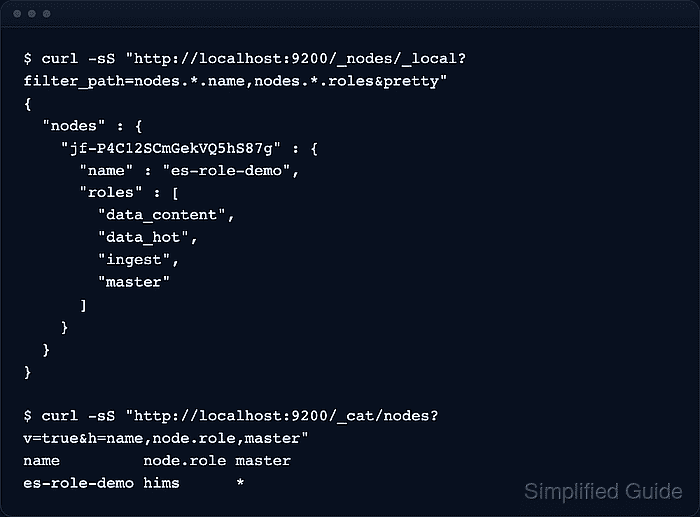
Elasticsearch reads node.roles from /etc/elasticsearch/elasticsearch.yml when a node starts. If node.roles is not set, current self-managed nodes start with the default role set, including master, generic data, the built-in data tier roles, ingest, ml, remote_cluster_client, and transform. Once node.roles is set, it becomes a full override, so every role the node still needs must be listed explicitly.
Role changes take effect only after a restart, and reusing a former data or master-eligible node can fail if shard or index metadata is left on disk after those roles are removed. Current Elastic guidance also requires either generic data or both data_content and data_hot somewhere in the cluster. Secured deployments need the normal authenticated HTTPS endpoint when running the API checks below.
Steps to configure Elasticsearch node roles:
- Record the current node names and cluster-wide role letters before changing any configuration.
$ curl -sS --fail "http://localhost:9200/_cat/nodes?v=true&h=name,node.role,master"
name         node.role master
es-role-demo hims      *
The current node.role CAT column uses compact letters such as m for master, h for data_hot, s for data_content, i for ingest, and - for a coordinating-only node.
Secured clusters usually require the authenticated HTTPS endpoint used by operators for that cluster.
- Confirm the cluster will still keep the required role coverage after the change.
Every cluster still needs master coverage and either generic data or both data_content and data_hot. Features such as ingest pipelines, machine learning, transforms, and cross-cluster search also need ingest, ml, transform, and remote_cluster_client where those workloads run.
- Open /etc/elasticsearch/elasticsearch.yml with sudo privileges.
$ sudoedit /etc/elasticsearch/elasticsearch.yml
- Set node.roles to the exact list that node should advertise at startup.
# General-purpose node
node.roles: [ master, data, ingest ]

# Dedicated master-eligible node
# node.roles: [ master ]

# Coordinating-only node
# node.roles: [ ]
Setting node.roles replaces the default role set. Keep every required role explicitly, and do not mix generic data with specialized tier roles such as data_hot or data_warm on the same node.
- Stop Elasticsearch first if the node is being repurposed to remove data or master responsibilities from an existing host.
$ sudo systemctl stop elasticsearch
- Run the repurpose tool on a stopped node when leftover shard or index metadata must be cleaned up for the new role set.
$ sudo /usr/share/elasticsearch/bin/elasticsearch-node repurpose
Current Elastic guidance reserves elasticsearch-node repurpose for stopped nodes only. Removing data deletes leftover shard data, while removing both data and master also removes leftover index metadata. Run it only after shards have been drained or when the remaining on-disk data is safe to discard.
Skip this step for brand-new nodes or for hosts that keep the same data and master responsibilities.
- Restart Elasticsearch to load the new role set.
$ sudo systemctl restart elasticsearch
- Confirm the service is active after the restart.
$ systemctl is-active elasticsearch
active
If the unit fails, check journalctl --unit=elasticsearch.service --no-pager before retrying.
- Verify the local node now reports the intended explicit roles.
$ curl -sS --fail "http://localhost:9200/_nodes/_local?filter_path=nodes.*.name,nodes.*.roles&pretty"
{
  "nodes" : {
    "jf-P4C12SCmGekVQ5hS87g" : {
      "name" : "es-role-demo",
      "roles" : [
        "data_content",
        "data_hot",
        "ingest",
        "master"
      ]
    }
  }
}
The Nodes API returns full role names, which is easier to audit than the condensed CAT output.
- Recheck the cluster-wide view so the changed node appears with the expected role letters alongside the rest of the cluster.
$ curl -sS --fail "http://localhost:9200/_cat/nodes?v=true&h=name,node.role,master"
name         node.role master
es-role-demo hims      *
Use the role letters as a quick cluster-wide spot check, but treat the Nodes API as the authoritative detail view when auditing exact roles.
- Confirm cluster health after the role change and, when data roles moved, verify that shards are assigned again.
$ curl -sS --fail "http://localhost:9200/_cluster/health/role-check-000001?pretty"
{
  "cluster_name" : "docker-cluster",
  "status" : "green",
  "timed_out" : false,
  "number_of_nodes" : 1,
  "number_of_data_nodes" : 1,
  "active_primary_shards" : 1,
  "active_shards" : 1,
  "relocating_shards" : 0,
  "initializing_shards" : 0,
  "unassigned_shards" : 0,
  "unassigned_primary_shards" : 0,
  "delayed_unassigned_shards" : 0,
  "number_of_pending_tasks" : 0,
  "number_of_in_flight_fetch" : 0,
  "task_max_waiting_in_queue_millis" : 0,
  "active_shards_percent_as_number" : 100.0
}
$ curl -sS --fail "http://localhost:9200/_cat/shards/role-check-000001?v=true&h=index,shard,prirep,state,node" index shard prirep state node role-check-000001 0 p STARTED es-role-demo
Replace role-check-000001 with a real index in the cluster. A yellow state can be normal while replicas relocate or when a single-node test cluster has replicas configured, but unassigned primaries or a stuck restart need follow-up before the role change is considered complete.