A dedicated coordinating-only node gives clients one consistent query and bulk-ingest entry point without spending data-node or master-node CPU on request fan-out, result reduction, and response assembly.
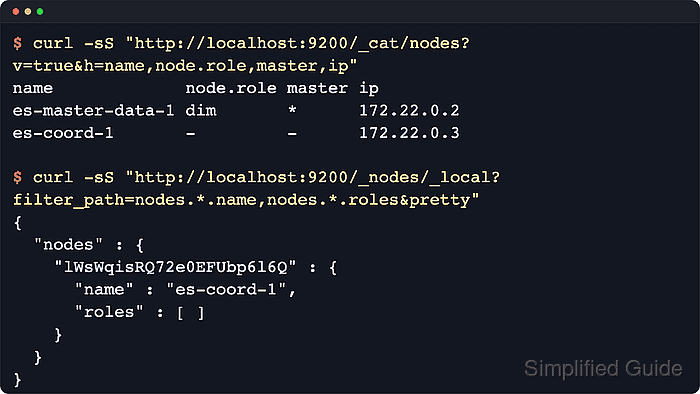
In Elasticsearch, every node can coordinate requests, but setting node.roles to an explicit empty list removes master, data, ingest, and other specialist duties so the node only routes requests, handles the search gather phase, and distributes bulk indexing. Elastic node-role guidance describes coordinating-only nodes as smart load balancers that keep a full copy of the cluster state and route traffic directly to the right shards.
A coordinating-only node still needs enough heap and CPU for large aggregations and high-concurrency searches, and adding too many of them increases cluster-state acknowledgement work on the elected master. When converting an existing node that previously held shard data or master metadata, drain the node first and keep an empty or repurposed data path before restart, otherwise startup can fail; secured clusters also require HTTPS, authentication, and a trusted CA for the API checks.
Steps to configure a coordinating-only node in Elasticsearch:
- If the node previously held shards, exclude it from shard allocation before removing its data roles.
$ curl -sS --fail -H "Content-Type: application/json" --request PUT "http://localhost:9200/_cluster/settings?pretty&flat_settings=true" --data '{
  "persistent" : {
    "cluster.routing.allocation.exclude._name" : "es-coord-1"
  }
}'
{
  "acknowledged" : true,
  "persistent" : {
    "cluster.routing.allocation.exclude._name" : "es-coord-1"
  },
  "transient" : { }
}
Wait until shards have drained from the node before restarting it with the new role set.
- Open /etc/elasticsearch/elasticsearch.yml in an editor with sudo privileges.
$ sudoedit /etc/elasticsearch/elasticsearch.yml
- Set node.roles to an empty list while keeping the node's existing cluster discovery and security settings intact.
node.roles: [ ]
Elastic docs note that nodes without both master and data roles refuse to start if index metadata remains on disk, so a brand-new node with an empty path.data is the simplest coordinating-only build; if the host must be reused, follow the repurposing steps or use elasticsearch-node repurpose only after draining data first.
- Restart the elasticsearch service to apply the role change.
$ sudo systemctl restart elasticsearch.service
Coordinating-only nodes still need enough heap and CPU for large aggregations, scrolls, and high-concurrency search traffic.
- Verify the local node reports no roles through the node info API.
$ curl -sS --fail "http://localhost:9200/_nodes/_local?filter_path=nodes.*.name,nodes.*.roles&pretty"
{
  "nodes" : {
    "6utUaVeJR4GtQLlfZrseVQ" : {
      "name" : "es-coord-1",
      "roles" : [ ]
    }
  }
}
Secured deployments usually need the authenticated HTTPS endpoint used by operators for that cluster.
- Confirm the cluster-wide node role view marks the node as coordinating-only.
$ curl -sS --fail "http://localhost:9200/_cat/nodes?v=true&h=name,node.role,master"
name             node.role   master
es-coord-1       -           -
es-master-data-1 cdfhilmrstw *
The node.role CAT column uses - for a coordinating-only node, while compact letters such as m for master-eligible, d for data, and i for ingest can appear on mixed-role nodes.
- Index a temporary document through the coordinating endpoint.
$ curl -sS --fail -H "Content-Type: application/json" --request PUT "http://localhost:9200/coord-smoke/_doc/1?refresh=true&pretty" --data '{"service":"coord","status":"routed"}'
{
  "_index" : "coord-smoke",
  "_id" : "1",
  "_version" : 1,
  "result" : "created",
  "forced_refresh" : true,
  "_shards" : {
    "total" : 2,
    "successful" : 1,
    "failed" : 0
  },
  "_seq_no" : 0,
  "_primary_term" : 1
}
This request is sent to the coordinating-only node, but the primary shard is handled by a data node.
- Search the temporary document through the same endpoint.
$ curl -sS --fail "http://localhost:9200/coord-smoke/_search?q=service:coord&filter_path=hits.total,hits.hits._source&pretty" { "hits" : { "total" : { "value" : 1, "relation" : "eq" }, "hits" : [ { "_source" : { "service" : "coord", "status" : "routed" } } ] } } - Remove the temporary smoke-test index.
$ curl -sS --fail --request DELETE "http://localhost:9200/coord-smoke?pretty" { "acknowledged" : true } - Check cluster health through the coordinating endpoint.
$ curl -sS --fail "http://localhost:9200/_cluster/health?filter_path=cluster_name,status,number_of_nodes,number_of_data_nodes,active_primary_shards,active_shards,relocating_shards,initializing_shards,unassigned_shards,number_of_pending_tasks,active_shards_percent_as_number&pretty"
{
  "cluster_name" : "sg-coord-verify",
  "status" : "green",
  "number_of_nodes" : 2,
  "number_of_data_nodes" : 1,
  "active_primary_shards" : 2,
  "active_shards" : 2,
  "relocating_shards" : 0,
  "initializing_shards" : 0,
  "unassigned_shards" : 0,
  "number_of_pending_tasks" : 0,
  "active_shards_percent_as_number" : 100.0
}
A yellow status can still be expected while replica shards are unassigned or relocating, so focus on whether requests succeed and whether any primary shards remain unassigned.
- Clear the temporary allocation exclude after the node rejoins as coordinating-only.
$ curl -sS --fail -H "Content-Type: application/json" --request PUT "http://localhost:9200/_cluster/settings?pretty&flat_settings=true" --data '{
  "persistent" : {
    "cluster.routing.allocation.exclude._name" : null
  }
}'
{
  "acknowledged" : true,
  "persistent" : { },
  "transient" : { }
}
Skip this step when the node was created as coordinating-only from the beginning and no drain filter was set.

Mohd Shakir Zakaria is a cloud architect with deep roots in software development and open-source advocacy. Certified in AWS, Red Hat, VMware, ITIL, and Linux, he specializes in designing and managing robust cloud and on-premises infrastructures.


