How to configure DRBD quorum
DRBD quorum keeps a replicated resource from accepting writes when a node is no longer part of a voting partition. Configure it on resources where an isolated Primary must stop I/O instead of continuing with data that could diverge from the surviving peer set.
The setting belongs in the resource options section of the .res file under /etc/drbd.d or in the common options section for a deliberate cluster-wide default. Per-resource configuration is easier to review during a maintenance change because the quorum policy, loss action, and any diskless tiebreaker are visible beside the resource definition.
Use majority for the common diskful-pair plus diskless-tiebreaker design, all only when every voting node must remain reachable, and a number only when the node count is deliberately fixed. Choose on-no-quorum io-error when the application or cluster manager can unmount and demote after failed I/O, or on-no-quorum suspend-io when writes should freeze until an operator recovers the lost Primary.
Related: How to check DRBD resource status
Related: How to configure DRBD fencing
Related: How to recover DRBD split brain
Steps to configure DRBD quorum:
- Check the resource state before changing quorum policy.
$ sudo drbdadm status webdata
webdata role:Primary
  disk:UpToDate
  beta role:Secondary
    peer-disk:UpToDate
  gamma role:Secondary
    peer-disk:Diskless
Do not apply a new quorum policy while the resource is in split brain, resynchronizing from an unknown source, or missing a peer that might still contain newer data.
Related: How to check DRBD resource status
- Back up the active resource file on the first node.
$ sudo cp /etc/drbd.d/webdata.res /etc/drbd.d/webdata.res.before-quorum
- Open the resource file on the first node.
$ sudoedit /etc/drbd.d/webdata.res
- Add the quorum policy, loss action, and diskless tiebreaker mapping to the resource.
resource "webdata" {
  options {
    quorum majority;
    on-no-quorum io-error;
  }

  net {
    protocol C;
  }

  device minor 1;
  disk "/dev/vg_drbd/webdata";
  meta-disk internal;

  on "alpha" {
    node-id 0;
    address 192.0.2.10:7789;
  }
  on "beta" {
    node-id 1;
    address 192.0.2.11:7789;
  }
  on "gamma" {
    node-id 2;
    disk none;
    address 192.0.2.12:7789;
  }

  connection-mesh {
    hosts alpha beta gamma;
  }
}
quorum majority lets a Primary keep writing only while it is in a majority partition. The gamma node is diskless, so it can vote as a tiebreaker without storing a copy of the data.
Use on-no-quorum suspend-io only when the recovery plan covers a suspended primary. I/O can remain frozen until the resource is demoted, reconnected, or recovered with the intended cluster manager.
- Copy the updated resource file to a peer node.
$ scp /etc/drbd.d/webdata.res admin@beta:/tmp/webdata.res
Repeat the copy for the diskless tiebreaker and any other node with an on section. Configuration management can replace manual copy commands when it installs the same resource file everywhere.
- Install the updated file on the peer node.
$ ssh admin@beta 'sudo install --mode=0644 /tmp/webdata.res /etc/drbd.d/webdata.res'
Mismatched resource files can leave nodes voting with different quorum rules after a reboot, failover, or later drbdadm adjust.
- Parse the active resource file on the first node.
$ sudo drbdadm dump webdata
# resource webdata on alpha: not ignored, not stacked
# defined at /etc/drbd.d/webdata.res:1
resource webdata {
    device               minor 1;
    disk                 /dev/vg_drbd/webdata;
    meta-disk            internal;
##### snipped #####
    connection-mesh {
        hosts alpha beta gamma;
    }
    options {
        quorum           majority;
        on-no-quorum     io-error;
    }
    net {
        protocol           C;
    }
}
Run the same parser check on every node that has an on section for the resource.
Related: How to validate DRBD configuration - Preview the runtime change without applying it.
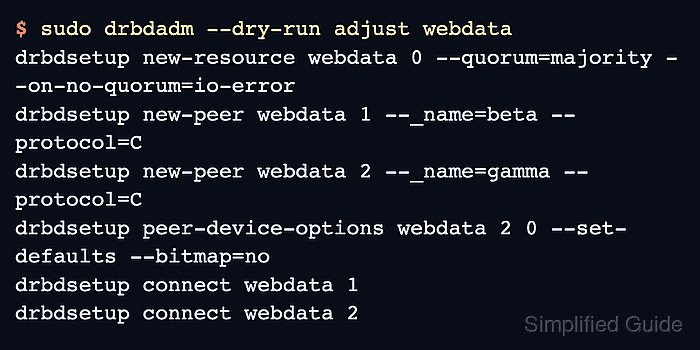
$ sudo drbdadm --dry-run adjust webdata
drbdsetup new-resource webdata 0 --quorum=majority --on-no-quorum=io-error
drbdsetup new-peer webdata 1 --_name=beta --protocol=C
drbdsetup new-peer webdata 2 --_name=gamma --protocol=C
drbdsetup peer-device-options webdata 2 0 --set-defaults --bitmap=no
drbdsetup connect webdata 1
drbdsetup connect webdata 2
The dry run should show --quorum=majority and --on-no-quorum=io-error in the drbdsetup new-resource or resource-options call.
- Apply the adjusted resource on the first node.
$ sudo drbdadm adjust webdata
No output is expected when drbdadm adjust applies the change successfully.
- Apply the same adjusted resource on a peer node.
$ ssh beta sudo drbdadm adjust webdata
Repeat this on the tiebreaker node, for example ssh gamma sudo drbdadm adjust webdata, so every node participates with the same quorum policy.
- Confirm the resource is still connected after the adjustment.
$ sudo drbdadm status webdata webdata role:Primary disk:UpToDate beta role:Secondary replication:Established peer-disk:UpToDate gamma role:Secondary replication:Established peer-disk:Diskless - Test a single tiebreaker loss only in a lab or approved maintenance window.
$ sudo drbdadm disconnect webdata:gamma
This interrupts one DRBD connection. Do not run a quorum-loss test on a production workload unless the failover, application recovery, and reconnection plan are approved.
- Verify that the Primary still has quorum through the diskful peer.
$ sudo drbdadm status webdata
webdata role:Primary
  disk:UpToDate
  beta role:Secondary
    replication:Established peer-disk:UpToDate
  gamma connection:Connecting
If the Primary also loses the diskful peer, quorum is lost and DRBD follows the configured on-no-quorum action.
- Reconnect the tiebreaker after the controlled test.
$ sudo drbdadm connect webdata:gamma