How to query DNS over TCP with dig
DNS clients normally send ordinary lookups over UDP, but resolvers and authoritative servers also need to answer on TCP port 53. A direct TCP query separates transport reachability from the DNS record question when a firewall, network path, or name server treats the two protocols differently.
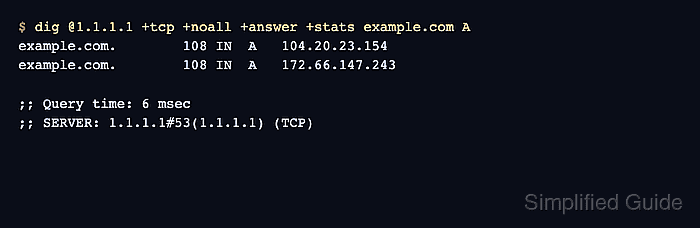
The dig utility uses UDP by default for most queries and automatically retries over TCP after a truncated UDP response. The +tcp option skips that initial exchange and opens a TCP connection to the selected name server for the query.
A successful reply proves that the selected server answered over TCP from the client path that ran the command. The (TCP) suffix on the SERVER statistics line identifies the transport, while the header status and answer rows show how the server handled the DNS question.
Steps to query DNS over TCP with dig:
- Run an A record query for example.com through Cloudflare's 1.1.1.1 resolver with +tcp.
$ dig @1.1.1.1 example.com A +tcp +noall +comments +answer +stats
;; Got answer:
;; ->>HEADER<<- opcode: QUERY, status: NOERROR, id: 34158
;; flags: qr rd ra; QUERY: 1, ANSWER: 2, AUTHORITY: 0, ADDITIONAL: 1

;; OPT PSEUDOSECTION:
; EDNS: version: 0, flags:; udp: 1232
;; ANSWER SECTION:
example.com.        50      IN      A       172.66.147.243
example.com.        50      IN      A       104.20.23.154

;; Query time: 8 msec
;; SERVER: 1.1.1.1#53(1.1.1.1) (TCP)
;; WHEN: Sun Jul 12 21:41:41 UTC 2026
;; MSG SIZE  rcvd: 72
The example uses a public recursive resolver and a documentation domain. Answer order, TTL values, query time, and message ID can differ between runs.
- Confirm that the response header reports status: NOERROR.
NOERROR means the resolver returned a DNS response without a protocol-level error; the ANSWER count and rows still determine whether the requested records were present.
- Verify that the ANSWER SECTION contains the requested A records.
An empty answer with NOERROR is possible when the name exists but has no records of the requested type.
- Confirm that the SERVER line ends with (TCP).
A timeout or connection refusal instead points to TCP port 53 reachability or server policy on the tested path.