How to trace DNS delegation with dig
DNS resolution crosses a hierarchy of parent and child zones before an authoritative server can return the requested record. A record may exist in the child zone yet remain unreachable when a parent publishes the wrong nameservers or a referral cannot be followed.
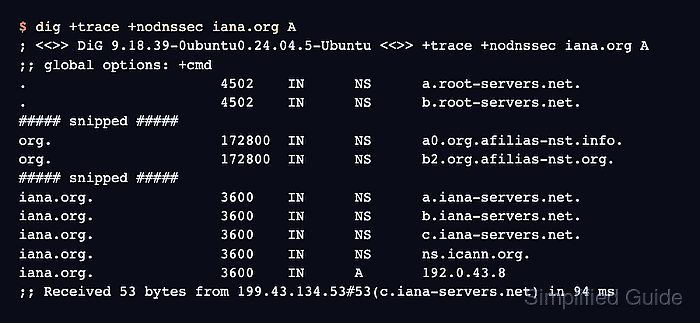
The dig +trace option starts with the root nameserver set and follows referrals iteratively toward the requested name. Adding +nodnssec keeps the display focused on delegation and answer records; remove it when DNSSEC records are part of the investigation.
A trace is not the same as asking the workstation's recursive resolver for an answer. It bypasses that resolver's cache and policy after the initial root discovery, although dig can still consult /etc/resolv.conf when a referral does not include a usable nameserver address.
Steps to trace DNS delegation with dig:
- Choose the public DNS record for the delegation trace.
The observed example uses the iana.org. name with the A record type.
- Run the iterative trace for the chosen public DNS record.
$ dig +trace +nodnssec iana.org. A

; <<>> DiG 9.20.18-1ubuntu2.1-Ubuntu <<>> +trace +nodnssec iana.org. A
;; global options: +cmd
##### snipped #####

org.                    172800  IN      NS      c0.org.afilias-nst.info.
org.                    172800  IN      NS      a0.org.afilias-nst.info.
org.                    172800  IN      NS      b0.org.afilias-nst.org.
##### snipped #####
;; Received 470 bytes from 192.112.36.4#53(g.root-servers.net) in 79 ms

iana.org.               3600    IN      NS      a.iana-servers.net.
iana.org.               3600    IN      NS      b.iana-servers.net.
iana.org.               3600    IN      NS      c.iana-servers.net.
iana.org.               3600    IN      NS      ns.icann.org.
;; Received 168 bytes from 199.19.57.1#53(d0.org.afilias-nst.org) in 161 ms

iana.org.               3600    IN      A       192.0.43.8
iana.org.               86400   IN      NS      a.iana-servers.net.
iana.org.               86400   IN      NS      b.iana-servers.net.
iana.org.               86400   IN      NS      c.iana-servers.net.
iana.org.               86400   IN      NS      ns.icann.org.
;; Received 140 bytes from 199.4.138.53#53(ns.icann.org) in 256 ms
Nameserver order, TTLs, selected servers, and response times can change between runs.
- Read each referral block with the Received line directly below it.
The org. referral came from a root server, the iana.org. referral came from an org. server, and the A answer came from an iana.org. authoritative server. The initial root nameserver block can come from the resolver configured in /etc/resolv.conf.
- Select one nameserver from the final child-zone referral.
The trace lists a.iana-servers.net., b.iana-servers.net., c.iana-servers.net., and ns.icann.org. for the final direct check.
- Query the selected nameserver with recursion disabled to confirm the traced answer.
$ dig @a.iana-servers.net iana.org. A +norecurse +noall +comments +answer
;; Got answer:
;; ->>HEADER<<- opcode: QUERY, status: NOERROR, id: 31755
;; flags: qr aa; QUERY: 1, ANSWER: 1, AUTHORITY: 0, ADDITIONAL: 1

;; OPT PSEUDOSECTION:
; EDNS: version: 0, flags:; udp: 4096
;; ANSWER SECTION:
iana.org.               3600    IN      A       192.0.43.8
The aa flag shows that the selected server answered authoritatively, and the matching A value confirms that the delegation path reached the zone publishing the record.
Related: How to query a specific DNS server with dig