How to authenticate to an HTTP proxy with cURL
An outbound HTTP proxy can block every request until the client proves who it is. When that happens, cURL never reaches the origin server until the proxy accepts the proxy credentials.
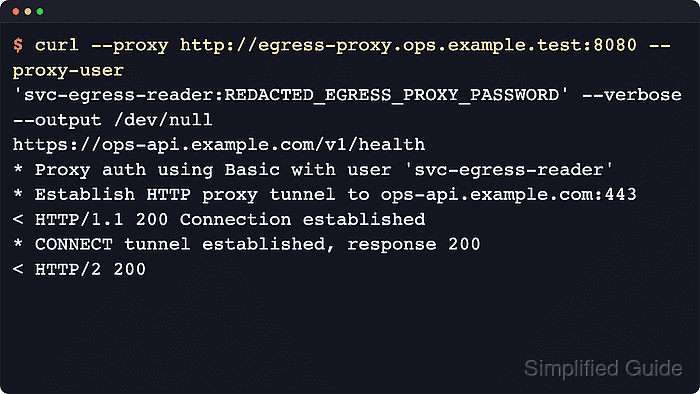
Use --proxy to point cURL at the proxy and --proxy-user to supply the proxy username and password. For HTTP proxies, cURL uses Basic as the default proxy authentication method, so a normal Basic proxy usually needs no extra auth flag. If the proxy advertises more than one scheme, --proxy-anyauth can wait for the challenge and retry with one that cURL supports.
The examples below use masked service-account credentials and placeholder proxy hostnames. Keep proxy secrets out of shell history and shared logs where possible. For a quick local check, inline credentials are acceptable for a one-off test. For repeated work, move them into a short-lived cURL config file and remove it when the task is done.
Steps to authenticate to an HTTP proxy with cURL:
- Send one request without credentials first so the failure is clearly coming from the proxy.
$ curl --proxy http://egress-proxy.ops.example.test:8080 --verbose --max-time 20 --output /dev/null https://ops-api.example.com/v1/health
*   Trying 198.51.100.18:8080...
* Establish HTTP proxy tunnel to ops-api.example.com:443
> CONNECT ops-api.example.com:443 HTTP/1.1
> Host: ops-api.example.com:443
< HTTP/1.1 407 Proxy Authentication Required
< Proxy-Authenticate: Basic realm="Egress Proxy"
* CONNECT tunnel failed, response 407
curl: (7) CONNECT tunnel failed, response 407
A 407 Proxy Authentication Required response comes from the proxy hop. If the origin server challenges instead, the status is usually 401 Unauthorized and the relevant header is WWW-Authenticate rather than Proxy-Authenticate.
- Retry with --proxy-user to send the proxy username and password and prove the request now reaches the upstream service.
$ curl --proxy http://egress-proxy.ops.example.test:8080 \
  --proxy-user 'svc-egress-reader:REDACTED_EGRESS_PROXY_PASSWORD' \
  --silent --show-error --output /dev/null \
  --write-out 'HTTP %{http_code}\n' \
  https://ops-api.example.com/v1/health
HTTP 200
cURL uses Basic as the default authentication method for HTTP proxies, so --proxy-user is enough when the proxy expects Basic.
Inline credentials are easy to expose through shell history, copied commands, and process listings on shared systems. Keep them to short-lived tests or switch to a temporary config file for repeated work.
- Inspect the verbose tunnel handshake when you need proof that the proxy accepted the credentials before the origin response was returned.
$ curl --proxy http://egress-proxy.ops.example.test:8080 \
  --proxy-user 'svc-egress-reader:REDACTED_EGRESS_PROXY_PASSWORD' \
  --verbose --output /dev/null \
  https://ops-api.example.com/v1/health
* Proxy auth using Basic with user 'svc-egress-reader'
> CONNECT ops-api.example.com:443 HTTP/1.1
> Proxy-Authorization: Basic ***REDACTED_PROXY_AUTH***
< HTTP/1.1 200 Connection established
* CONNECT tunnel established, response 200
##### snipped #####
< HTTP/2 200
A successful HTTPS request through an authenticated HTTP proxy shows both the proxy's 200 Connection established response and the final upstream status code. That proves the proxy accepted the credential before the site responded.
Verbose traces expose the encoded Proxy-Authorization header. Redact them before sharing tickets, chat logs, or incident notes.
- Add --proxy-anyauth only when the proxy may advertise more than one authentication scheme and cURL needs to pick one after the challenge.
$ curl --proxy http://egress-proxy.ops.example.test:8080 \
  --proxy-user 'svc-egress-reader:REDACTED_EGRESS_PROXY_PASSWORD' \
  --proxy-anyauth --verbose --output /dev/null \
  https://ops-api.example.com/v1/health
* Establish HTTP proxy tunnel to ops-api.example.com:443
> CONNECT ops-api.example.com:443 HTTP/1.1
< HTTP/1.1 407 Proxy Authentication Required
< Proxy-Authenticate: Basic realm="Egress Proxy"
* Connect me again please
* Proxy auth using Basic with user 'svc-egress-reader'
> CONNECT ops-api.example.com:443 HTTP/1.1
> Proxy-Authorization: Basic ***REDACTED_PROXY_AUTH***
< HTTP/1.1 200 Connection established
##### snipped #####
< HTTP/2 200
--proxy-anyauth adds an extra request-response round trip because cURL waits for the proxy challenge before retrying with a supported method.
If the proxy is fixed to one scheme, prefer the matching flag, such as --proxy-basic, --proxy-digest, --proxy-ntlm, or --proxy-negotiate. Related: Authenticate with NTLM
- Put repeated proxy settings in a short-lived cURL config file when several commands need the same authenticated proxy.
proxy = "http://egress-proxy.ops.example.test:8080"
proxy-user = "svc-egress-reader:REDACTED_EGRESS_PROXY_PASSWORD"
$ chmod 600 curl-proxy.conf
The config file is still plain text. Keep it task-local, restrict it to the current user, and remove it when the work is finished.
- Reuse the temporary config file so the command line stays focused on the actual request instead of repeating the proxy secret.
$ curl --config curl-proxy.conf \
  --silent --show-error --output /dev/null \
  --write-out 'HTTP %{http_code}\n' \
  https://ops-api.example.com/v1/health
HTTP 200
This is a cleaner fit for a short script or a sequence of manual checks than pasting the same --proxy-user value into every command.
- Remove the temporary config file after the proxy-authenticated work is complete.
$ rm -f curl-proxy.conf
For longer-lived proxy credentials, store the secret in the platform's normal secret-management workflow instead of leaving reusable passwords in shell history or on disk.