Plain HTTP tests through a proxy can give the wrong evidence when the proxy relays the request instead of opening the same TCP path the application uses. Forcing CONNECT makes cURL ask the proxy for a tunnel first, which is useful when a backend behaves differently behind a relaying proxy, when a protocol must stay end to end, or when proxy policy troubleshooting needs proof of the exact handshake.
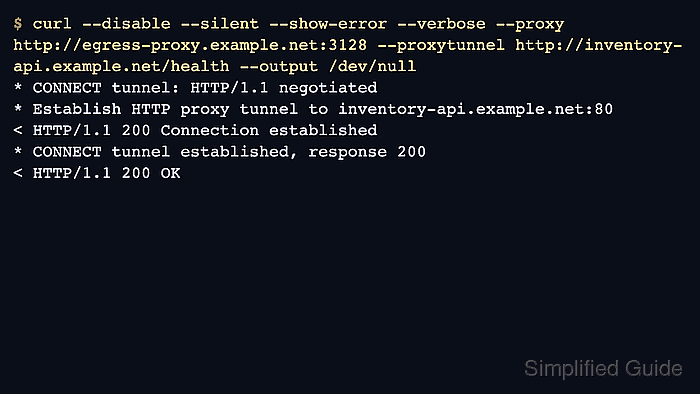
With a normal --proxy request to an HTTP URL, cURL sends the full URL in the request line and the proxy fetches the resource itself. Adding --proxytunnel changes that flow: cURL first asks the proxy to open a TCP connection to the target host and port, and only after 200 Connection established does it send the origin request through that tunnel.
This option only applies to HTTP proxies. HTTPS targets already use CONNECT automatically through most HTTP proxies, while plain HTTP requests and some non-HTTP protocols only tunnel when --proxytunnel is added. Many proxy policies allow CONNECT only to a short port allowlist, so a tunnel to port 80 or a custom service port can still be denied even when the proxy itself is reachable. Use --disable during tests so ~/.curlrc does not quietly add proxy settings or other options that hide the real request path.
Steps to force proxy CONNECT tunneling with cURL:
- Send the request through the HTTP proxy without --proxytunnel first so the relayed baseline is explicit.
$ curl --disable --silent --show-error --verbose --proxy http://egress-proxy.example.net:3128 http://inventory-api.example.net/health --output /dev/null
* Connected to egress-proxy.example.net (198.51.100.24) port 3128
> GET http://inventory-api.example.net/health HTTP/1.1
> Host: inventory-api.example.net
> User-Agent: curl/8.7.1
> Accept: */*
> Proxy-Connection: Keep-Alive
< HTTP/1.1 200 OK
< Content-Type: application/json
A relayed plain-HTTP proxy request sends the full target URL in the request line, so no CONNECT lines appear.
- Repeat the same request with --proxytunnel so the proxy must open a raw TCP path before the origin request is sent.
$ curl --disable --silent --show-error --verbose --proxy http://egress-proxy.example.net:3128 --proxytunnel http://inventory-api.example.net/health --output /dev/null
* Connected to egress-proxy.example.net (198.51.100.24) port 3128
* CONNECT tunnel: HTTP/1.1 negotiated
* Establish HTTP proxy tunnel to inventory-api.example.net:80
> CONNECT inventory-api.example.net:80 HTTP/1.1
> Host: inventory-api.example.net:80
> User-Agent: curl/8.7.1
> Proxy-Connection: Keep-Alive
< HTTP/1.1 200 Connection established
* CONNECT phase completed
* CONNECT tunnel established, response 200
##### snipped #####
> GET /health HTTP/1.1
> Host: inventory-api.example.net
> User-Agent: curl/8.7.1
> Accept: */*
< HTTP/1.1 200 OK
< Content-Type: application/json
If the proxy denies CONNECT to that destination or port, the tunnel fails before the origin request is sent.
- Compare the same proxy against an HTTPS target to confirm that CONNECT is already the normal path there.
$ curl --disable --silent --show-error --verbose --proxy http://egress-proxy.example.net:3128 https://inventory-api.example.net/health --output /dev/null
* Establish HTTP proxy tunnel to inventory-api.example.net:443
> CONNECT inventory-api.example.net:443 HTTP/1.1
> Host: inventory-api.example.net:443
< HTTP/1.1 200 Connection established
* CONNECT tunnel established, response 200
##### snipped #####
* SSL connection using TLSv1.3 / TLS_AES_256_GCM_SHA384
> GET /health HTTP/2
< HTTP/2 200
--proxytunnel is mainly useful when a plain-HTTP request or another protocol must tunnel instead of being relayed by the proxy.
- Add --suppress-connect-headers with --dump-header - when a tunneled request should print only the origin response headers instead of the proxy's CONNECT response.
$ curl --disable --silent --show-error --dump-header - --suppress-connect-headers --proxy http://egress-proxy.example.net:3128 --proxytunnel http://inventory-api.example.net/health --output /dev/null
HTTP/1.1 200 OK
Content-Type: application/json
--suppress-connect-headers only affects header-output modes such as --dump-header or --show-headers. It does not hide the CONNECT exchange from --verbose or --trace.

Mohd Shakir Zakaria is a cloud architect with deep roots in software development and open-source advocacy. Certified in AWS, Red Hat, VMware, ITIL, and Linux, he specializes in designing and managing robust cloud and on-premises infrastructures.


