How to use HTTP/3 with cURL
Using HTTP/3 with cURL confirms that an HTTPS endpoint can complete a request over QUIC before monitoring, edge routing, or client policy depends on that transport. A successful check proves more than an Alt-Svc header because the transfer itself finishes over HTTP/3.
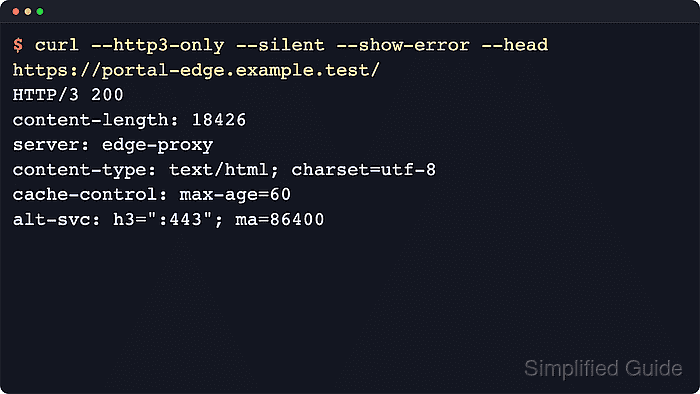
The --http3 option tells cURL to open a QUIC attempt directly to the URL host and port while still allowing HTTP/2 or HTTP/1.1 if the HTTP/3 path fails or is slow. The stricter --http3-only option removes that fallback and fails the transfer when HTTP/3 cannot be established.
Both options require a cURL build whose Features: line includes HTTP3, and HTTP/3 is available only for HTTPS URLs. Packaged builds do not always include QUIC support, HTTP/3 does not work through a proxy in cURL, and firewalls can still block UDP while ordinary HTTPS over TCP succeeds. Put --disable first when a saved ~/.curlrc could add hidden headers, proxy settings, or protocol options to the check.
Related: How to use HTTP/2 in cURL
Related: How to debug HTTP requests with cURL
Tool: cURL Command Generator
Steps to use HTTP/3 with cURL:
- Check the local cURL build for the HTTP3 feature before using protocol-specific flags.
$ curl --version
curl 8.20.0 (aarch64-apple-darwin25.4.0) libcurl/8.20.0 OpenSSL/3.6.2 zlib/1.2.12 brotli/1.2.0 zstd/1.5.7 AppleIDN libssh2/1.11.1 nghttp2/1.69.0 ngtcp2/1.23.0 nghttp3/1.16.0 mit-krb5/1.7-prerelease OpenLDAP/2.4.28/Apple
Release-Date: 2026-04-29
Protocols: dict file ftp ftps gopher gophers http https imap imaps ipfs ipns ldap ldaps mqtt mqtts pop3 pop3s rtsp scp sftp smb smbs smtp smtps telnet tftp ws wss
Features: alt-svc AppleSecTrust AsynchDNS brotli GSS-API HSTS HTTP2 HTTP3 HTTPS-proxy IDN IPv6 Kerberos Largefile libz SPNEGO SSL threadsafe TLS-SRP UnixSockets zstd
Look for HTTP3 in the Features: line. Without it, --http3 and --http3-only fail immediately with an unsupported-option error.
- Send a header request with --http3 to let cURL try HTTP/3 first while still allowing an older protocol when necessary.
$ curl --disable --http3 --silent --show-error --head https://curl.se/
HTTP/3 200
content-length: 11379
server: nginx/1.27.5
content-type: text/html
cache-control: max-age=60
##### snipped #####
alt-svc: h3=":443";ma=86400,h3-29=":443";ma=86400,h3-27=":443";ma=86400
A status line that starts with HTTP/3 confirms that the transfer completed over QUIC instead of a TCP fallback.
Related: How to send HEAD requests with cURL
- Print the negotiated protocol and response code when a script or health check needs one clean result.
$ curl --disable --http3 --silent --show-error --output /dev/null --write-out 'HTTP/%{http_version} %{response_code}\n' https://curl.se/
HTTP/3 200
HTTP/3 200 confirms successful HTTP/3 negotiation and a successful response, while HTTP/2 or HTTP/1.1 shows that the request finished over an earlier HTTP version.
- Inspect verbose output when the transport decision needs stronger proof than the response status line.
$ curl --disable --http3 --verbose --silent --show-error --output /dev/null https://curl.se/
* Host curl.se:443 was resolved.
* IPv6: 2a04:4e42:400::347, 2a04:4e42::347, 2a04:4e42:a00::347, 2a04:4e42:200::347, 2a04:4e42:e00::347, 2a04:4e42:600::347, 2a04:4e42:c00::347, 2a04:4e42:800::347
* IPv4: 151.101.129.91, 151.101.193.91, 151.101.65.91, 151.101.1.91
*   Trying [2a04:4e42:400::347]:443...
##### snipped #####
* using HTTP/3
* [HTTP/3] [0] OPENED stream for https://curl.se/
* [HTTP/3] [0] [:method: GET]
* [HTTP/3] [0] [:scheme: https]
* [HTTP/3] [0] [:authority: curl.se]
* [HTTP/3] [0] [:path: /]
> GET / HTTP/3
< HTTP/3 200
The using HTTP/3 line and the HTTP/3 stream metadata provide stronger transport proof than the response status line alone.
- Test a host that does not currently complete HTTP/3 to see how --http3 falls back instead of failing.
$ curl --disable --http3 --max-time 10 --silent --show-error --output /dev/null --write-out 'HTTP/%{http_version} %{response_code}\n' https://example.com/
HTTP/2 200
HTTP/2 200 means the request succeeded, but the transfer did not stay on HTTP/3.
- Force strict transport with --http3-only after a normal --http3 request has already shown that the endpoint speaks HTTP/3.
$ curl --disable --http3-only --silent --show-error --head https://curl.se/
HTTP/3 200
content-length: 11379
server: nginx/1.27.5
content-type: text/html
cache-control: max-age=60
##### snipped #####
alt-svc: h3=":443";ma=86400,h3-29=":443";ma=86400,h3-27=":443";ma=86400
Strict mode is appropriate when fallback would hide a broken QUIC path that should fail a check instead.
- Cap a strict-mode negative test with --max-time when the target or network path might never complete HTTP/3.
$ curl --disable --http3-only --max-time 5 --silent --show-error --head https://example.com/
curl: (7) Failed to connect to example.com port 443 after 227 ms: Could not connect to server
--http3-only does not downgrade to HTTP/2 or HTTP/1.1, so unsupported targets and UDP-blocked paths fail the transfer instead of silently succeeding over TCP.